Hi all,
Its probably very simple when you know how but I've tried for hours to get this to work.
Basically I have two tags: Year:2008 Date:0112
The result I am looking for is: Year:2008-01-12 Date:0112
So all in all I just need to copy the contents of the date field to the right of the year and have the Year: in the format YYYY-MM-DD as this is what trakor Pro (DJ software) uses to read the release date all the while keeping the Date: field intact.
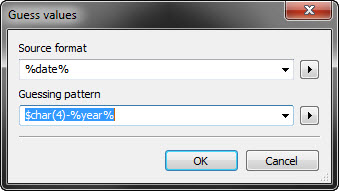
Yes the screenshot shows, that you have tried something worse.
What should the function $char(4) do in this context?
Did you ever looked into the manual or read through the FAQ section on this board?
Because of missing delimiter characters, there is no way to use the action "Guess values" in it's normal way. To solve your problem I would use an action "Format value" together with a function $regexp().
Field: YEAR
Formatstring: $regexp(%YEAR%%DATE%,'(\d\d\d\d)(\d\d)(\d\d)','$1-$2-$3')
It was my last attempt at getting it to work, it was just one of many things I tried. I also tried replace with regular expression. But I guess I was totally wrong!!
Yes I looked through these for reference many times and found many things which helped, but this is the most complicated thing I've tried so far!
I'm sorry for being such a pain but I was wondering if you could take this one step further by saying:
IF the year is in the format:YYYY-MM-DD then it populates it with the date:MMDD
and vice-versa
IF the date is in the format:MMDD then it populates it with the year:YYYY-MM-DD
And it wont keep adding the MMDD to the year tag. e.g. YYYY-MM-DD-MM-DD and so on.
Just like a double argument. (I hope you can understand)
this writes YYYY-MM-DD to %year% IF %year% has four digits AND IF %date% has four digits:
Action: Format Value
Field: YEAR
Formatstring: $if($eql($regexp(%year%,^\d{4}$,yes),yes),$if($eql($regexp(%date%,^\d{4}$,yes),yes),$regexp(%year%%date%,(\d{4})(\d{2})(\d{2}),$1-$2-$3),%year%),%year%)
this writes MMDD to %date% IF %date% is NOT already four digits AND IF %year% is written like YYYY-MM-DD:
Action: Format Value
Field: DATE
Formatstring: $if($eql($regexp(%date%,^\d{4}$,yes),yes),%date%,$if($eql($regexp(%year%,^\d{4}-\d{2}-\d{2}$,yes),yes),$regexp(%year%,(\d{4})-(\d{2})-(\d{2}),$2$3),%date%))
combine both actions in a action group and you've got what you want
EDIT:
The second action will not write MMDD to %date% if the actual year is written as %date% as it might be the case with some files. Because YYYY and MMDD are both four digits and can't kept apart easily.
To workaround this, I have three ideas:
Action: Format Value
Field: YEAR
Formatstring: $if($eql($regexp(%year%,^\d{4}$,yes),yes),$if($eql($regexp(%date%,^\d{4}$,yes),yes),$regexp(%year%%date%,(\d{4})(\d{2})(\d{2}),$1-$2-$3),%year%),$if($eql($regexp(%year%,^\d{4}-01-01$,yes),yes),$if($eql($regexp(%date%,^\d{4}$,yes),yes),$regexp(%year%%date%,(\d{4})-(\d{2})-(\d{2})(\d{2})(\d{2}),$1-$4-$5),%year%),%year%))
This does the following:
IF %year% = 4 digits
...IF %date% = 4 digits
...-> YYYY-MM-DD from the values in %year% and %date%
...ELSE
...-> keep %year% YYYY as it is
ELSE
...IF %year% = 4 digits-01-01
......IF %date% = 4 digits
......-> YYYY-MM-DD from the values in %year% and %date% (overwriting 01-01 in year)
......ELSE
......-> keep %year% YYYY-MM-DD as it is
...ELSE
...-> keep %year% YYYY-MM-DD as it is
Or in the script language:
$if($eql($regexp(%year%,^\d{4}$,yes),yes),

 trying to figure out how you done it!!