Hi! I'll make with your help and action to export the field URL to a file.url.
For example:
Artist
------- year - album
------- year - album
------- year - album
------- year - album
When drop the Artist folder in MP3Tag and run the action, just export a file.url into a first folder but I need a file.url for each folder and/or subfolder.
This is the script I use:
Doens't work.
If I drop the Artist folder, the file is generated in that folder and nothing more
Artist
------- year - album
------- year - album
------- year - album
------- year - album file.url file.url file.url file.url
What I need:
Artist
------- year - album file.url
------- year - album file.url
------- year - album file.url
------- year - album file.url
I don't understand your folder structure.
Is "------- year - album" a sub-folder of "Album"?
How can there be multiple files (or sub-folders) with the same name in the folder "Album"?
Post a screenshot of your actual folder structure to make it clear.
The Export function does not create 1 file for every selected file.
That can be done by using a Tool.
I'm sorry... that's is and example.
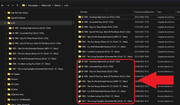
This is a real structure:
So the main folder is "a-ha" and every subfolder, is an album, maxi, single, compilation, etc...
I need export 1 file.url per subfolder.
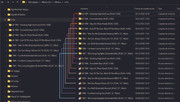
With your help now export 1 file.url per directory but the files appears in the main directory not in each folder.
Sorry, but I cannot reproduce your results.
My previous solution creates 1 file in each subfolder.
Maybe you should show the contents of one of the album sub-folders.
And attach the MTE file, found here: %APPDATA%\Mp3tag\export.