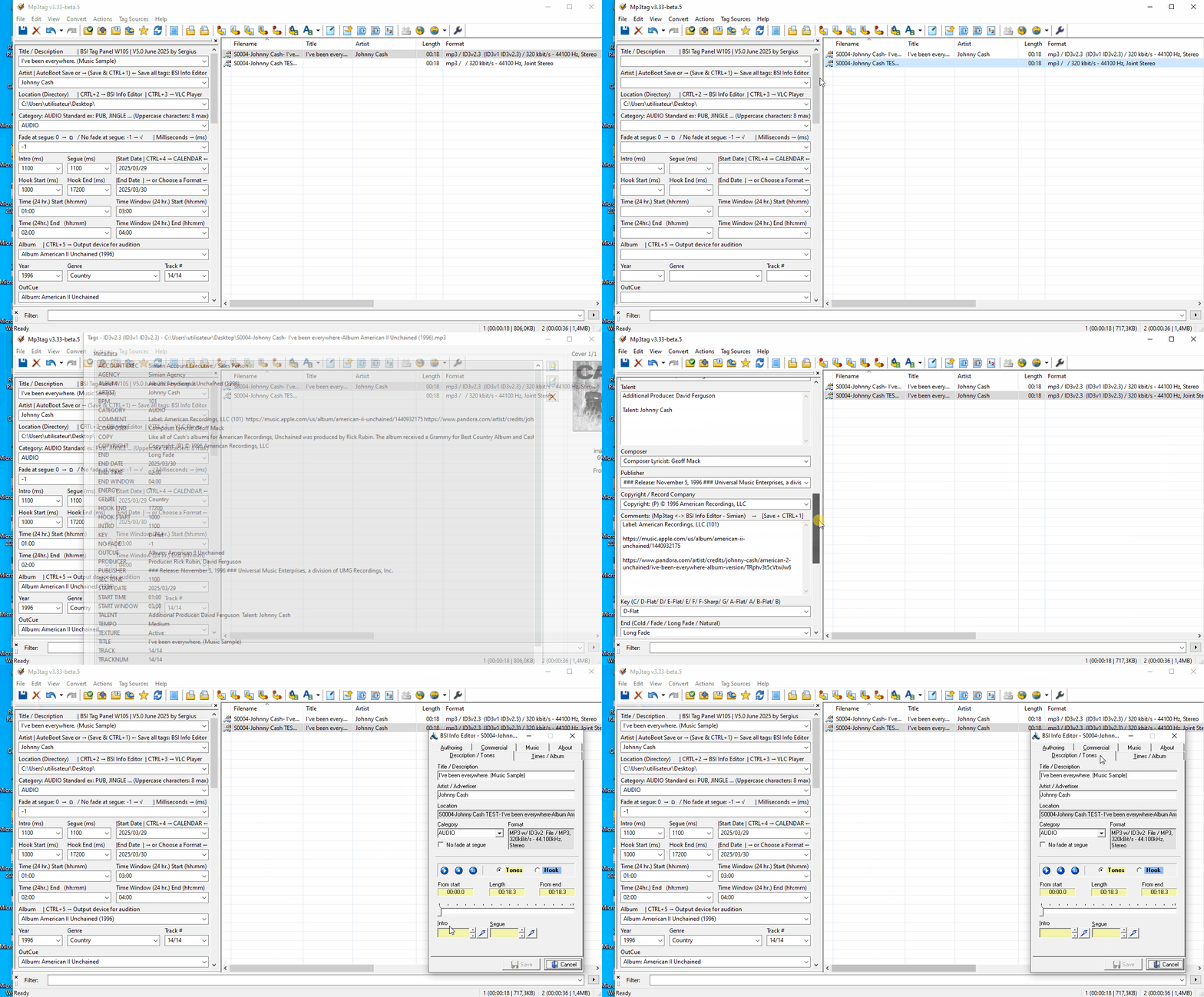
Extended Tags – Metadata: Transferring tags from one file to another always worked well before, but it doesn't work well with Mp3tag version v3.33-beta.5

Hello @Florian,

In older versions of Mp3tag, when I edited the same audio file with certain programs that erased my tags and image, I could save the tag information and image to another file using Extended tags – Metadata.

With Mp3tag version v3.33-beta.5, the tag data is correctly copied and pasted into the empty file with Mp3tag, but I'm surprised that the data isn't all saved in my Info Editor file as before.

I've included two short videos.

The first test with Mp3tag version v3.32 shows that the tag transfer is perfect.

The second test with Mp3tag version v3.33-beta.5 shows that not all the tags are transferred?
Mp3tag v3.32 (Extended tags - Metadata) Transfers Tags from one file to another file (01)
Mp3tag v3.33-beta_5 (Extended tags - Metadata) Transfers Tags from one file to another file (02)

So it is a problem of the target application as there is no notable difference in MP3tag?

Just a hint: it is not necessary, to open the extended tags dialogue, select all the tags and copy them, close the dialogue, select the next file, open the extended tags dialogue and paste the tag fields - instead

  • select the source (set of) file(s),
  • use Edit>Copy tag,
  • select the target (set of) file(s),
  • use Edit>Paste tag.

Are you using the same writing settings in both versions of Mp3tag? IIRC, your Info Editor requires ID3v2.3 written in ISO-8859-1, so maybe you can double-check the settings.

Thanks @Florian, for the reminder. ID3v2.3 is written in ISO-8859-1. It's true that I've had this problem two or three times before, which I didn't check yesterday. I checked, and the MPEG page programming was correct.

A big thank you @ohrenkino for your method:
Use Edit > Copy tag,

Use Edit > Paste tag.

Wow, it's great! It works perfectly and it's faster. It also copies the image at the same time. Before, I copied the tags first and then the image. :blush: :+1:

See my short video.
Mp3tag, copy and paste the tag, the Ohrenkino method, it works very well

OK, glad it seems to be working now for you.

For your information, if you already had the correct setting of ID3v2.3 with ISO-8859-1 in your initial experiment:

Both variants,

  • directly copying the complete tag and
  • copying all the individual fields

should produce the same result (except for the cover art, as you've observed).

I'm just mentioning this, because there seems to be an additional factor that influences when the changed metadata is read by your Info Editor.

Hello @Florian,

What you wrote intrigued me, as it should produce the same result.

Based on what you wrote, the result should be the same; it seems logical to me, it should be like that. Unfortunately, that's not the case, and I'm surprised by the second result: copy and paste the tag, which no longer works, I imagine because I previously used Extended tags – Metadata…

I did a quick test with another video using Mp3tag v3.33-beta_5, which you can view at the bottom of my text…

First test: Extended tags – Metadata Mp3tag v3.33-beta_5, without copying the image, some tags are missing when I open my Info Editor.

Second test: I do a copy and paste the tag, which also copies the image, but the same tags are still missing when I open my Info Editor…
Mp3tag v3.33-beta_5 (Extended tags - Metadata) Transfers Tags from one file to another file& copy and paste the tag (03)

I doubt that.
What happens if you test both ways in the older MP3tag version?

Hello @ohrenkino

I ran the test because of your doubt… I thought it was worth seeing the results…
See my video…

I was thinking that with Mp3tag v3.32, there wouldn't be any problems with this version when performing the two tests…

I'll tell you what I think, based on the tests I've done. I might be wrong, so please give me your opinion on the matter, ohrenkino. I'd also like @Florian to explain exactly what's happening in his Mp3tag programming based on the tests I've done with Mp3tag v3.32 and Mp3tag v3.33-beta_5.

  1. Here's what I observed during these tests with Mp3tag v3.32:

We see that this first test with extended tags – Metadata – works very well without the image, everything The tags are in Mp3tag, and when I open my Info Editor, all the tags are present…

The second test: I copy and paste the tags, which also copies the image. The tags are still there in Mp3tag when I open my Info Editor… everything works fine in the second test as well; we get the same results…

  1. However, this is different with Mp3tag version v3.33-beta_5

Ohrenkino, you asked me to use the following commands:

select the source (set of) file(s),
use Edit>Copy tag,
select the target (set of) file(s),
use Edit>Paste tag.

Your steps work perfectly; the tags and image are copied correctly into my second file using Mp3tag v3.33-beta_5, and my Info Editor receives all the tags.

However, if I run the same two tests I did with the Mp3tag mentioned above, I get different results; it doesn't work.

First test: Extended tags – Metadata Mp3tag v3.33-beta_5, without copying the image, the tags are in the Mp3tag, but some tags are missing when I open my Info Editor.

Second test: I copy and paste the tags, which also copies the image. The tags are in the Mp3tag, but the same tags are still missing when I open my Info Editor; we still get the same results…

Here's my opinion: I believe that when I use Extended Tags – Metadata, based on what I see in my tests, it cancels the following commands:

select the source (set of) file(s),
use Edit>Copy tag,
select the target (set of) file(s),
use Edit>Paste tag.

I think this command either doesn't work or is canceled by mistake, because it always gives the same results as Extended Tags – Metadata.

Mp3tag v3.32 (Extended tags - Metadata) Transfers Tags from one file to another file& copy and paste the tag (04)

So, everything is fine in both MP3tag versions.
It appears differently in the target application - which seems to have special demands.
Apparently, you have 2 installations of MP3tag: 3.32 and 3.33-beta_5. 3.32 works for you, 3.33 does not.
So what is the difference in settings for the options between these programs?

Thank you for your reply, @ohrenkino.

Excellent question!

For my part, my Mp3tag settings remain unchanged between the two versions…

However, the settings for the options seem to be different between these two versions of Mp3tag…

Dear @Florian, we await your response… :wink:

Did you take care that this is the case?
Where would

the options are a local affair.

On a personal note: I much prefer still photography over videos if it comes to compare final results of actions. A video is best to exemplify a process. IMHO, it is the outcome that represents the problem. So I'd rather look at a clear screenshot as long as I may need instead of watch a video again and again.

Screenshots of the Options>Tags>Mpeg would be nice.

Hello @ohrenkino,

I answered your question (without specifying my Mp3tag MPEG configuration, sorry for the quick and imprecise response). I respect that you prefer photos…

My personal opinion on this subject: I prefer videos because they are more precise and you can see the entire process (we're limited to 3 MB, which doesn't make for a long video). I find them faster than taking photos, especially when considering the process of a video that takes multiple photos…

Ever since @Florian asked me this question, I've been constantly checking my Mp3tag MPEG configuration with the latest tests I've done recently. Nothing has changed in my Mp3tag MPEG configuration.

Here is the requested photo:

I performed your test by copying all the individual fields and pasting them into an untagged file via Extended Tags using versions v3.32 and v3.33-beta.5, and this produced bit-identical files.

From what I understand, your Info Editor behaves differently in these tests, which is quite surprising, given the same input.

Thanks @Florian, for your test.

I'm surprised too, I can confirm, because it's always the same file with the same data and the same MPEG programming from Mp3tag…

I don't understand why my Info Editor behaves differently with the two different versions of Mp3tag. I really like your program because my Info Editor is always stable when writing tags, when the tags are written normally…

I'm glad you have a command to copy/paste tags, including the image, from one file to another that works very well with Mp3tag v3.33-beta.5. This method is much faster…

Thanks again for your tests and your excellent work. Long live you and Mp3tag! :+1: