Feature Request: Optional Advanced View Showing Metadata Container and Frame Provenance

Hello Florian and forum members,

I hope you will not mind me opening a new topic.

My previous support topic regarding APEv2 tags was correctly diagnosed and resolved, and I appreciate the help I received there.

However, while investigating metadata across a larger archive, I realised that my underlying concern was slightly different from the issue discussed in that thread.

This is therefore not a support request and not a bug report.

Instead, it is a feature suggestion relating to metadata transparency and provenance.

Before continuing, I would like to explain the repeated appearance of the word "Fuckingham" below.

The word is not being repeated for shock value or provocation. It is the actual historical event name stored within the metadata of the file being discussed.

The distinction between:

Fuckingham Palace

and:

F*ckingham Palace

is central to the example.

While preparing an archive recording for possible public release, I intentionally edited various metadata fields to use the censored form "F*ckingham Palace" for public-facing consistency.

During later verification, I noticed that different applications appeared to display different values.

This was not important because of the specific word involved.

It was important because it made me realise that I was asking a different question:

Not:

"What is the title?"

but:

"Which metadata frame supplied this title?"

and:

"Which metadata container supplied this value?"

After investigating the file, I found myself repeatedly wanting to see four things together:

Display Name
MP3Tag Variable
Actual Frame Name
Container Type

For example:

Title | %title% | TIT2 | ID3v2.3

rather than simply:

Title

Likewise, if multiple metadata containers exist within a file, an optional advanced view could potentially show:

ID3v2/TIT2 = value

ID3v1/TITLE = value

APEv2/TITLE = value

This would not change any existing behaviour.

It would simply expose information that MP3Tag already understands internally.

For everyday tagging, the current interface is ideal.

For archival work, preservation projects, metadata migration, troubleshooting, and auditing large collections, understanding the provenance of a value can be just as important as the value itself.

I am therefore wondering whether an optional advanced mode showing:

• MP3Tag variable
• Actual frame name
• Container type
• Value

might be useful for users working with complex collections.

Thank you again for all the work you put into MP3Tag and for taking the time to consider the suggestion.

PS. I'm still gradually learning the terminology and underlying standards involved here, so if I've used any terms incorrectly, please feel free to correct me. Part of the reason I'm asking these questions is that I'm trying to become more self-sufficient and avoid repeatedly taking up other people's time when I can research and verify things myself. AI tools have helped me get much further than I otherwise could have, but I remain aware that there are gaps in my understanding. I hope this example is specific enough to justify a fresh thread and that it comes across in the constructive spirit intended. Thank you for your patience and for sharing your expertise.

Thanks, Fez @ KS

I think that the examples only work for Mp3 files. They would not work for MP4, Flac, matroska and all the others that do not use native id3vX tag formats.
I also have problems to imagine what the display should look like for a bunch of selected files e.g. from the same album by the same artist but in different file formats, e.g. mp3 files for audio only and mp4 for a video file.
What should the display look like for files that do not have all tag versions in a file but feature the same data in several tag fields.
E.g. the ARTIST would be the same in all files but some files would feature that data only in the V1 or the V2 tag (or even APE tag).
What would happen to fields that are mapped - which is regularly recommended for FLAC files and the field TRACKNUMBER (flac) being mapped to TRACK in MP3tag.
In general: your idea is not new, see e.g. here:

Thank you for the reply.

I think this may be where my concern differs slightly from the implementation questions being discussed.

The reason I raised the suggestion is that I encountered a situation where I deliberately changed metadata, saved the file, and MP3Tag was configured to write all supported tag formats.

At that point I believed the metadata had been updated.

Later I encountered different information elsewhere.

What troubled me was not simply that another tool could inspect the file differently.

What troubled me was that I did not know how to verify within MP3Tag itself what had actually been updated and what had not.

That is the gap I am trying to describe.

I completely understand that other tools may already expose lower-level metadata structures.

However, from my perspective, needing to leave MP3Tag in order to verify the result of an edit performed in MP3Tag feels like an incomplete workflow.

The reason I continue to pursue this idea is not because I want to replace the existing interface, nor because I want to turn MP3Tag into a different application.

Quite the opposite.

I like MP3Tag enough that I want to rely on it more heavily, recommend it to other people, and build workflows around it.

My concern is that when I save a file, I would ideally like a way to verify within the same application exactly what metadata now exists and where it exists.

The moment I find myself needing a second application to answer that question, I start to lose confidence in my ability to explain the workflow to somebody else.

That is really the motivation behind the suggestion.

The issue for me is not whether metadata provenance can be inspected somewhere.

The issue is whether it can be inspected within MP3Tag itself.

Thanks again. :slight_smile:

EDIT:

TL;DR:

I deliberately changed metadata values.

MP3Tag was configured to write all supported tag formats.

I saved the file.

I therefore reasonably believed the old value had been replaced.

Later, another application displayed an older value.

My confusion is simple:

If MP3Tag can read the metadata well enough to present a unified view of the file, and is configured to write all supported tag formats, why would an older equivalent value still survive?

Have I misunderstood what "write all supported tag formats" actually does?

If not, how can I verify within MP3Tag itself which values were updated, which values were preserved, and what another application might still read from the same file?

That question, rather than any particular UI design, is what motivated this feature request.

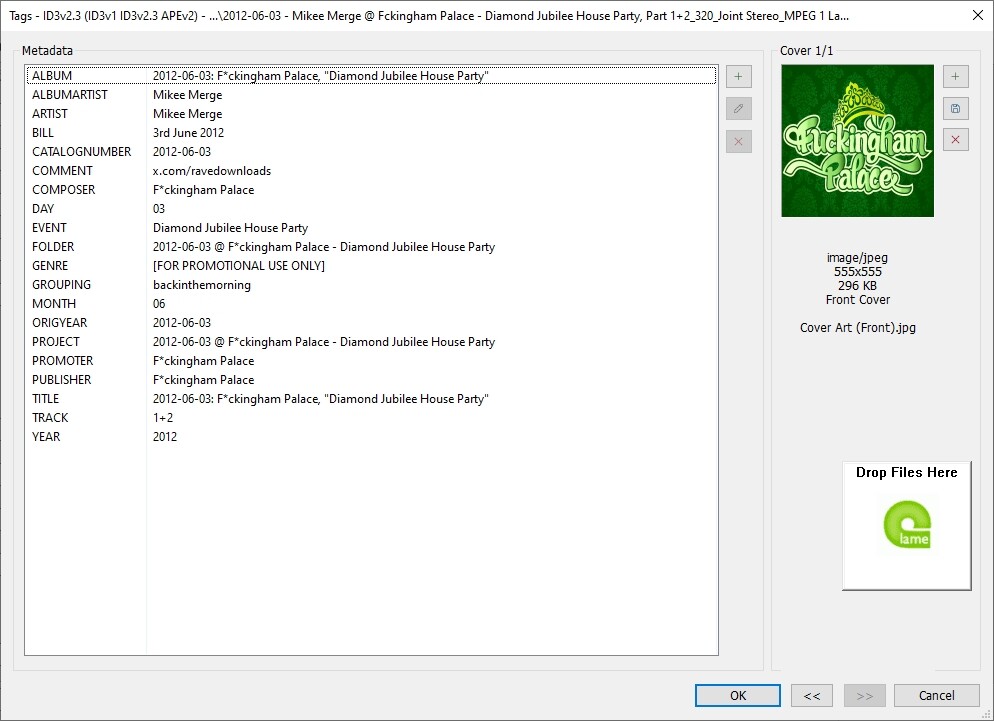
Screenshots of the corresponding settings, example files (before and after) would illustrate the problem.

Whereas MediaInfo reveals this on the same file:

2012-06-03 - Mikee Merge @ Fckingham Palace - Diamond Jubilee House Party, Part 1+2_320_Joint Stereo_MPEG 1 Layer III_168611477.mp3
Format                                   : MPEG Audio
File size                                : 161 MiB
Duration                                 : 1 h 10 min
Overall bit rate mode                    : Constant
Overall bit rate                         : 320 kb/s
Title                                    : Fuckingham Palace (Diamond Jubilee House Party 2012-06-03)
Album                                    : 2012-06-03: F*ckingham Palace, "Diamond Jubilee House Party"
Album/Performer                          : Mikee Merge
Track name/Position                      : 1+2
Performer                                : Mikee Merge
Composer                                 : F*ckingham Palace
Publisher                                : F*ckingham Palace
Genre                                    : [FOR PROMOTIONAL USE ONLY]
Original/Released date                   : 2012-06-03
Recorded date                            : 2012
Writing library                          : LAME3.98r
Cover                                    : Yes
Cover description                        : Cover Art (Front).jpg
Cover type                               : Cover
Cover MIME                               : image/jpeg
Comment                                  : x.com/ravedownloads
DAY                                      : 03
MONTH                                    : 06
FOLDER                                   : 2012-06-03 @ F*ckingham Palace - Diamond Jubilee House Party
PROJECT                                  : 2012-06-03 @ F*ckingham Palace - Diamond Jubilee House Party
CATALOGNUMBER                            : 2012-06-03
BILL                                     : 3rd June 2012
EVENT                                    : Diamond Jubilee House Party
PROMOTER                                 : F*ckingham Palace
ORIGYEAR                                 : 2012-06-03
COVER ART (FRONT)                        : Cover Art (Front).jpg

Audio
Format                                   : MPEG Audio
Format version                           : Version 1
Format profile                           : Layer 3
Format settings                          : Joint stereo / MS Stereo
Duration                                 : 1 h 10 min
Bit rate mode                            : Constant
Bit rate                                 : 320 kb/s
Channel(s)                               : 2 channels
Sampling rate                            : 44.1 kHz
Frame rate                               : 38.281 FPS (1152 SPF)
Compression mode                         : Lossy
Stream size                              : 160 MiB (100%)
Writing library                          : LAME3.98r
Encoding settings                        : -m j -V 4 -q 2 -lowpass 20.5

Image
Type                                     : Cover
Title                                    : Cover Art (Front).jpg
Format                                   : JPEG
Muxing mode                              : ID3v2 APIC
Width                                    : 555 pixels
Height                                   : 555 pixels
Color space                              : YUV
Chroma subsampling                       : 4:2:0
Bit depth                                : 8 bits
Compression mode                         : Lossy
Stream size                              : 296 KiB (0%)


Could you also please include a screenshot of the options for Mpeg tags?

A further observation which may or may not be relevant:

Yesterday I noticed that all of my dropdown suggestions/history entries appeared to have vanished, while my custom tag panel layout remained intact.

Because the custom fields themselves were still present, I assumed at the time that it was merely an inconvenience and moved on without investigating further.

Today, while gathering the requested screenshots, I discovered that APE reading had somehow become disabled in my MPEG settings. Re-enabling it and reloading the files immediately made the previously missing metadata visible again.

What I find puzzling is that this does not resemble the complete configuration loss I experienced previously, where the cause was obvious.

Instead, it feels more like a partial reset or partial configuration change, where some customisations remained while others did not.

I do not currently know whether these two observations are related, but the timing seems noteworthy enough to mention.

I am beginning to wonder whether I am losing my marbles, although I am fairly sure I would not have intentionally disabled APE reading given the kind of archival work I do.

Sorry to take up so much of your time, thanks again for all your help and Happy Weekend to you. :slight_smile:

-Fez