FINALLY SOLVED: Acquire the "Day of the Week" of "%_file_mod_datetime%" AND "%_file_create_datetime%" using their respective Epoch-Unix values (i.e., "%_file_mod_datetime_raw%" and "%_file_create_datetime_raw%") (2024-2025) | Great for Columns Sorting

Day of the Week String for "%_file_mod_datetime%":

$replace($mod($div($add(%_file_mod_datetime_raw%,$mul($ifgreater(86400,%_file_mod_datetime_raw%,'+1','0'),'+63113904000'),$mul($regexp($regexp($regexp($regexp(%_file_mod_datetime%,'^.*(?<![\d])(\d{1,2}):(\d{1,2}:\d{1,2})[\W_]*(?=(?:[AP]M)?$)',$1,1),'(?<![\d])(0?[1-9]|1[0-1])(?![\d])PM',$add($regexp(%_file_mod_datetime%,'^.*(?<![\d])(0?[1-9]|1[0-1]):(\d{1,2}:\d{1,2})(?![\d]).*$',$1),12),1),'^.*(?<![\d])(?:12)AM$',00,1),'[^0-9\n]+',),'-3600')),86400),7),'0','Thursday','1','Friday','2','Saturday','3','Sunday','4','Monday','5','Tuesday','6','Wednesday')

Day of the Week String for "%_file_create_datetime%":

$replace($mod($div($add(%_file_create_datetime_raw%,$mul($ifgreater(86400,%_file_create_datetime_raw%,'+1','0'),'+63113904000'),$mul($regexp($regexp($regexp($regexp(%_file_create_datetime%,'^.*(?<![\d])(\d{1,2}):(\d{1,2}:\d{1,2})[\W_]*(?=(?:[AP]M)?$)',$1,1),'(?<![\d])(0?[1-9]|1[0-1])(?![\d])PM',$add($regexp(%_file_create_datetime%,'^.*(?<![\d])(0?[1-9]|1[0-1]):(\d{1,2}:\d{1,2})(?![\d]).*$',$1),12),1),'^.*(?<![\d])(?:12)AM$',00,1),'[^0-9\n]+',),'-3600')),86400),7),'0','Thursday','1','Friday','2','Saturday','3','Sunday','4','Monday','5','Tuesday','6','Wednesday')

I forgot to post this shortened string back in early 2025.

Note: For some reason, Mp3Tag community page keeps messing up my regexp format, such as remove the asterisks symbol after a dot. Can anyone help?

If your topic involves a format string, please enclose the format string in backticks `, e.g., `my format string` so that spaces and other special characters like backslashes \ and stars * are preserved by the forum software.
You can also use Ctrl + E to mark the selected text as preformatted or use the corresponding symbol from the format palette.

Discourse Format as Code

Thank you, sir. Prior to receiving your response, I filled in the "_" & "*", manually. Nonetheless, the script is good to go for providing the Day of the Week, which I use for column sorting.

As I see it, some of the expression is now in italic typeface which suggests that some characters are interpreted as formatting tags.

I copied the result and now present it as code - please check if the expression is still correct:

$replace($mod($div($add(%_file_mod_datetime_raw%,$mul($ifgreater(86400,%_file_mod_datetime_raw%,'+1','0'),'+63113904000'),$mul($regexp($regexp($regexp($regexp(%_file_mod_datetime%,'^.*(?<![\d])(\d{1,2}):(\d{1,2}:\d{1,2})[\W_]*(?=(?:[AP]M)?$)',$1,1),'(?<![\d])(0?[1-9]|1[0-1])(?![\d])PM',$add($regexp(%_file_mod_datetime%,'^.*(?<![\d])(0?[1-9]|1[0-1]):(\d{1,2}:\d{1,2})(?![\d]).*$',$1),12),1),'^.*(?<![\d])(?:12)AM$',00,1),'[^0-9\n]+',),'-3600')),86400),7),'0','Thursday','1','Friday','2','Saturday','3','Sunday','4','Monday','5','Tuesday','6','Wednesday')

and the one for day of the week:

$replace($mod($div($add(%_file_create_datetime_raw%,$mul($ifgreater(86400,%_file_create_datetime_raw%,'+1','0'),'+63113904000'),$mul($regexp($regexp($regexp($regexp(%_file_create_datetime%,'^.*(?<![\d])(\d{1,2}):(\d{1,2}:\d{1,2})[\W_]*(?=(?:[AP]M)?$)',$1,1),'(?<![\d])(0?[1-9]|1[0-1])(?![\d])PM',$add($regexp(%_file_create_datetime%,'^.*(?<![\d])(0?[1-9]|1[0-1]):(\d{1,2}:\d{1,2})(?![\d]).*$',$1),12),1),'^.*(?<![\d])(?:12)AM$',00,1),'[^0-9\n]+',),'-3600')),86400),7),'0','Thursday','1','Friday','2','Saturday','3','Sunday','4','Monday','5','Tuesday','6','Wednesday')

Thanks. And, yes, they are both correct. Moreover, both strings, respectively, are for "Day of the Week" for %_file_create_datetime% and %_file_mod_datetime%.

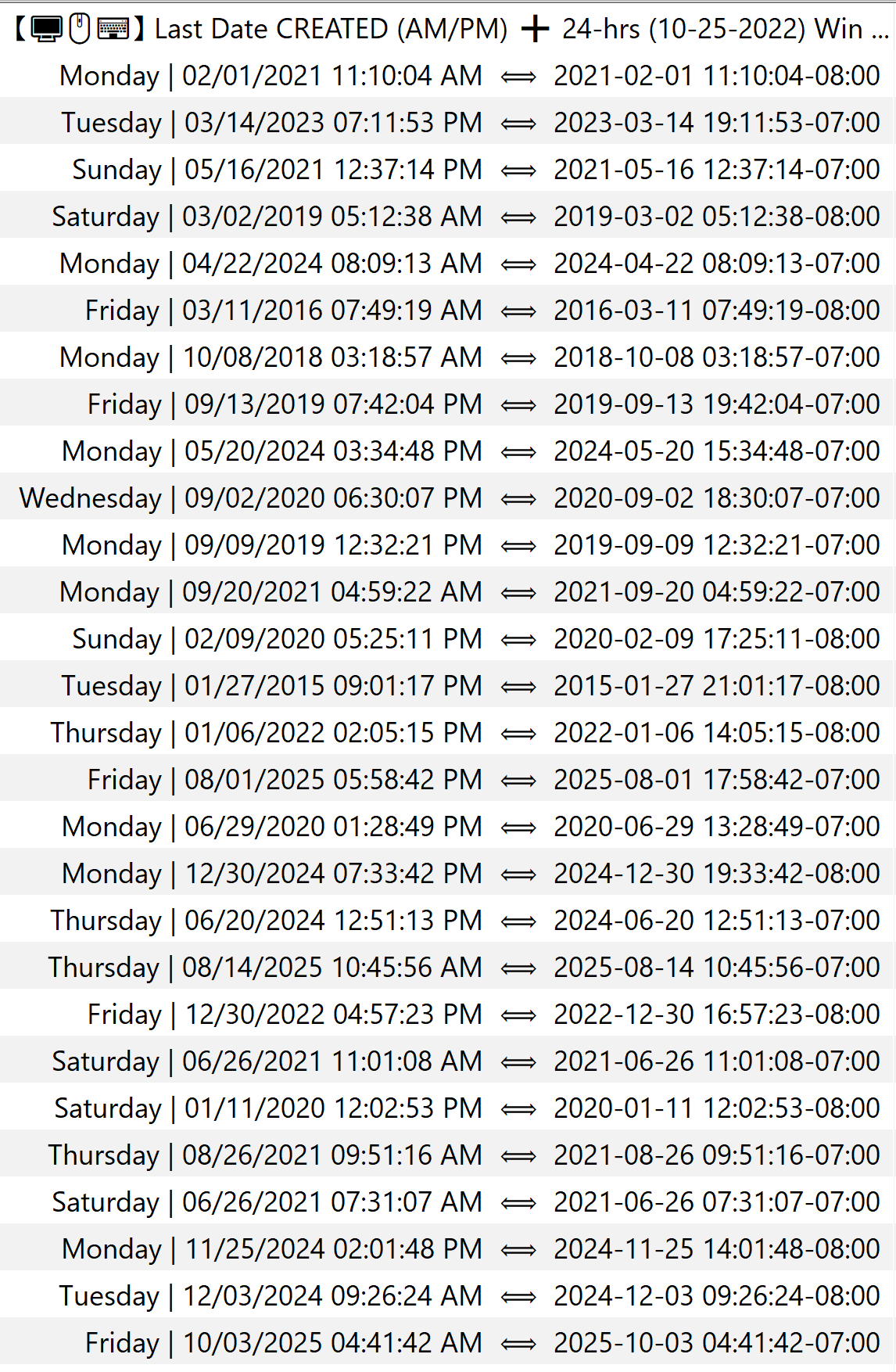
I forgot to post an image of the results. Nonetheless, the image below shows the Day of the Week (i.e., from either of the two strings provided above), before the pipe, where it directly coincides with the date of %_file_create_datetime% or %_file_mod_datetime%.