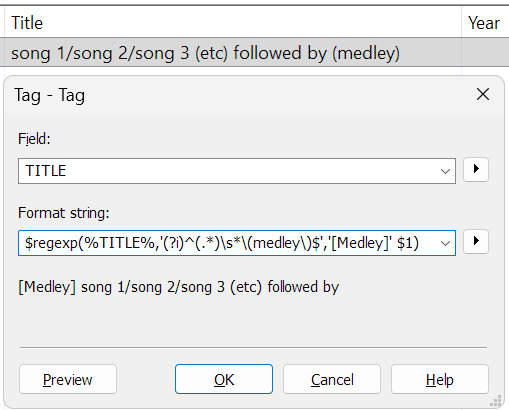
You would like to move the word (medley) from the end of TITLE to the beginning, put it in square brackets [Medley], write the first letter uppercase and replace the / separators with commas and space?
Do you first filter manually for tracks with (medley) at the end?
The filter command explained title MATCHES "\(medley\)$"
MATCHES is the Mp3tag filter command for a regular expression comparison.
In this case, it looks for an opening parenthesis, escaped with a backslash = \(
followed by the word medley
followed by a closing paranthesis, escaped with a backslash = \)
(medley) should only be matched if it is at the end of the TITLE content string = $
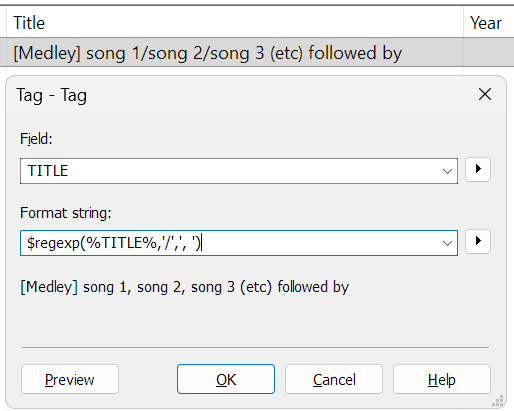
The replace of every Slash with a comma and a space using a regular expression explained: $regexp(%TITLE%,'/',', ')
could also be simplified with $regexp(%TITLE%,/,', ')
The meaning is:
Replace every occurence of / in TITLE with a comma and a space.
As the comma is also part of the formula, it has to be enclosed in ' '
For example $regexp(%TITLE%,/,, ) would not work.
BTW:
I don't replace a Backslash \ in the above regular expression.
As in your given example, it replaces a "forward" Slash / with comma and space.
This only prepends [Medley] , removes all occurrences of (medley) and replaces / with , when TITLE contains (medley) (case insensitive) and does not begin with [Medley] .