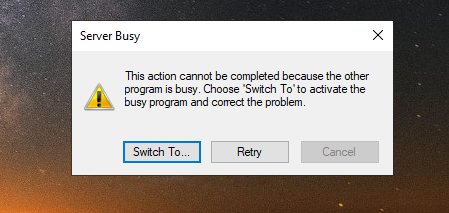
I have used MP3Tag again for several months after not having used it for about a year. During use a week ago I got the "Server Busy" message and nothing I did allowed me to use it again. I have uninstalled it and check for remaining fragments in Task Manager and the Registers but when I install it again I get the same message. Since there are no recent discussions, the problem must be unique to my system which is Windows 10. I have installed MP3Tag on another computer Windows computer running Windows 11 and it works but I would like to get it installed again and working on my Windows 10 computer.
So: what is the difference between the 2 system (besides the OS version)?
I would check network and access rights esp. ownership.
Does it happen to all files or only special ones?
Where is MP3tag stored? Is it a standard or a portable installation?
After which step of your workflow do you get the message?
I get the message when I open Mp3tag. I cannot go past launching it. Although I installed and launched it on my other computer, I didn't go past the app loading and ready. Mp3tag is installed on main drive. As soon as the installation was complete and when asked if I wanted to launch it, I launched it. I got the server busy message appeared and the app didn't launch. I can see it's installed when I look in installed programs. This has happened several times. The differences are updated hardware. These computers are not installed on a network and don't share rights or resources. Both have admin rights. Mp3tag is installed on each computer in standard form. The app failed while in use. I'm not sure which version I was using and if it was recently updated. I don't update unless there is a need or an alert of some type. I have had it in use for about 12 or 18 months. I'm not a power user. I just recently started batch renaming and shortening titles and removing track numbers in mp3 folders. It was working great then.....BOOM. Thanks in advance if you have any suggestions. I don't go in a change things in the registry. I stay out of places I don't belong.
M
Could you try to start MP3tag for a single file with the shell extension entry from the explorer right-click menu?
Just a shot in the dark:
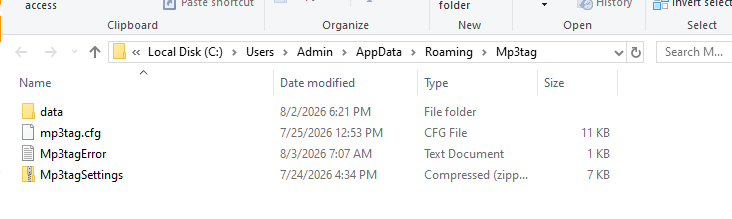
Rename your Mp3tag-Konfiguration-File "mp3tag.cfg". In this case the file will be created again by Mp3tag during launch.
In a standard-installation you will find the file in
%appdata%\Mp3Tag
Same problem when I tried to open it that way.
I can't get into the program to modify the settings. Thanks
Please post a screenshot of the complete "Server Busy" dialog, especially any program name it mentions.
First, check Task Manager’s Details tab for Mp3tag.exe and end every remaining instance, including instances under another user session. A second launch normally activates the existing instance, so an invisible or hung process can look like Mp3tag never starts.
Then reset the per-user configuration without deleting it: rename %APPDATA%\Mp3tag to %APPDATA%\Mp3tag-backup and start Mp3tag again. This also removes the stored startup folder, which may be relevant if the issue started while working with a particular location.
If it still occurs with a newly created configuration, the dialog might identify a Windows or third-party COM component that is blocking startup. The screenshot, Mp3tag version, and whether it starts after a clean boot would help isolate it.
Thanks for your help. I'm not giving up but I'm not devoting any more time to it now. Another Open Source application works but I don't like it as well since I'm not as far along on the learning curve. I can avoid some of the issues on the front end which created the need for the application in the first place.
I ended multiple "COM Surrogate" tasks in Task Manager and when I launched MP3Tag v 3.35.1 it opened. I did not look at any of the properties or details associated with those background processes. I will next time I see them after the Server Busy message.
Thanks again
I ended multiple "COM Surrogate" tasks in Task Manager and when I launched MP3Tag v 3.35.1 it opened. I did not look at any of the properties or details associated with those background processes. I will next time I see them after the Server Busy message.
Thanks for your earlier response.