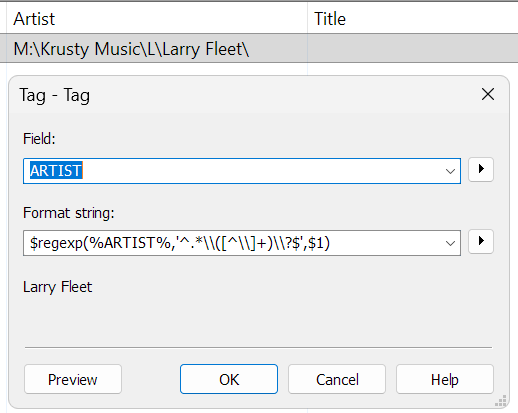
I have accidently changed the Artist tag in my files from the %_folderpath% field
Artist Field is currently:M:\Krusty Music\L\Larry Fleet\
How do I eliminate "M:\Krusty Music\L\" and the last "\" to leave just "Larry Fleet" as the artist name. That is extract the Artist Name out of which is there currently
I have 1000's of files to reconvert
Try Convert>Filename-Tag (again)
Format string: %artist%\%dummy%
I should add my Scripting Knowledge is basically non existant
One more way would be to change the content of the field ARTIST like this:
Menu Convert -> Tag-Tag
Field: ARTIST
Format string: $regexp(%ARTIST%,'^.*\\([^\\]+)\\?$',$1)
Explanation for the regular expression:
| Part |
Meaning |
^ |
Start of the string |
.* |
Any characters, including letters, numbers, spaces and special characters |
\\ |
Matches a literal backslash (\) |
( |
Starts a capturing group |
[^\\]+ |
Matches one or more characters that are NOT a backslash. The caret (^) inside square brackets [...] acts as a negation operator. It means "NOT". |
) |
Ends the capturing group |
\\? |
Matches an optional trailing backslash |
$ |
End of the string |
Why $1?
The parentheses (...) define the first capturing group.
As replacement after the comma, $1 refers to the content captured by that group.
Therefore, Mp3tag replaces the entire original string with just the captured last part of the current folder name in ARTIST = new ARTIST content.
Note: The ? makes the trailing backslash optional, so the expression works with or without a final backslash.
Works Perfectly
Thank You very much you are a lifesaver!!!