I am trying to figure out if MP3Tag can replace underlined text with plain text equivalent. Example is that I wish for this title to NOT have any underlined characters.
André P̲r̲e̲vin'̲s̲ ̲trio̲ ̲j̲a̲z̲z̲ ̲̲–̲ ̲k̲i̲n̲g̲ ̲s̲i̲z̲e̲!̲ ̲(̲1̲9̲5̲9̲)̲ ---> Andre Previn's trio jazz - King Size! (1959)
Any ideas?
Mp3tag let you replace every character with another character.
The problem is that you have to copy every single character or word you want to replace.
For example
$replace(%TITLE%,André P̲r̲e̲vin''̲s̲ ̲trio̲ ̲j̲a̲z̲z̲ ̲̲–̲ ̲k̲i̲n̲g̲ ̲s̲i̲z̲e̲!̲ ̲(̲1̲9̲5̲9̲)̲,André Previn''s trio jazz - king size (1959))
Try
Convert>tag-tag for TITLE
Format String: $replace(%title%,$char(818),)

(I put the string in COMMENT to test it)
Maybe there is a way to remove the "COMBINING LOW LINE" only?
U+0050 : LATIN CAPITAL LETTER P
U+0332 : COMBINING LOW LINE {underline, underscore}
U+0072 : LATIN SMALL LETTER R
U+0332 : COMBINING LOW LINE {underline, underscore}
U+0065 : LATIN SMALL LETTER E
U+0332 : COMBINING LOW LINE {underline, underscore}
U+0076 : LATIN SMALL LETTER V
U+0069 : LATIN SMALL LETTER I
As @ohrenkino already correctly wrote:
$char(818) is the equivalent of U+0332
Thank Ohrenkino! Convert > TAG-TAG worked beautifully to start the cleanup process. I also followed up with Convert > TAG-FILENAME to get that right as well. Cheers and Happy Friday!
For future readers:
If you don't want to search for (or calculate) the correct $char number,
you can also use $regexp and the syntax \x{nnn}
For example the
U+0332 : COMBINING LOW LINE {underline, underscore}
would be replaced in TITLE with nothing = deleted with
$regexp(%TITLE%,\x{332},)

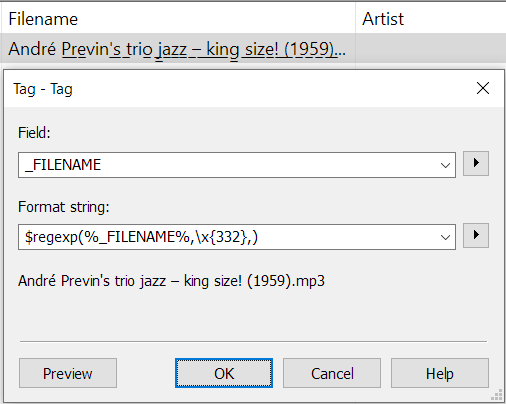
Of course, this also works in Convert TAG -> TAG for the _FILENAME:
$regexp(%_FILENAME%,\x{332},)
Thanks LyricsLover, this also worked for me!