again after reading multiple entries - I was not privy to finding what i was wanting.
senario:
columns lyrics: and lyrics both contain well lyrics. (as well as several other columns at times)
but i want to have all lyrics in the %UNSYNCEDLYRICS% column
i have been identifying what tracks contain lyrics in each folder and moving copying them and then deleting them one at a time and it is very tenuous at best
i have most of the library with the lyrics in %UNSYNCEDLYRICS% and want to keep it that way. but depending on if i buy an album from amazon or youtube music the results can vary vastly. (trying to keep the library legal) including songs i rip from music cd's.
so to keep things uniform - i would like an action that can be clicked when i select tracks with lyrics in either of the above mentioned columns and move them to %UNSYNCEDLYRICS%
To merge 2 fields, try an action of the typ "Format value" or Convert>Tag-Tag for the target field e.g. UNSYNCEDLYRICS
Format string: [%unsyncedlyrics% $char(13)$char(10)]%lyrics%
Just a quick note:
You never move the content of columns. You always treat one or more fields.
To combine the content of the UNSYNCEDLYRICS field with the content of the LYRICS field, you can use ohrenkino's suggestion.
This wouldn't delete the LYRICS content, though, as 'move' implies. It would only expand the existing content of UNSYNCEDLYRICS
If that should be the result, the try an action of the type "Guess value"
Source format: [%unsyncedlyrics% $char(13)$char(10)]%lyrics%==
Guessing pattern: %unsyncedlyrics%==%lyrics%
As explained in previous posts, columns cannot be "moved" or "copied."
My suggestion for working with the values contained in the "fields" with quick actions.
Sorry for the imprecision. I hope this post makes things clearer.
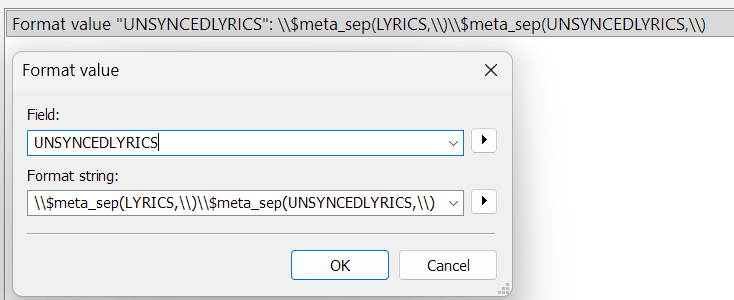
The first action "moves" and "adds" the value from one field to another, in our example: %LYRICS% + %UNSYNCEDLYRICS% --> UNSYNCEDLYRICS
This action does not delete the %LYRICS% field.
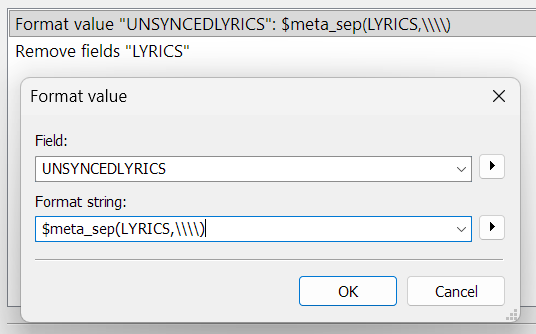
The second action "moves" the value from one field to another and deletes the first field. 1=$meta_sep(LYRICS,\\\\)
Example: move %LYRICS% --> %UNSYNCEDLYRICS%
deletes the %LYRICS% field.
Combining the two actions you can obtain more variations.