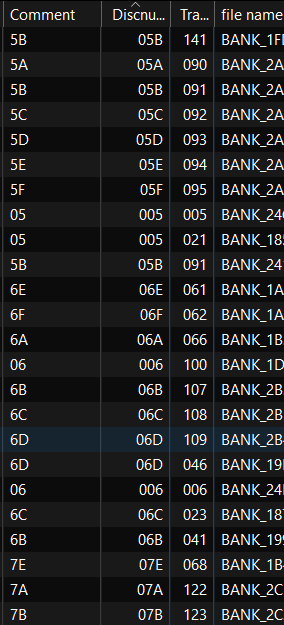
Hi, I think I stupidely erased the column of "file name", and since the files I'm working with have a file name made of the hexadecimal ID of the sound and no other data, I would really like to sort them again by that value while I give them a proper title. But I can't find what to write in the fields after hitting "customize" and "new".
I'm also a bit annoyed because I tried making a custom value that I can make appear in the tag panel, but no way to make it a column
Additionnally, I started using the value Discnumber instead but I can't find a way to make that value appear in Windows's file browser, which renders that work pretty useless; that information is not the track number (which I'm using for another value), but I'd like to make those files able to be sorted by a numeric value, an hexadecimal value, the file's name or the title I gave them, that's why I need to make that value appear in the browser. Should I just move that over to the "comment" column?
I'm not super good with computers so go easy with me please and thank youuu!
Set only value, e.g. with %_filename%, %_filename_ext% or %_path%.
Please tell us the custom field name. Which field name did you choose for the tag panel?
This is a Windows problem - there is no way that MP3tag can do anything about the functions in the Windows Explorer or Windows Media Player.
Here is a thread about Windows Explorer's displayed music file properties:
but that will still not appear in the file explorer, which is the whole point of adding that information to the files... so I'd better move the info of that column to "comments"?
Looks like it is sorted correctly to me, likely you have enabled the numerical check box for the column. However I would wonder why your disc numbers contain those non-integer letters. Most disc and track number formats expect only numbers, with the exception of the forward slash character / in some metadata formats to separate the current from the total for that field.
In a way it does: if you have set the column to contain numeric values (I assume that as the data is right-aligned) then everything that is non-numeric is ignored or sets the whole string to the value 0. And if sort criteria do not discriminate properly, then the order of the previous sort is taken.
AFAIC see, all 5s and 6s are grouped together
Right, you mentioned you had created a separate field and column for this. But the %disc% and %track% fields specifically are integer fields. So those extra characters are ignored when sorting.
I am not aware of any music manager or player programs or mobile apps that use hex for anything. So it isn't a format I would recommend in your metadata.