How to restore missing MEGADATA?

That is strange as they work over here.

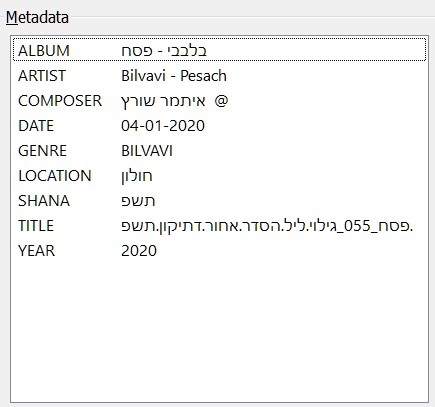
If you do not see in the extended tags dialogue a field called DATE then it is not stored in the file(s).
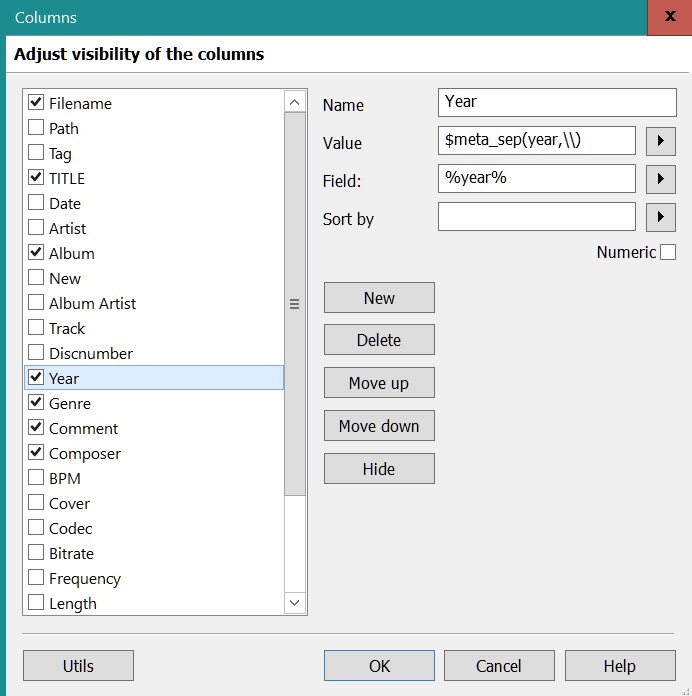
What would still be of interest: a screenshot form the column definition dialogue.
E.g. for Year it may look like this:

1-
columns screenshot
[bilvavi.net/images/columns.jpg]([bilvavi.net/images/columns.jpg](https://bilvavi.net/images/METADATA-פסח 055.jpg))

2-screenshot METADATA-055 פסח
[bilvavi.net/images/METADATA-פסח 055.jpg](https://bilvavi.net/images/METADATA-פסח 055.jpg)
3- screenshot tag file list
[bilvavi.net/images/tag-file list- פסח 055.jpg](https://bilvavi.net/images/tag-file list- פסח 055.jpg)
*Please note that in the METADATA there are columns that do NOT appear in the Tag-file list
What I am trying to do is to have the missing METADATA appear in the tag-file list

SORRY----|here are the correct links--
2- https://bilvavi.net/images/METADATA-פסח%20055.jpg

3- https://bilvavi.net/images/tag-file%20list-%20פסח%20055.jpg
tag-file list- ___ 055

So add a new column as described in

for e.g. DATE set a decent Label
Value: %date%
Field: %date%
Repeat that correspondingly for all the other fields that you want to see in the file list.

On a side note: the correct data format for DATE would be a 4-digit-number like 0401 for the date that you have as 04-01-2020
So, no hyphens and no year in that field.
If you want to have a field that uses such a format, try RELEASETIME.
You find more about fields in the documentation

THIS WORKS- ALL "MISSING COLUMNS" RE-APPEARED USING THIS CODE
%title%
%title%

regarding the date- you are correct- they are not formatted properly