I installed new version and did not save configuration.
The new version does not have all the MEGADATA for each mp3 file.
I made new columns with identical names and the columns are blank and do not restore the MEGATDATA that is in each file
How do I "restore" the MEGADATA columns?
If this is a WIndows version problem, see this part of the documentation about restoring a saved configuration:
If it is a problem for the Mac version, see here:
UNsaved configuration
No backup, no mercy - you know that motto.
If you installed a new version in a different folder or switched from "portable" to "standard" installation mode or vice versa, check the old installation location or the old %appdata%\mp3tag folder for the MP3tagSettings.zip file and use that to restore your configuration.
This applies to the Windows version.
What do you mean with MEGADATA columns?
What exactly should they show in addition to the standard columns?
If you press Alt + T on one of your tracks (View -> Extended Tags) you see what kind of metadata is included in one of your older tracks.
With this information, you can rebuild the same fields in the Tag Panel or the File List columns.
yes- I SEE THE METADATA when i press Alt + T. I made new columns with exact same names and the columns are blank and do not show "old megadata
Please show us the definition of one of your own added columns with a screenshot.
See here how to customize MP3tag:
Please note that you have to add more than a column header to see data
1- do not see the Tag Panel to the left of the file list-
2- do not see Options → Tag Panel
The Tag Panel is the sidebar on the left of the File List that shows the fields to enter metadata. Besides the standard fields, you can add user-defined tag fields to the Tag Panel via Options → Tag Panel .
See the View Menu to open the tag panel.
And: screenshots would help a lot.
What have you tried to open the Options?

OK accessed this- but how do i add megadta that is embedded in each file (ALT + T) but is not appearing in the comun list?
Follow the instructions already given here:
or show us a screenshot of your previous attempt to define a new column.
utils> load configuaration> (in AppData>Roaming>Mp3tag>Data>panals) is blank
shows only option for *.ini file
BUT in AppData>Roaming>Mp3tag folder is a file- mp3tag.cfg
is this what i need?
No. You need some ini files like
columns.ini
genres.ini
tools.ini
usrfields.ini
and others.
You can check the modification date to see whether this is an older file or a recent one that has been created by MP3tag when you noticed that you are missing configuration data.
If you install an updated MP3tag version in the same way and folder as before, then you do not loose any configuration data.
But if you chose a different approach (portable vs. standard and vice versa) then you have to look in the old locations.
in roaming >Mpstag>data
only a columns.ini
usefields.ini
files in data folder
Please note that this folder only applies to a standard installation.
If you had a portable installation before or chose that in this installation, then you have to look for the correct configuration folder with File>Open configuration folder.
If that is not the same as that folder that you have checked for your reply, then use the files from the other folder.
It is still true that if you use the same installation method as before, then you do not loose any configuration data.
As long as you do not uninstall Mp3tag (or delete the files) the configuration files should still be there somewhere.
1-
attached here is a screenshot showing the metadata
(accessed via ALT t) https://bilvavi.net/images/metadata.jpg

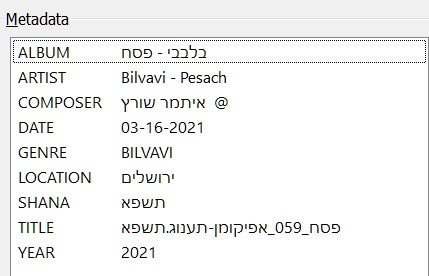
2-
the tag-file list has these columns:
FILE NAME-TITLE-ALBUM-YEAR-GENRE-COMMENT-COMPOSER
(in the updated version 3.29 "YEAR" TRANSFORMED INTO "DATE")
https://bilvavi.net/images/tag-list.jpg


3-
missing from the tag-file list is
DATE
LOCATION
SHANA
YEAR (IN THE UPDATE 3.29 YEAR = DATE)
4-
How can I restore these "missing" metadata columns in the tag-file list.
I have tried all suggestions and nothing is "working."
5-
my suspicion is that the metadata format for the missing columns is different than the format of the 3.29 metadata