I’m currently digitazing my analog LP:s and 45:s (and my dads old 78:s for that matter) using Discogs for the metadata. As Discogs use A1, A2….. for tracknumbers I got an error when writing the data. When update it seems OK but the Track-field is empty. Do I something wrong here or can this be converted to 01, 02, 03…..??
I’m digitazing to Windows 11 wav-file and keep that for some sort of master. No problems here.
After processing the audio (remove clicks and others with Adobe Audition) I save as .wma and here I got error on the tracks beeing A1, A2 a.s.o. After I update the screen it is saved but the track is 0 (zero).
I tested by saving to .mp3 and this works as expected. Seems that .wma only support numbers in this field.
If you search for information about WMA, you will quickly find the definition "WMA track number is a string". This was also mentioned 10 years ago, here
However that definitely doesn’t apply to us as end users.
The Two-Layer Reality
The confusion often arises because users see a String in the SDK/API and assume the underlying file format supports Alphanumeric values (like "A1" or "12-B"). However, the architectural truth is split into two layers:
Layer
Role
Data Type
ASF Container (Physical)
How data is written to the disk
WORD (16-bit Unsigned Integer)
API / SDK (Interface)
How software communicates with the file
String (WSTR)
Key Technical Points
The Physical Constraint: The ASF (Advanced Systems Format, used for WMA audio files) specification explicitly defines the WM/TrackNumber attribute as a WORD (a 16-bit unsigned integer data type, not a human-readable word composed of letters!). This means the actual bits stored in the file header can only represent a whole number between 0 and 65'535.
The API Abstraction: The Windows Media SDK often passes metadata values as Strings for the sake of uniformity. When you "write/save" a track number via the API, the system takes your String (e.g., "10"), converts it to an Integer, and packs it into that 16-bit slot.
Why Alphanumeric Fails: If you attempt to pass an alphanumeric value like "A1" to the API, the underlying writer will fail to convert it to a WORD. Since the physical container has no "String" field for this specific attribute, the data simply cannot be stored.
Thats also the reason why we see this error message in Mp3tag, if we try to save "A1" into a WMA file from the Tag Panel or try to fill the TRACK (WM/Tracknumber) from a WebSource Script like the one from Discogs or MusicBrainz:
The MPEG-4 format also expects an integer. This applies to MP4, M4A, M4B, and M4V files.
My suggestion - While the traditional concept of album "sides" applies when comparing the track list on the cover to the corresponding record and side, this isn't the same for the audio files once they have been digitized. Options are to simply use a single run of track numbers from the first track to the last for the complete album. Or you can be creative and use the DISCNUMBER field to indicate separate records or even sides within each album along with the corresponding TRACK number.
Leading zeros and the slash "/" character are not saved as the field is expected to be an integer value. This applies to the DISC, TRACK, TOTALDISCS, and TOTALTRACKS fields for the MP4 tag format. This should exclude any alphabetical characters as well. This has been documented here previously. Not sure why this is saving on your side. I suspect this would cause issues for some players as well.
The standard for ID3v2.3/4 does not allow this too.
The 'Track number/Position in set' frame is a numeric string containing the order number of the audio-file on its original recording. This may be extended with a "/" character and a numeric string containing the total number of tracks/elements on the original recording. E.g. "4/9".
Anyway it is possible to use non-integer characters like A1.
No, and it's written as user-defined TRACK field in those cases where the value of the field cannot easily be transformed to an integer value (e.g., the string 01 can be transformed to integer 1).
This explains why other programs may not be able to properly use the data. Essentially then this non-conforming data is only useful directly within mp3tag.
Perhaps you do not really need to store the A and B letters in the track field itself.
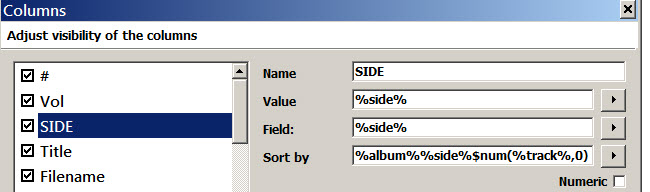
Instead, you could create a custom tag in Mp3tag to hold the LP side designators (A or B). Let's call this field "SIDE". Then, in the Mp3tag column sort setup for SIDE, you could sort first by the album name, second by the SIDE tag, and third by the track number.
This would allow you to create playlists that look like traditional song lists for vinyl LPs. And sorting by SIDE would allow you to sort the track numbers as integers, even when the numbers were stored in the audio file as strings. The conversion to integers can be done by a script function $num(%track%,0) :