How to insert a hyperlink.
I'm sure it's possible, but I don't see how or know how to insert a hyperlink in a field.
http//www.wikipdeia as an example.
Thanks
How to insert a hyperlink.
I'm sure it's possible, but I don't see how or know how to insert a hyperlink in a field.
http//www.wikipdeia as an example.
Thanks
See here for a list of fields:
There are a number of them which deal with www properties.
Reviewed information. don't really understand it.
to simply quote tag info from Wikipedia. Instead of copy paste, i would just like to include a Hyperlink to launch the wikipedia page.
thanks
Yes.
And which field would you like to show that link?
MP3tag supports a number of fields for www addresses, you already had a look at the list.
The other big question would be: does your target system support those fields.
Hello,
target system? Not sure what it refers to. I am on Windows 10 Pro if that's what you mean.
I too am intrigued as to how to insert a clickable hyperlink in a field . The field name in question is Lyrics using the WWW tag with this entry (Mariah Carey - All I Want for Christmas Is You Lyrics | Lyrics.com).
Puzzled because the type choices for the field are Text, Check and Multiline whereas I associate a hyperlink with the HTML "a" tag in web pages. How then do you make it clickable so that it takes you to the website's page? Not sure what Office type documents use to create hyperlinks.
Thanks.
That is exactly what I mean by "Target system": the player has to show the field and it has to have a function / feature that interprets the text as hyperlink and then call the corresponding program.
I do not know any player that does that.
Sorry but what player are you referring to?
Would it not be feasible to add a new of type to the program, one that recognises html tags and which when you click on it opens up the user's default browser?
I suggest to copy & paste the lyrics directly in the UNSYNCEDLYRICS tag.
This way, you always have the lyrics inside your song. Wherever you play your song, you already have the lyrics embedded - you don't even need internet access.
Many player also support this field and show the content of the UNSYNCEDLYRICS tag directly.
It would look like this in Mp3tag (View -> Extended Tags):
In the player "VLC" the lyrics looks like this:
I would assume that simply collecting tag data is not really the purpose of an audio collection.
I would assume that the audio should also be played.
And that player should then also deal with the tag information.
In this case: interpret the text as HTML code.
MP3tag lets you edit corresponding fields.
The interpretation is then task of the player.
If you want to get the lyrics from an internet page: there are several web source scripts to browse dedicated sites for that kind of data.
Ta LyricsLover, not sure how much incorporating lyrics into the file increases its size and by how much. Probably not much as it presumably is just text. For me the leaner the better so having such a facility would provide an easier alternative to copying lyrics or links and pasting it into a browser, should I really want to view the lyrics, if that makes sense? I use it as a reference rather than a viewing platform for the lyrics. Agreed that one distinct advantage is that you don't need internet access once the lyrics are incorporated into the file.
Precisely,which is what copying lyrics into a tag does and adding to the file's size. It's a question of giving users choices.
Why? Having a hyperlink that opens up the browser does away with the need for a "player" as such. The user then has the choice if he wants to, to play the song using the website's internal or external player. - with lyrics.com it allows you to view the video or to listen to the track on line.
So basically and in essence this lean approach would take the burden you describe away from MP3TAG and shift it to the browser.
Hope that makes sense.
Looks like the already existing streaming platforms to me.
So if you want to reduce instead of
I would consider the option of the streaming services.
This would also reduce the need to embed covers or to tag files at all.
The lyrics - pure text - usually have only a size about 2 - 4 KB.
If you have 100'000 music files and add 4 KB lyrics to each of it, you need 400 MB more disc hdd/ssd drive space. Nothing that I would think about it. Especially with the huge advantage to never depend on the internet, the lyrics information provider, the streaming provider and so on.
But of course:
It's completely up to you.
Are you really so optimistic that you think that such hyperlinks will last a few years?
With lyrics, I think you spend more time inserting the hyperlinks and checking them regularly for functionality than copying the text once into the corresponding tag field.
Doesn't this defeat the purpose of having the music file collection? If you have local files, one would assume the intention is to play those. If you prefer to have a simple browser that is pointing to audio, video, and even lyric files located online - just use that service in the first place.
Are you serious or pulling my leg?
[quote="poster, post:13, topic:41416"]
Are you really so optimistic that you think that such hyperlinks will last a few years?
[/quote]
poster, good point. Who knows what's in store for us what with AI and whatever innovations come next. I was using the lyrics tag as an illustration of how the program might it too evolve by giving us alternatives, more choices and extending its functionality
Why restrict it to hyperlink which are very useful in themselves.
Why not its own browser?
Assume - you know what that says about you and me, don't you?
I reckon that you fail to differentiate between the playing of files from the main purpose of a program like MP3TAG which in my estimation is essentially a repository to store one's favorite music along with relevant information concerning their creation and facts of interest to you personally.
Is the playing of those files its main function, I would argue not but it primarily being a place to store and maintain in an organised fashion your music while providing easy access to view and to easily alter its stored data. So why would it have to depend on a player to create and decode hyperlinks, it makes no sense.
Can you play those files without opening MP3TAG ? Of course you can.
Does it have its own player? No, it relies on proving a link to the operating system's default player to play the music files so in the same way why can't it provide links to open web pages of interest or indeed internal links?
Better still as I mentioned to poster before I came across your entry to take it further why not find a way to incorporate its own player so that it's completely independent of other programs and adding browser capabilities to open and play music files to it would surely be a plus.
You're missing the point - it was raised to disentangle "the player" in the convoluted explanation from ohrenkino on post 9 from the simple ability to open a web page from a saved bit of information in the form of a hyperlink.
Really?
AFAI understand MP3tag, it is just a module in a collection of functions to maintain one's collection.
MP3tag does not have a file manager but relies on the Windows Explorer (see discussions about a folder tree)
MP3tag does not have a graphics editor and only basic functions to convert and resize pictures - anything more sophisticated has to be looked for in dedicated programs.
MP3tag does not deal with the stream contents of files - you also need other programs to do that.
MP3tag does not convert one format into another, you need, you will have guessed it, a dedicated editor for that.
And for most of these other purposes there are other full-fledged programs around, some of them even cost a lot of money so that I think that it is not very likely that MP3tag expands into those fields as well.
And in respect to hyperlinks... I know that you can add a Tool (see the options>Tools) to open a link, see e.g. a set of suggestions to open links from within MP3tag:
it is just not
Your idea that MP3tag should interpret data and find that this is an internet link has not yet been implemented and I doubt that it will be soon.
It is up to the user to tell MP3tag to take that data as hyperlink and forward it to another program.
Your idea to
is currently not part of the modular approach. Also,
is so far not nourished by fact. MP3tag is a program to tag files that comply with the implemented tagging standards.
Nope, this is just a reasonable expectation for anyone with a music collection. Especially if they are here and use mp3tag to assist in enhancing the content to be displayed while playing files from that collection.
Now who is making assumptions?
Feel free to make a request for this feature enhancement for mp3tag. If it gets incorporated someday in the future, then you can hyperlink away. In the meantime the current answer is no.
If you want to play a piece of music you need a player. If you want that this player shows the destination-content of your hyperlink you need a player that is capable to do this.
If you simply want to store a hyperlink to some internet information in a tagfield of your choice and access this information out of MP3Tag, you already can do that with the help of
a defined tool in Mp3Tag very comfortable even with a shortcut.
i.e.
Fill a tagfield of your choice (let's call the tagfield HYPERLINK here). Fill in the wikipedia -hyperlink for the album Abbey Road of the Beatles: https://en.wikipedia.org/wiki/Abbey_Road
Define a tool to show this hyperlink: File->Options->Tools->New
Name: Wikipedia
Path: C:\Program Files (x86)\Google\Chrome\Application\chrome.exe
Parameter: %hyperlink%
Place this tool in your tool list at a position between 1-10, lets say position 1.
Highlight your file and press CTRL-1. Your wikipedia article will be shown in your browser.
AFAI? Who is that, what does it stand for - https://www.allacronyms.com/AFAI - which one applies to your post?
Sorry ohrenlino, apologies but I don't see the relevance of these remarks to my original post #5 when I asked " How then do you make it clickable so that it takes you to the website's page? "and your reply
What puzzled me was why MP3TAG according to your comments needed to involve "that player" in any way to enable a tag that contains a hyperlink to open it in a browser.
And as your post now further suggests it does not through User-defined Tools and as mentioned by poster in post 18 though I have yet to experiment with it. I will look into it.
The inevitable conclusion then must be that there is no need / necessity to involve "that player" in this simple operation. Are you with me?
True, should have added for any picky person "through the ability to tag files that comply with the implemented tagging standards."
But come on:-
Fact : - "A repository is a place where things are stored and can be found - (REPOSITORY | definition in the Cambridge English Dictionary) and at heart (in no way a reflection of the creator's vision, talents and dedication) is not MP3TAg a database (a large amount of information stored in a computer system in such a way that it can be easily looked at or changed - DATABASE | definition in the Cambridge English Dictionary) with specialised tag editing capabilities and other ancillary functions?
Thanks for your suggestion poster which I will look into, that is exactly what my original inquiry was all about.
Which MP3TAG provides as an adjunct to its tag editing role through providing a link to the operating system's default player to open and play the music files - again not an essential part of the program. It did not need to but does so to implement and comply with "MotleyGs post:17, topic:41416"' comment - "a reasonable expectation for anyone with a music collection".
That again is surely the role of browsers and nothing to do its primary role of playing audio/video files. But supplying a facility not to show internally the destination-content of your hyperlink but to open it in a browser (a hyperlink's primary function) which then shows the content in it surely must be feasible.
But anyway who asked for that in my original post?
Not sure but I don't think that it is matter of "Your idea that MP3tag should interpret data and find that this is an internet link"- the hyperlink probably already does that - all the program needs to do is recognize by its stricture that it is an hyperlink and proceed accordingly and that for text and images links. What programming language is MP3TAG written in?
I suppose now that I have an inkling that "Insert Hyperlink in field" can be done and work would Florian Heidenreich consider integrating the function into the program?
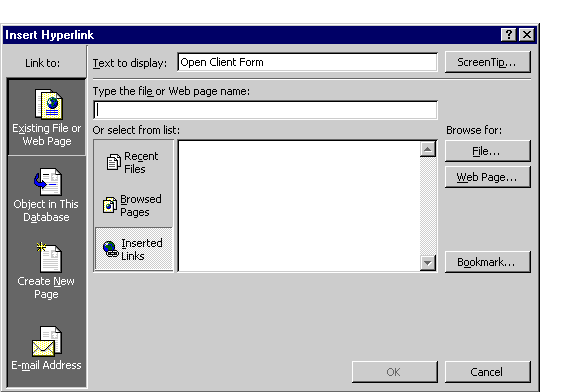
I would envisage a right mouse click in a tag text box or image that brings up an insert hyperlink dialog box similar lines to this one:
(https://www.relationaldbdesign.com/access-features/module3/images/hyper-link2.gif)
If you read this, Mr Heidenreich, please regard it as request for a much needed, added functionality to your amazing creation and in assisting and increasing ease of use of it, specially for external but also internal navigation and add value to it.
AFAIK = as far as I know.
That does not quite fit so I chose
AFAI
to cater for "as far as I" and then continued the sentence with an different verb.
Just to put this right: MP3tag has only access to the tag data availabe in the currently loaded files. I would consider a database to provide data from all the records as long as the database file can be accessed. MP3tag does not have a database as dedicated file to retrieve information.
Coming back to the original idea:
provided that the function should really be implemented - should the call to open a browser be issued by data in any field (that looks like a hyperlink) or only the dedicated ones that are already supported.
IMHO I would see a hyperlink in the lyrics field only as valid data if the song text actually quotes that as part of the lyrics. And then it would be plain text, as far as I am concerned.
Have a look at the documentation for a number of already supported fields that deal with hyperlinks: