I have files that start with A1, A2, B1, B2, ect., followed by the name of the song. This makes up my filename tag, but it also makes it difficult to add anything in the middle of that $_filename tag. I would like to add non-tagged text in-between the two values and I can do that, but I have to do it in two steps. One for the A side and one for the B side.
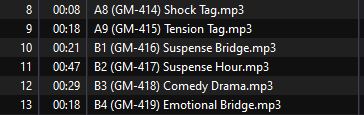
I would like to know a way in Tag - Filename to batch add text in the middle of the filename while maintaining the filename values I already have. Here are before and after examples of what I'm talking about.
Before:

After:
Quite honestly: if you only fiddle with the unstructured filename, then probably a dedicated file renamer would be a better tool for you.
If, on the other hand, you intend to really fill the tags in your files to get structured data and then generate filenames from there, everything would probably be much easier.
So: use Convert>Filename-Tag to get the data from the filename into the tag fields with:
Format string: %trackside% %title%
which puts A01 etc into the user-defined field TRACKSIDE.
I assume that you have created a "GM" field with the text that you want to insert.
Then use Convert>Tag-Filename
Format string: %trackside% (%gm%) %title%
(From where do you get the "(GM-414)" part?)
There are several ways I can think of.
I am assuming the filename starts with A or B? You need to adjust length and starting point if it starts with what looks like minutes or seconds. Post the filenames in plain text, and it is easier to help you.
This RegEx will give you the parts,
(^.{2}) (.*)
but actually you can get the first part with
$left(%_filename%, 2)
and the second part with
$trim($mid(%_filename%,4,99))
(maybe there's a shorter/better way to get to the end of the filename?)
Now you put your GM piece between the two and Bob's your uncle 
$left(%_filename%, 2) (GM-??) $trim($mid(%_filename%,6,99))
Just my 2 cents...
You could also use Convert>Filename-Filename
Mask over filename: %1 %2
Mask for new filename: %1 (GM-414) %2
Where does he get the GM part from? These things I usually do with VS Code, multi-cursors and the rename function of Directory Opus (commercial).
Bulk Rename Utility (Free)
should also be able to help.
So that's 4 cents now 
The "GM" portion is a catalog number and the letters and numbers in the parentheses vary from album to album. I have a string code to insert what is needed based on the album. It was the text on other side of the catalog number that I needed split so it could go in-between them. This worked, so thank you.