In Tag Field Mappings – Mp3tag Documentation the tag RELEASETIME is shown as being both an ID3v2.3 and ID3v2.4 tag TDRL whereas in id3v2.3.0 - ID3.org it can not be found. It first appears in id3v2.4.0-frames - ID3.org, and also in Tag Mapping - Hydrogenaudio Knowledgebase it is mentioned as ID3v2.4 tag only.
I wanted to use RELEASETIME, because it contains a complete date and not only a year. But when I use RELEASETIME in mp3tag with writing ID3v2.3 tags to mp3 files, I therefore get an inconsistent tag in the file. I think the tag should read e.g. TXXX="RELEASETIME 2009-10-12" and not TDRL="2009-10-12". Mp3diags btw. does not find this issue, but with exiftoolgui you can see, that there are v2.3 and v2.4 tag together in the file.
So I don't know what is wrong and what is right. What do you think? Should mp3tag write a user defined tag?
No. Apple introduced this tag field in podcasts also for ID3V2.3. And as it has been adopted also for other podcasts, it should stay like that. Standard fields are much wider accepted than user-defined fields.
The advantage of the current solution is: while the user-defined field always has the name that follows TXXX, a standard field like TDRL can be localized.
So the field RELEASETIME about which we can talk without any ambiguities, would be hard to understand if it would be named locally e.g. "Veröffentlichungsdatum".
Even now various applications have their own naming schemes and data interchange would become virtually impossible for this kind of data.

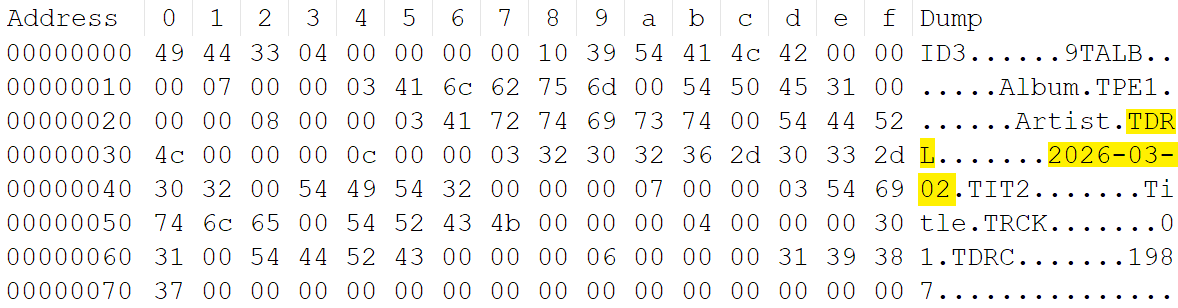
@yorickausyps Or are you suggesting that Mp3tag should not write TDRL in ID3v2.3 because it is not defined in the official standard?
BTW: The official standard for ID3v2.4 describes timestamps as:

Perhaps I'm mistaken, but I understood that all these time-variants are valid:
yyyy
yyyy-MM
yyyy-MM-dd
yyyy-MM-ddTHH
yyyy-MM-ddTHH:mm
yyyy-MM-ddTHH:mm:ss
or with examples:
1987
1987-12
1987-12-31
1987-12-31T23
1987-12-31T23:59
1987-12-31T23:59:59
I’ve noticed it’s supported in Windows File Explorer by Matroska files using the “Date released” column.
.mp3’s set to use IDv2.4 no longer show YEAR like with v2.3 but they do show RELEASETIME in both “Year” and “Date released”.
.mp3’s actually fill in the "Year" column from either YEAR or RELEASEDATE:
- with ID3v2.3 tags, it prefers
YEARas long as it's formatted correctly. - with ID3v2.4, it'll prefer the "newest" stated date between the two tags.
- If
YEAR's missing, it'll useRELEASETIME(and obviously vice versa).
RELEASETIME is always required for “Date released” for the formats shown to support it.
DATE’s a stranger one as it’s only supported by .flac and is the only time-formatted tag supported for .opus. This is just from File Explorer, mind you.
YEAR = 1000
RELEASETIME = 2000
DATE = 3000

Thank you all for your contributions. Now I think it is OK to use RELEASETIME in ID3v2.3 tags, because Apple does it and Microsofts Windows does it also. Currently I'm looking for apps that also can properly use a RELEASETIME tag in mp3 files with ID3v2.3 tags. So far I have only found musicbee to display its content correctly.