I use EAC for ripping CDs, Discogs to save my music collection and Jellyfin as my media server. I use MP3TAG when a match isn't found (EAC doesn't connect to Discogs ) or artwork is missing. I follow a lot of small or new bands and typically they issue releases without adding to the databases. If I submit a new release to Discogs, I then use MP3TAG with the release id to setup the tags. Everything looks fine, the music is identified by Jellyfin BUT the track titles are not identified. They are 'Track01', Track02' etc.
First step was to raise an issue with Jellyfin. They asked me to run ffprobe on the tracks and the only thing they noticed was that the tag title field was lower case 'title' instead of 'Title', also true of 'disc' and 'track', and closed the case.
I started looking into your documentation and found the action to change to uppercase, but I can't workout how to just change the first letter, can you help? . I did re-run ffprobe, with all caps 'TITLE' and the field was changed but still didn't work with Jellyfin.
Please tell us the file format (flac, wav, mp3, etc.?).
Please tell us what you have tried so far.
Also check out this section about case conversion, esp. the part about _FIELDNAME and Mixed case.
Just to be sure:
You want to change the content of the TITLE field (like "My song title") and the content of TRACK (like 01/11)?
You don't want to change the fieldnames itself, right?
BTW: I assume that you already know this Jellyfin article about the expected Music organization? Including:
Albums are organized in folders, with one folder containing one and only one album. Jellyfin does not care how you organize albums together, as long as each album is contained within one folder. Filenames generally do not matter since the info will be scraped from the embedded metadata of the tracks. If no other metadata was found, Jellyfin uses the file names as track titles.
...
While Jellyfin generally doesn't use the file names for identification, file names containing special characters can still cause problems. The following characters are known to cause issues: < , > , : , " , / , \ , | , ? , *
It's the actual tag field name I need to change from 'title' to 'Title' - not the actual content of the title field. You can see the difference in the ffprobe output.
I'll have another search through the docs
The Jellyfin file setup is correct. The other 550 albums are all fine, it's the ones I created in Discogs that don't work.
So: what have you tried so far?
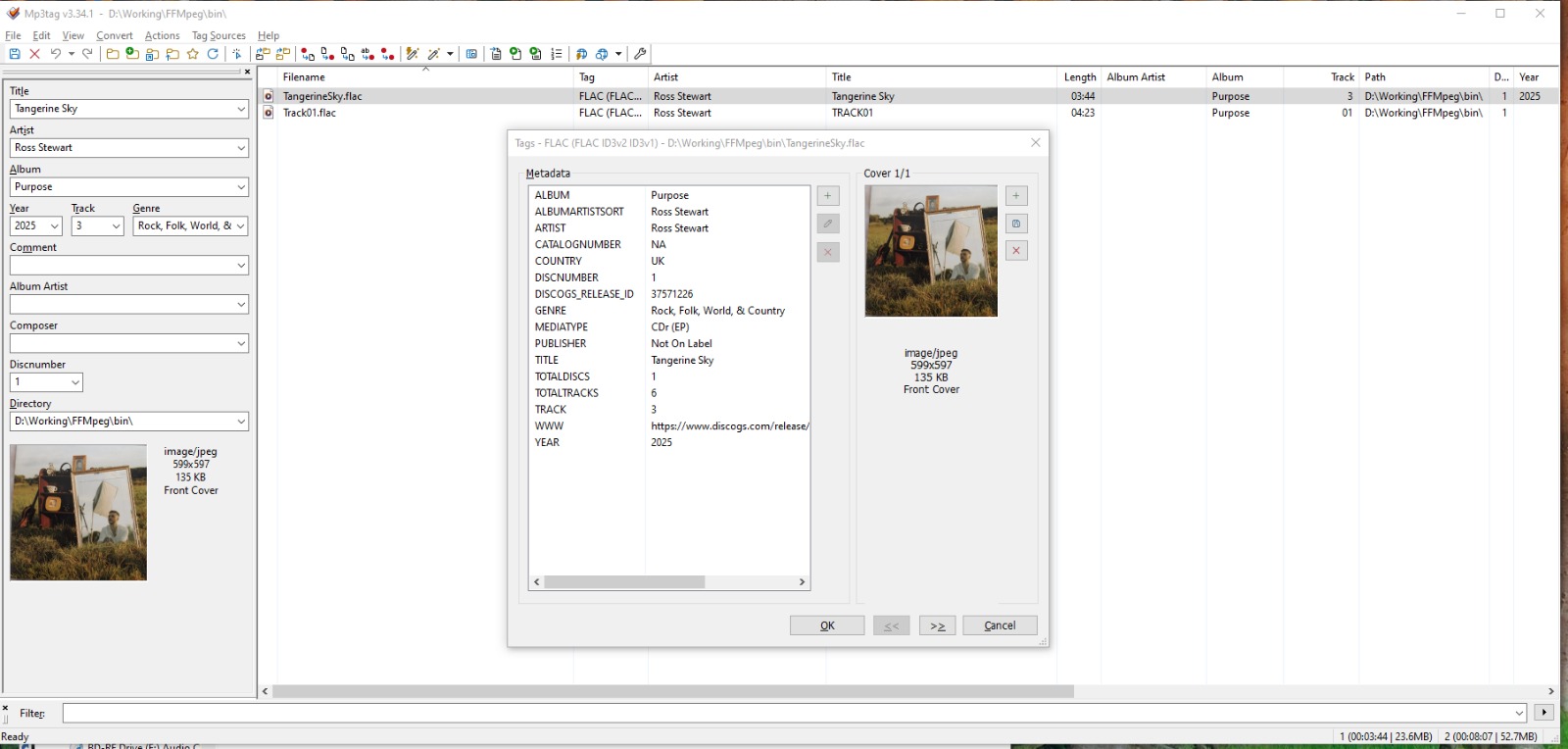
What about the screenshot of the extended tags dialogue for a single problematic file?
What about the message that there are vorbis comments and ID3 tags in the file?
Thank you.
You can see in the window title that this FLAC file not only features FLAC tags (vorbis comments) but also ID3V1 and ID3V2.3 tags.
Please use Edit>Cut tag and immediately afterwards Edit>Paste tag to clean up the tag versions and see if this file works ok now in your target program.
Spent a few days with Jellyfin support, they got me to use ffprobe and they said the issue was the tag field name. It was 'title' instead of 'Title' and that was enough for JF to ignore it. They totally ignored the other comments in the trace, and then closed the support case.
It looked at mp3tag community and documents.
Tried recreating files, re-rip,in mp3tag - type in track names directly, download from Discogs, download from Musicbrainz and Picard
used ffprobe to view each time to see changes
Tried running up an LMS server to see if it has the same problems (battling with docker/NAS/ server currently)
Tried using Action -> Case conversion but could not work out how to change first character of 'Title' field name
Check the generation of the files - one of the programs along the workflow inserts the ID3 tags which is considered invalid for flac files.
You can check every step in your workflow with MP3tag to find out which program is the culprit.
I would now assume that the files asr also OK in Jellyfin and that the case of the fieldname does not really matter.
You can filter for files with such tag confusion with %_tag% HAS flac AND %_tag% HAS ID3