Keep custom list values after change of Tag Panel configuration?

Steps to reproduce the problem:

  1. Open a random drop-down-box (like the one for GENRE) an add a value like "Test1"
  2. Press Shift + Return
  3. Click on the "arrow down" button on the right side of this drop-down-box: The new entry "Test1" is there.
  4. Restart Mp3tag and check if the value is still there: :ok:
  5. Save the Tag Panel configuration with a right-click on the Tag Panel and "Save configuration", name it like TestPanel
  6. Change a random field on the Tag Panel (it is enough to deactivate one of the fields).
  7. Save the Tag Panel configuration again with a right-click on the Tag Panel and "Save configuration",
    name it like TestPanel2
  8. Load the previous Tag Panel configuration with a right-click on the Tag Panel and "Load configuration", choose TestPanel1
  9. Have a look for your previously added custom list value: It's gone.

I assume that the values entered are stored in the file usrfields.ini. But every time you load a different Tag Panel configuration, this usrfields.ini will be overwritten.

My suggestion:
Could the manually added custom values be saved in the Tag Panel configuration file too?

This way we could share such configuration files including the custom values in the drop-down-boxes.

BTW:
It doesn't matter if you change the custom value with Shift+Return or if you add it in Options -> Tag Panel -> Double click on the Field and "Manage" for custom list values.

Hello LyricsLover & Florian,

It's a shame, I did some tests with the data that I had placed directly in Category: Audio in Mp3tag after having made a Backup of the configurations...

I resumed saving this file on the Mp3tag Tag Panel hard drive. .. and replaced this backup in Mp3tag

I modified my texts in Comments, sometimes I had to do CTRL+1 twice to display more than 26 characters...

Then, I tried to place the data 18000 (milliseconds=18seconds) in Intro with SHIFT+RETURN, it did not appear,

I clicked: Customize... Management
from the intro... Custom list values: The number 18000 was there, but not in the INTRO area of ​​the normal Mp3tag program, it didn't appear?

I put a copy back in Mp3tag, which I had modified only in the Mp3tag Tag Panel file..., I no longer have a problem...

I too notice that there is a problem after adding data in Category: Audio directly in Mp3tag, when we do Save Configuration... Mp3tag Tag Panel.., there is a problem when we take this file from the hard drive, to put it back in Mp3tag

I also believe, according to the tests I have done, that there must be data that does not record well...

Hello LyrisLover and Florian

I did some more tests in Mp3tag, I placed the data in the category: AUDIO with SHIFT+ENTER

Afterwards I made a Backup of the configurations...

I resumed saving this file on the Mp3tag Tag Panel hard drive. .. and replaced this backup in Mp3tag

And tested with Play (VLC Player) several times

Test result:

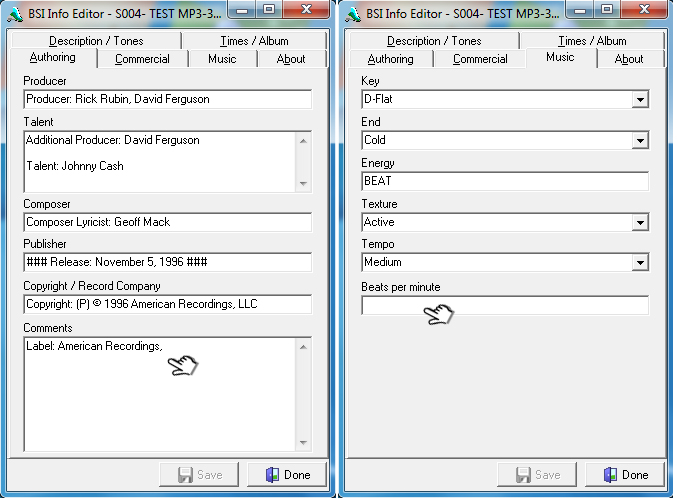
In BSI Info Editor in Comments tag: characters were missing, there were only 26 characters
(In BSI Info Editor there is a BUG that LyricsLover with a cmd program - Fixes every time, making it possible to have all characters saved in that tag)

And the TAG – Beats Per Minute (BPM) data is gone

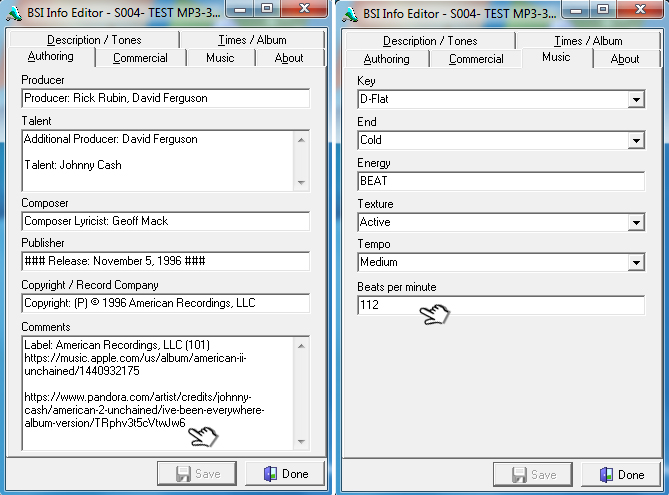
I made a backup of the TAGS and CTRL+1 to display in tag Comments: and Beats per minutes (BPM) all the characters again...

I closed Mp3tag

I opened the file: Mp3tag Tag Panel BSI Info Editor-Simian (Configuration_LyricsLover).ini

I deleted the Category TAG data (except AUDIO) directly in the file: Mp3tag Tag Panel...ini

Data that I had previously placed with Mp3tag

I placed the same data in the TAG category directly with the keyboard in Mp3tag Tag Panel LyricsLover...ini

I saved the Mp3tag Tag Panel LyricsLover...ini

I opened Mp3tag

I placed Mp3tag Tag Panel LyricsLover...ini, into the Mp3tag program.

And tested with Play (VLC Player) several times

there is no more problem:

Comments tags and Beats per minute (BPM) data no longer disappear...

I also noticed that when I update Mp3tag, I redo a "Load configuration..." of
Mp3tag Tag Panel LyricsLover...ini

To avoid having small TAGS problems

A big thank you to Florian, for the Mp3tag programming, your programming works with "Tag Panel from LyricsLover" & my old program TAGS BSI Info Editor (Simian) TAGS of lowercase and uppercase letters, which unfortunately does not respect the TAGS standard

TAGS should only be in capitals only, which BSI Simian has not changed over the years (21 years)...

---See photos---
Mp3tag Tag Panel - IMAGE - Category AUDIO


01 BSI Info Editor - Comments and Beats per minute (BPM), missing texts
02 BSI Info Editor - Comments and beats per minute (BPM), full texts

I've followed your steps and can't reproduce. It's still here in my case.

It safes the user added values in the individual tag panel configuration ini for you?

Yes, this is from my Test.ini, note the custom_values entry:

[#8]
name=Composer
value=COMPOSER
size=12
enabled=1
default=\u000b1
multiline=0
custom_values=TestComposer\u000bTestComposer2
prefer_tag=1
version=1

Thanks to a conversation with Florian and further tests I understand that this is not a bug.

Long story short:
If you want to save your Custom List Values into your Tag Panel INI file, you have to save your Tag Panel configuration manually as written here:

As long as you enter your Custom List Values with Shift + Enter these values are stored in the usrfields.ini

If you want to share your Tag Panel configuration including all your Custom List Values, you have to save the Tag Panel configuration first.

Therefore I change the category from "Bug Reports" to Support.

Hello LyricsLover and Florian, following your discussion... and some explanations from LyricsLover...

I redid my tests and I understood that it was not a bug...

In my tests sometimes, I clicked on Title without realizing that Mp3tag had saved the data after...

To save all my tags I have to press CTRL+1 (Tool)
Which I didn't do, because I hadn't noticed that Mp3tag had made a backup...

This is why I was sometimes missing in my tests, data in the 2 tags: Comments and Beats per minute (BPM) of the TAG

Here are my 9 photos to understand the steps and my error