I have some file that look like this:
ARTIST: YOUNG JEEZY
TITLE: SOUL SURVIVOR (FEAT. AKON)
I want to move the contents including the parentheses to the artist field and append it to the end of the artist field with a space between the artist last letter and opening of parentheses.
I've used this but it overwrites the artist:
GUESS VALUES: TITLE
Guess pattern: %title% (%artist%) (taken from similiar thread > logic understood, just not what I need)
and
Guess pattern: %title% (%artist% (%artist%)) (does not work wrong logic, not sure how to guess at a memory location pointer)
Clearly neither work, can someone point me in the right direction?
Thank you
I'll try.
you have to format both fields in several steps.
%artist% <& $mid(%title%,$strstr(%title%,' (Feat.'),$len(%title%))>
(this action is case sensitive in respect to the "Feat")
Cut the featured artist from the title:
If you like, trim the field
As the pointer movement can be a little tricky, play around on a test track first.
ohrenkino:
I'll try.
you have to format both fields in several steps.
%artist% <& $mid(%title%,$strstr(%title%,' (Feat.'),$len(%title))>
(this action is case sensitive in respect to the "Feat")
Cut the featured artist from the title:
If you like, trim the field
As the pointer movement can be a little tricky, play around on a test track first.
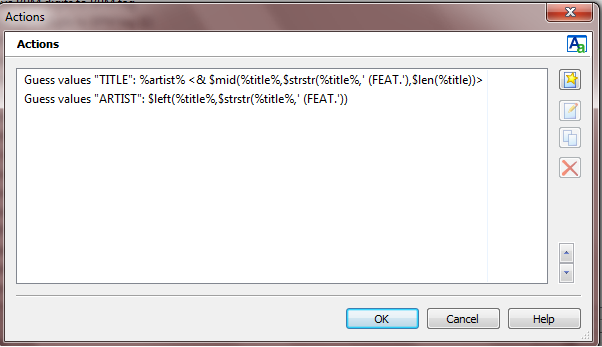
I "think" i've followed your instruction correctly on a test file but nothing happens. I'm not sure if I missed something, here is a screenshot, does this look right to you and as you intended? All of my file tags are upper case
Chris
Two things are different than what I thought is right:
Also all actions shouldn't be of the type "Guess value" but "Format tag field".
If you modify the actions accordingly, does still nothing happen?
Hi,
I should have saw that also, I just did a blind copy and paste, sorry about that.
Here is the before and after effects shown in the screenshots
Chris
dano
June 23, 2011, 7:40pm
6
Combine these three in one action group:
Action #1: Action type: Guess values Source format: %artist% --- $replace(%title%,'(','{(',')',')}') Guessing pattern: %artist% --- %title% {%temp%}
Action #2: Action type: Format value Field: ARTIST Formatstring: %artist%[ %temp%]
Action #3: Action type: Remove fields Fields to remove (semicolon-separated): temp
This worked perfectly, thank you!
Can you give me a laymans version of how action 1 operates? I don't really understand the ending of it:
%artist% --- $replace(%title%,'(','{(',')',')}')
I understand the artist and replace and title, but how does the end of it work in terms of how the expression views the raw data it is parsing?
Either way, thank you all very much for your help!
Chris
Dano's clever proposal from post #6 can be partly slimmed down to ...
Begin Action Group Test_2011#20110624.kittmaster
Action #1 Actiontype 7: Import tag fields (guess values) Source format: %ARTIST%===%TITLE% Guessing pattern: %ARTIST%===%TITLE%÷(%FEAT%)
Action #2 Actiontype 5: Format value Field: ARTIST Formatstring: %ARTIST%[÷(%FEAT%)]
Action #3 Actiontype 9: Remove fields Fields to remove (semicolon separated): FEAT
Note: Replace each special ÷ character with one space character. Test_2011#20110624.kittmaster (3 Actions)
DD.20110624.0532.CEST
... and even to the smallest ....
Begin Action Group Test_2011#20110624.kittmaster.3
Action #1 Actiontype 7: Import tag fields (guess values) Source format: %TITLE% Guessing pattern: %TITLE%÷(%FEAT%)
Action #2 Actiontype 7: Import tag fields (guess values) Source format: %ARTIST%÷(%FEAT%)===%DUMMY% Guessing pattern: %ARTIST%===%FEAT%
Note: Replace each special ÷ character with one space character. Test_2011#20110624.kittmaster.3 (2 Actions)
DD.20110624.1909.CEST
Thanks for this, I had already finished when you posted this, but I'll give it a go and and it to my list of stuff....
Best regards, to all,
Chris