I've been away for some months & opened MP3TAG, new update was available so I've updated the app & my actions to sort files by writing to _FILENAME are not moving files at all. I'm not sure what the issue is as they were working before & I haven't made changes besides updating the application.
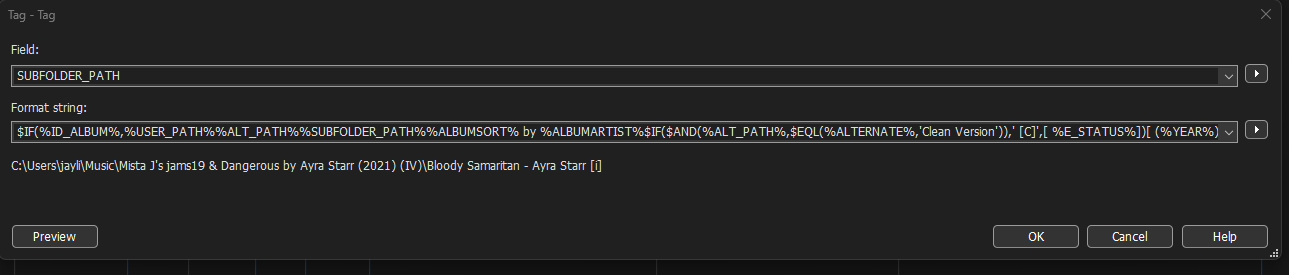
The string below seems to still be working, it reads the file & spits out a new path for the track
$IF(%ID_ALBUM%,%USER_PATH%%ALT_PATH%%SUBFOLDER_PATH%%ALBUMSORT% by %ALBUMARTIST%$IF($AND(%ALT_PATH%,$EQL(%ALTERNATE%,'Clean Version')),' [C]',[ %E_STATUS%])[ (%YEAR%)] %ID_ALBUM%[$IF($EQL(%ALTERNATE%,'MP4 ALT'),'\M4A',)][$IF($EQL(%ALTERNATE%,'OPUS ALT'),'\OPUS',)][$IF($EQL(%ALTERNATE%,'WAV ORG'),'\WAV',)][$IF($EQL(%ALTERNATE%,'FLAC ALT'),'\FLAC',)][$IF($EQL(%ALTERNATE%,'Clean Version'),'\CLEAN',)][$IF($EQL(%ALTERNATE%,'Explicit Version'),'\EXPLICIT',)][$IF($EQL(%ALTERNATE%,'Archive'),'\ARCHIVE',)][\%LC SUFFIX% - %COVER DESCRIPTION 3%]\%_filename%,%_filename%)
New Path:
C:\Users\jayli\Music\Mista J's jams\Island Vibes 1\19 & Dangerous by Ayra Starr (2021) (IV)\Bloody Samaritan - Ayra Starr [i]
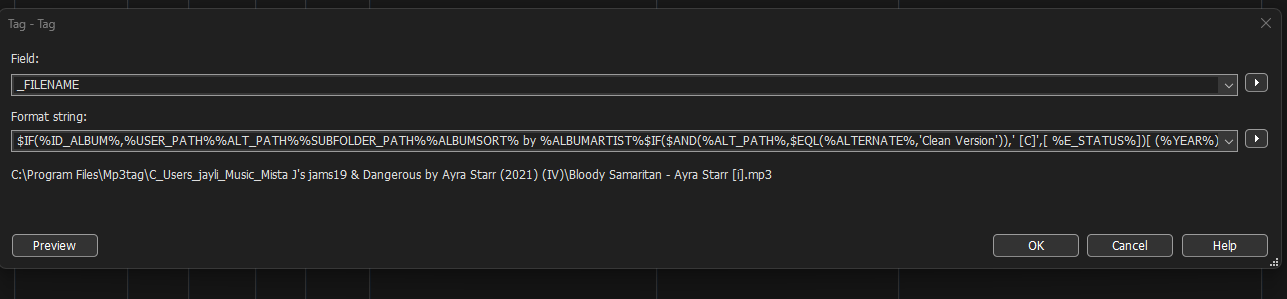
I am noticing a new thing in the preview when using Tag-Tag menu: this "C:\program files..." was not present before in the preview (see image below)

Running the action now my file goes nowhere but Mp3tag is acknowledging that its gone so clicking on the file after running the action makes the whole tow go blank as if the file had moved. Again this action was working before I updated so I don't know what the fix would be. After refreshing Mp3tag the track is editable again as if nothing happened. I've tried going back to an older version to see if the issue persists but the hyperlink seems to take me to the latest version again. I believe I had been using V3.34 as I remember the new UI changes as the last time I updated the application.
Thanks in advance