If you've been getting 403 Forbidden when fetching tags from Beatport or Traxsource, that's Cloudflare's bot protection blocking Mp3tag. I built a small free tool that works around it: Mp3tag Proxy.
What it is
A tiny local helper for Windows 10/11. It runs quietly in the system tray and sits between Mp3tag and the site, so your existing tag-source scripts work again. Everything stays on your PC — no account, nothing sent anywhere.
What it fixes
403 Forbidden on Beatport and Traxsource (Cloudflare)
Traxsource search, tags and full-size 600×600 covers
Setup (one-time)
Download mp3tag_proxy.exe and put it in any folder.
Requirements: Windows 10 / 11, and a version of Mp3tag that your scripts require (stevehero's Beatport v6 needs v3.22+, the Traxsource scripts need v3.26+).
I'm not redistributing anyone's scripts — you apply the edits to your own installed copies, so you'll need the scripts already installed from the links above.
Feedback and bug reports welcome.
Mp3tag Proxy is an independent, third-party tool and is not affiliated with or endorsed by Mp3tag. Mp3tag is a registered trademark and the exclusive property of its holder, as is its logo.
Odd. I've made all the changes suggested at Git, but still getting a 403. No VPN is on. I have MPT version 3.34.1 and the newest version of Steve's scripts.
You're on the old build, your log says impersonate=chrome131. Beatport tightened its Cloudflare check, and v2.1.0 (linked at the top of this topic) handles it via Edge.
Just download the latest and restart. Your script edits are fine, nothing else to change.
Fixes a case where running two copies of the proxy at once could hang it (Mp3tag error 12002). Only one instance runs now, a second launch just tells you it's already running.
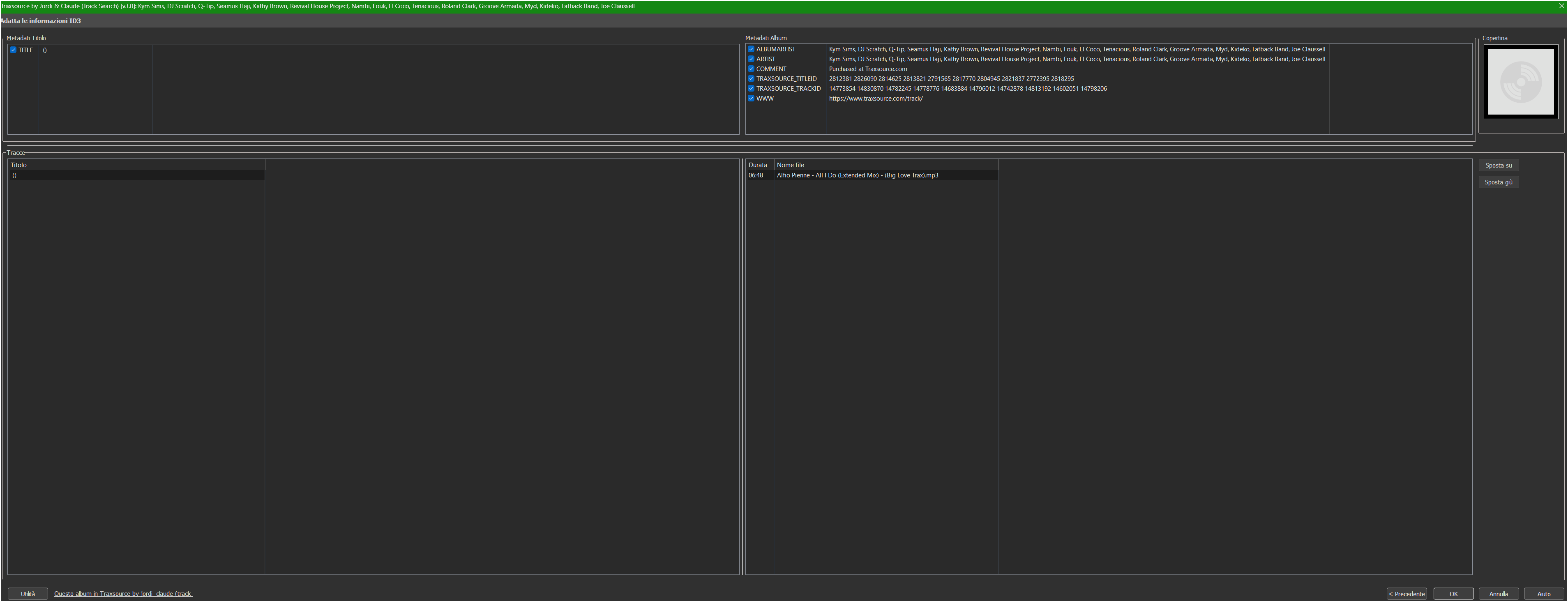
Hi and thanks for your work. i follow every steps in the guide ( i us Traxsource tags ) but it seems not working for me..i receive for example Title 0 and artists Kylie Mingogue, and some others in every tag search i do. i dont understand..
Hi, thanks for reporting this. "Title 0" and a random artist name on every search sounds like a parsing issue rather than something with the proxy itself, but I'd need a bit more info to be sure:
Which script exactly are you using (Search or Direct by URL)?
What search term did you type?
Is the proxy tray icon running when you search?
Could you check proxy.log next to the exe, does it show a request to traxsource.com when you search, and what status code (200/403/etc)?
A screenshot of the search results panel would help too.
proxy says: === 2026-07-16 16:10:14 v2.3.1 ====================
2026-07-16 16:10:14 Server listening on 127.0.0.1:8787 (impersonate=chrome146)
2026-07-16 16:10:14 [browser] Edge found — Beatport challenge solving available
2026-07-16 16:10:14 [update] up to date (v2.3.1)
Thanks, that's very helpful. Two things stand out:
Your proxy.log only shows the startup lines, no REQ/RESP lines. That means this particular search never actually went through the proxy. Can you double check the [BasedOn] and [IndexUrl] lines in your "Track Search" .inc file were saved correctly, and that you did a full Mp3tag restart (File → Exit, then reopen) after editing? Then run the search again and send me the fresh log tail, it should show a line like REQ GET .../search/tracks....
Separately, the empty title and every artist merged into one field looks like a parsing issue in how the search result list is built, not something the proxy causes. Once we confirm the proxy is actually in the loop, I'll dig into that part.
this is the new file log after re-made a pair of restart:
=== 2026-07-16 16:09:43 v2.3.1 ====================
2026-07-16 16:09:43 Server listening on 127.0.0.1:8787 (impersonate=chrome146)
2026-07-16 16:09:43 [browser] Edge found — Beatport challenge solving available
2026-07-16 16:09:43 [update] up to date (v2.3.1)
2026-07-16 16:10:04 [exit] user quit
Found it, thanks for the detailed logs, that really helped. It's a bug in the Track Search script itself, not the proxy. Traxsource recently added a small icon inside the track title link on search results pages, and it broke the regex that reads the track's URL for most rows. When that happens, Mp3tag ends up fetching the Traxsource homepage instead of the actual track page, which explains the empty title and the random mix of artist names (they're just names from the homepage).
Fix: open Traxsource by Jordi & Claude#TRACK Search.inc in a text editor and find this line:
 GitHub - Mr-The-Zhu/mp3tag-proxy: Cloudflare-bypass proxy for Mp3tag — Beatport and Traxsource (Windows) · GitHub