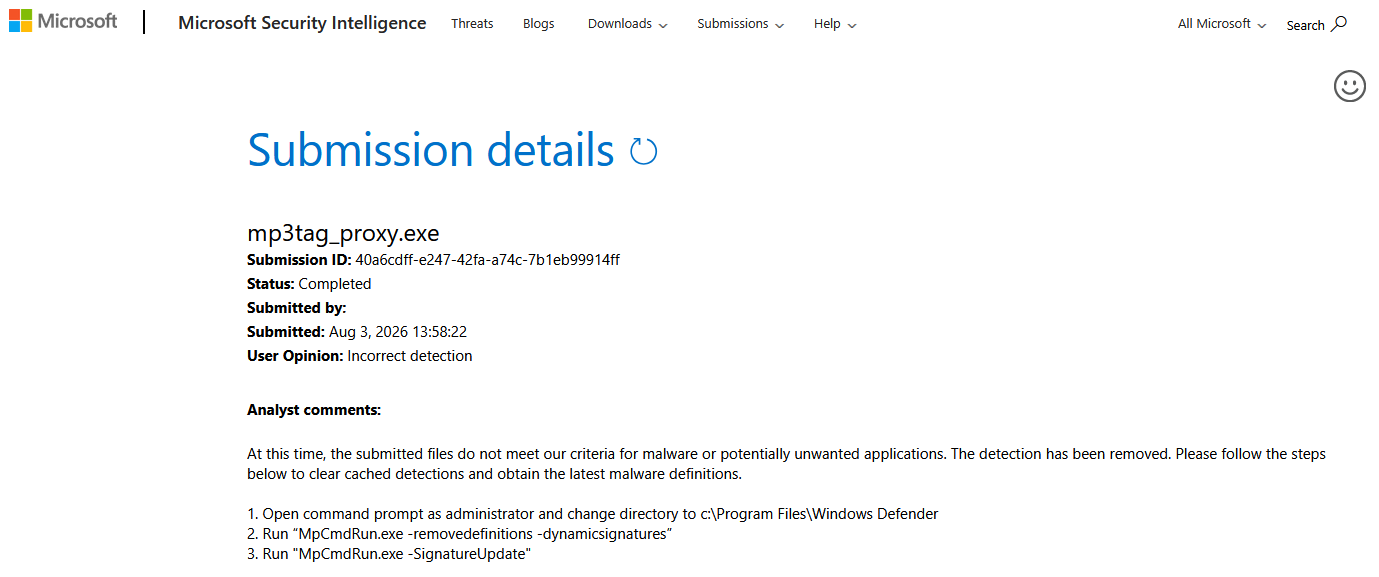
Thanks for flagging this, appreciate it. Looked into it: 5/70 engines, and the ones naming something specific point to generic ML classifiers (Microsoft's own is Trojan:Win32/Wacatac.ml, a heuristic model well known for false-positiving on PyInstaller-packed Python apps, not a signature match). Checked the build: the published exe's hash matches what I built locally, and every bundled dependency matches the untouched packages from PyPI byte for byte, no tampering anywhere in the chain.
The proxy does things that look "suspicious" to heuristics on paper (runs a local browser in the background to solve Cloudflare, closes it afterward, listens on a local port) but that's exactly the functionality the tool is built around, nothing more. Filing a false positive report with Microsoft now. If Defender still blocks it on your end in the meantime, you'll need to allow it manually or wait for the report to clear.
maybe you can just add an SBOM file to your source, it may help in these security concious days. also I don't see the source, I had to have ai analyze it, is the proxy Open Source? Thanks !
Fixes stevehero's Beatport Track Direct and Track Search scripts, broken by a JSON change on Beatport's end (Release Direct/Search were unaffected).
The proxy now checks your Beatport scripts on startup and tells you if they need fixing: a note on the splash and a "Fix Beatport scripts…" item in the tray, only when something's actually missing.
New tool bundled with this release: beatport_scripts_patcher.exe. Grab it alongside mp3tag_proxy.exe, it applies every needed fix in one go, with a backup of each file first.
Three releases in quick succession, and I owe you an explanation for the rush: v2.4.0 shipped with a broken patcher. It could not apply the Beatport fix it was written for, and the proxy then nagged about it endlessly. That was my mistake, and I am sorry to anyone who lost time to it.
What is fixed since v2.4.0:
The patcher now actually applies the Beatport track page fix. It also repairs what the earlier versions got wrong, including dates that came out with a time stuck on the end, so just run it again.
The About window closes when you click it, instead of launching the patcher at you. Escape and a close mark work too.
Both files now show their version, in the output and in the file properties, and the proxy warns you if the patcher next to it is older than itself. The two ship together, so update them together.
Beatport sends about 630 KB of page for a single track. The part your scripts actually read is under 2 KB of it. The rest is charts and recommendations that no tag source touches, but Mp3tag still has to work through all of it.
The new version can cut that page down before Mp3tag ever sees it. Same fields, same cover art, same length, just far less for Mp3tag to chew through. The difference is largest on older machines.
It is off by default. To switch it on, right click the tray icon and tick Faster Beatport tagging.
Only Beatport track pages are affected. Release pages, searches, artwork and Traxsource go through untouched either way.
You do not need to run the patcher this time, nothing in the scripts changed.
Beatport searches were slow for a hidden reason: a search returns about 150 results, and Beatport now points every one of them at a full size cover, around 169 KB each. Mp3tag was downloading and unpacking all of them just to draw the small icons in the list, roughly 25 MB per search.
The proxy now asks for list sized covers instead, about 65 times lighter. You keep the thumbnails and all 150 results, and the cover art saved into your files is unchanged.
Turn on Faster Beatport tagging in the tray menu, the same switch as before.
The script patcher now lives inside the proxy. You download one file, and when the Beatport scripts need something the proxy offers to fix them itself: a red line on the splash and a Fix Beatport scripts… item in the tray menu. Click either one, it does the work, keeps a .bak of every original, and tells you what it changed.
This release does change the scripts, so please run that fix once after updating.
What it restores: the Exclusive to beatport: line in UNSYNCEDLYRICS, missing since v2.4.1. I had assumed Beatport removed that field along with the track description. It had only moved, and @stevehero spotted it and said so. Thanks to him.
beatport_scripts_patcher.exe is still there and is now optional. Worth having if you prefer a console report, or if your scripts are not in the usual folder, for instance a portable Mp3tag: it works on any folder and will ask for one if it cannot find them.
Found it. There was a bug in how the proxy cleaned up after solving Traxsource's Cloudflare challenge, it could get stuck and just stop responding, no error, nothing. Fixed in v2.6.1.
The proxy could get stuck after solving Cloudflare's challenge. A timing issue in the cleanup left one background task retrying a dead connection forever, no backoff, pinning a CPU core until the proxy was restarted. Not Traxsource-specific, just whichever site needed the challenge solved. @DJDAVED reported it, thanks for that.
Ok, I'll test later, anyway thank for your work, as always! cheers!
EDIT: Unlucky it seems not work: This is my file log
=== 2026-09-18 10:47:24 v2.6.1 ====================
2026-09-18 10:47:24 Server listening on 127.0.0.1:8787 (impersonate=chrome150)
2026-09-18 10:47:24 [browser] Chrome found, Beatport challenge solving available
2026-09-18 10:47:25 [update] up to date (v2.6.1)
2026-09-18 10:47:43 [exit] user quit
Your log is fine. Cloudflare challenged, the proxy solved it, the search came back 200 with a real page. The problem is the line after it: REQ GET /https://www.traxsource.com. Mp3tag only fetches the bare homepage when a result has no URL on it, so the page reached the script and the script could not read it.
Traxsource minified their site a few days ago and stripped every HTML comment out of it. Jordi's Track Search parser finds the title, the label and the genre by exactly those comments. Nothing to match, no URL, homepage.
v2.7.0 fixes the scripts for you. Update mp3tag_proxy.exe, start it, and click Fix tagging scripts… when it offers. It keeps a .bak of everything it touches. Restart Mp3tag afterwards.
Traxsource minified their site a few days ago. Every HTML comment went with it, and Jordi's Track Search script finds the track title, the label and the genre by exactly those comments, so track search quietly stopped returning anything useful.
The proxy now repairs Jordi's Traxsource scripts itself, the way it has repaired stevehero's Beatport scripts since v2.6.0. Start it. If either set needs something you get a red line on the splash and a Fix tagging scripts… item in the tray, and that is all it takes: it backs up every file before touching it, then tells you what it changed.
One more thing. The optional console tool is mp3tag_scripts_patcher.exe now, because it is not only about Beatport any more. The old beatport_scripts_patcher.exe can go.