There may be a way - it depends on how you have / want to have your music collection organized regarding tags.
I also like to have dual titles for foreign music (original / transliterated), and my process is not fully automatic, but can be used in bulk.
1- First, tag your music in English data;
2- then, use a "Format value" action to write the English title to another tag, for example

3- next, tag your music in the original data.
Now, if you want to keep both titles:
4- use another "Format value" action to write the original title to another tag, like
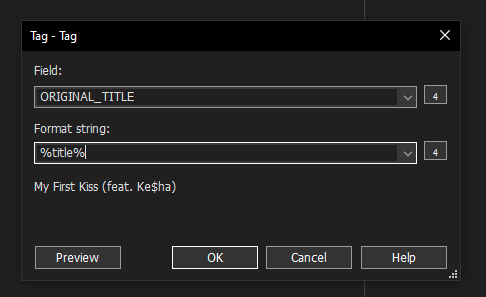
5- Finally, use another "Format value" action to change the %title% field:

Your music will have these tags:
TITLE: "Cyrillic Title / English Transliteration Title"
ORIGINAL_TITLE: "Cyrillic Title"
ENGLISH_TITLE: "English Transliteration Title"
If you don't want the original titles, and just keep the dual language title, end with
6- delete both ORIGINAL_TITLE and ENGLISH_TITLE.
--
Another way (if you don't want to keep the original titles) is:
- do steps 1, 2 and 3. You will have on your files:
TITLE: "Cyrillic Title"
ENGLISH_TITLE: "English Transliteration Title"
4a- use another "Format value" action to change the %title% field, as
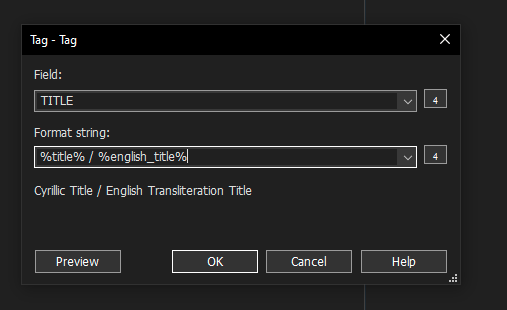
and you will get
TITLE: "Cyrillic Title / English Transliteration Title"
ENGLISH_TITLE: "English Transliteration Title"
And finally
5- delete ENGLISH_TITLE.
You can combine these actions into action groups, making step 2 into "Action group A" and steps 4-5-6 into "Action group B" for the first method and 4a-5 into "Action group B" for the second method.
If your tag source returns both English title and original title simultaneously, then after step 1 you will already have some form of
TITLE: "one of the titles"
ALTERNATIVE_TITLE: "the other language of title"
and can skip to step 3 in the first method / 4a in the 2nd method.
Like I said, this process is not automatic, but with it (if you use action groups) you can process an entire album in a few clicks.
Hope this helps.