In the tag panel the directory dialog box allows to select a different directory from the history with the mouse or the up and down arrows and to delete the currently displayed directory from the directory history with shift-del keys.
If I use this feature and delete the current directory with shift-del from that history list, and then use the keyboard shortcuts alt-left arrow or alt-right arrow to navigate through the directory history, the previously deleted directory shows up again and the name of the current directory in the tag panel does not change.
It seems to me that there are two different histories and only one of them was updated. To get both histories in sync again I have to close and restart mp3tag again.
1 Like
I am not sure if I understand that correctly, so I try to describe it in my words:
The focus is on the object for Directoy in the tag panel
The object shows the current working directory.
Shift-Del is used to delete the currently selected directory. (The object becomes empty)
Alt-Curser is used to select the next element in the directory history which leaves the previous work directory and becomes now the current work directory
A check of the full list of stored entries in the history shows the previously deleted entry.
IMHO, this is the perfectly logical behaviour if the directory history should keep track of the last visited folders.
If the current name of the work directory is deleted from the object, then the folder is still the current work directory which gets saved as soon as the next folder is selected as work directory.
To get rid of entries, it would be necessary to select an enty but not jump to the folder and then delete the entry.
Otherwise the reference to the folder would be deleted but then created again the moment MP3tag jumps to the next folder.
Actually the directory history is the list of the 10 or more most recently opened folders with the commands open directory and add directory. It doesn't change if you just change the working directory, only opening another directory adds that folder to the history list.
It also dosn't matter if you remove the current directory or any other from that list. To reproduce this issue, follow these steps:
press Tab until the directory in the tag panel highlights,
press Alt-Down Arrow to open the pull down menu with the history list,
press Down Arrow to select another folder,
press Shift-Del to remove it from the list,
now use Alt-Left Arrow and Alt-Right Arrow to go backwards and forwards in the directory history.
The removed folder still shows up during skipping through the history in this way with these keyboard shortcuts. The window frame always shows the current folder, only the directory box in the tag panel doesn't show the name of the removed folder, instead the name of the previous folder stays there. So there is an inconsisty between the window frame and the tag panels directory.
The screen shot shows the problem with Al Stewart being the removed folder and Adele the folder visited before.
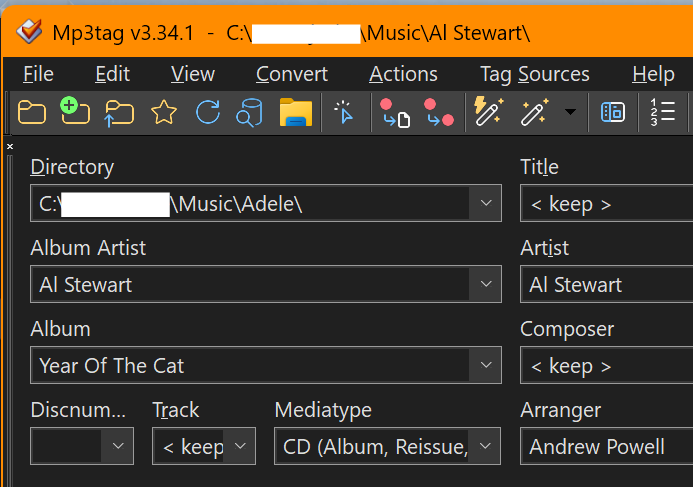
If you use the Up Arrow and Down Arrow keys with keyboard focus still on the directory box in the tag panel, skipping through the history works OK. But in my case the focus is on the file list, and then I need the Alt-left/right arrow keys to quickly change the current directory.
Hope this helps to understand the problem that the directory history is not updated so that Alt-left/right arrow keys work as expected.
Good catch (and tricky to fix). It should be working correctly now with Mp3tag v3.35-beta.1. Would appreciate if you could try and confirm the fix.
I can confirm that the problem is fixed now. Thank you, Florian.
1 Like
This topic was automatically closed 14 days after the last reply. New replies are no longer allowed.