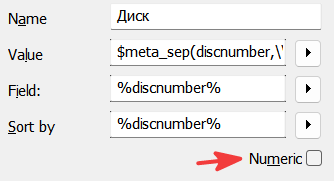
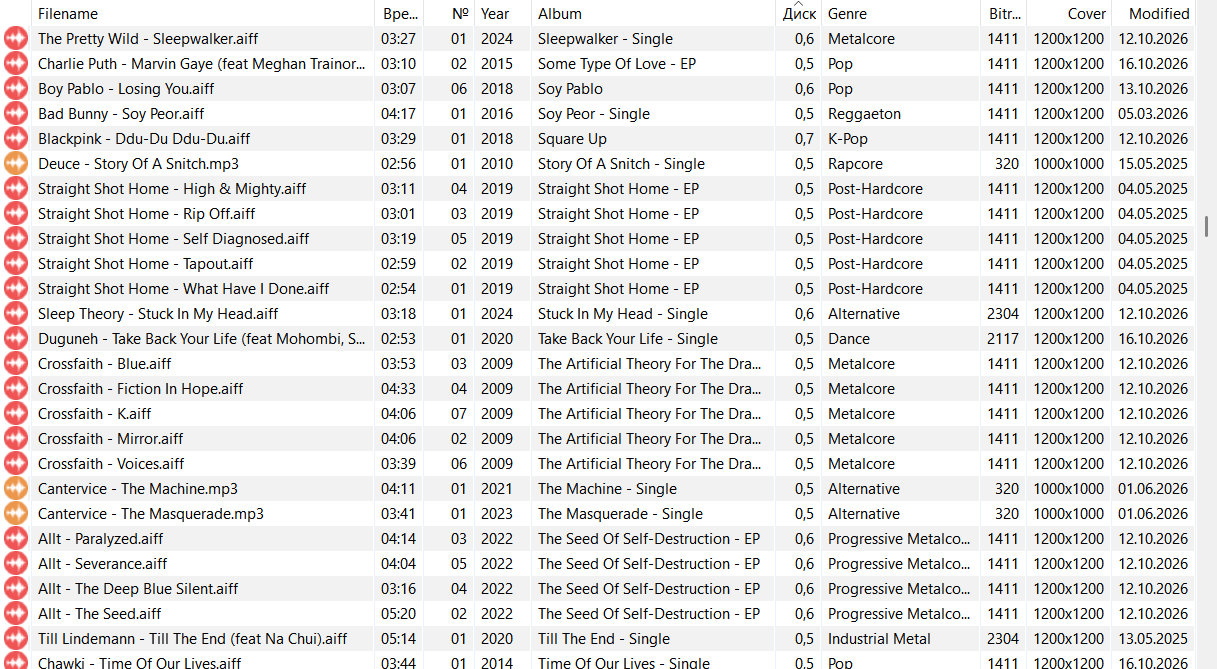
I have a custom column named “Диск” (“Disc”) for disc numbers. Its Field and Sort by are both set to %discnumber%. The tag values include comma-separated decimals such as 0,5, 0,6, and 0,7.
Steps to reproduce:
Add files with those values in %discnumber%.
Sort the custom Disc column with the Numeric option enabled.
Compare the order after disabling Numeric for the same column.
Actual result: With Numeric enabled, the decimal values are mixed rather than sorted by their numeric value. With Numeric disabled, they sort in the expected order.
Expected result: Numeric sorting should place 0,5 before 0,6 before 0,7 (or the reverse when sorting descending). Could Numeric sorting support a comma as the decimal separator?
I have attached screenshots of the incorrect column order and the column settings.
AFAIK no number in tags has decimals.
All mathematical calculations in MP3tag are integer, see e.g. the documentation
So if you check the numeric option, then more or less $num() is applied and that converts all the number parts of a string into a number until it hits a non-numeric character - which is the decimal indicator in this case - and all numbers like 0,5 or 0,6 become 0 and are treated as the same value.
The only way out would be a scripting expression in "Sort by" that converts the decimal number into a sortable string. I don't know the rest of your data so I cannot make a suggestion right now that treats the part in front and behind the comma in the correct way.
The option numeric and its effect is also decribed in the documentation:
Just to get your current case closer to a solution, I suggest the following expression in "Sort by": $num($regexp(%discnumber%,'(\d+),.*',$1),3)$num($regexp(%discnumber%,'.*,(\d+)',$1),1)
Also, I would like to emphasize that DISCNUMBER according to the standard also does not know any decimal numbers but only allows the / as separator. In general it is treated like a "numeric string".
Also, please consider that the decimal indicating character is not the same all over the world. So if you get data from other parts of the world, this may confuse such a function.
The only way around it would be to allow floating point numbers - but those are not mentioned in the tagging standards.
All these reservations to show reasons behind the current implementation and that it may take a while until you see a different function.
Until then my suggestion might help you to get better sorted discnumbers.
I move this thread to Support
This is correct, the expected field contents for Track, Discnumber, and their respective Totals fields are integer based. Even if mp3tag was to implement some option to include additional text characters, this would likely break other library managers and players. IMO it would end up being something that would introduce more frustration downstream.