I would like to insert an abbreviated DJ Service identifier, i.e. [SI], in the Title, but ensure that it's placed immediately after the song title, but before any following text.
Here is my example.
Often the title of a track has things after the actual title like: Song Title (Remix) (Clean) 120 bpm Song Title [Spinmaster Medley] (Clean) 120 bpm
Other times, it's just the Title.
Can an action with regular expression tools insert " [SI]" at the end of a line, when it's just a title, but position it before any existing "open parentheses "(" or open-brackets "[" when they exist.
Thanks for any help!
(And yes, I did the best search of the forums I could, before posting.)
Maybe this is possible with a very complicated regular expression.
I suggest to do it in two steps:
First use an Action "Replace with regular expression" like this:
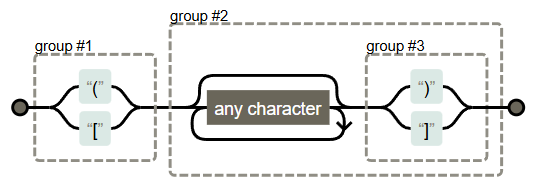
Format string: (\(|\[)(.*(\)|\]))
Replace matches with: [SI] $1$2
This would add [SI] and a space in front of the first opening bracket or opening square bracket.
For the second step, FilterF3 your songs for all TITLE content that has not yet your [SI] added: NOT %TITLE% HAS [SI]
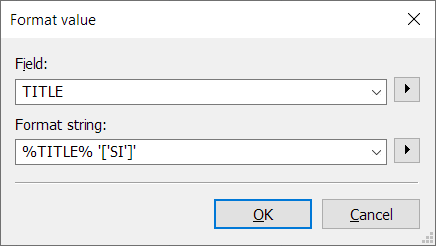
Then use another Action like "Format value"
with a Format string: %TITLE% '['SI']' (the square brackets need a special syntax)
This would add a space and [SI] at the end of the existing TITLE content.
Please test it carefully with various possible TITLEs from your collection.
Hint:
You can NOT use the regular expression twice for the same TITLE.
It would add [SI] again and again.
Yes, the Title (tag-field). Once I have the Artist and Title tag fields cleaned up, I use the Tag->Filename converter to make a cleaner/shorter file name.
@LyricsLover, the process worked perfectly. Here are the steps that yielded perfect Titles! (I added a "Replace" action as the last step in case I somehow create a double [Abbr] [Abbr].)
Before the next execution of the regular expression, I recommend that you first use a filter that only lists songs with a TITLE that do not yet contain [SI] or another used [Abbr].
This also reduces the risk of creating "double occurrences".