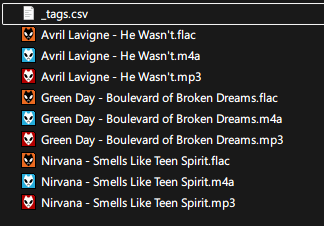
I keep my music library in different formats for different devices and previously just tagged my files via Filename -> Tag, which worked great. But now I want so add more tags like album, year and genre that I can't all stuff in the filename, so I thought I'd switch to text file tagging instead.
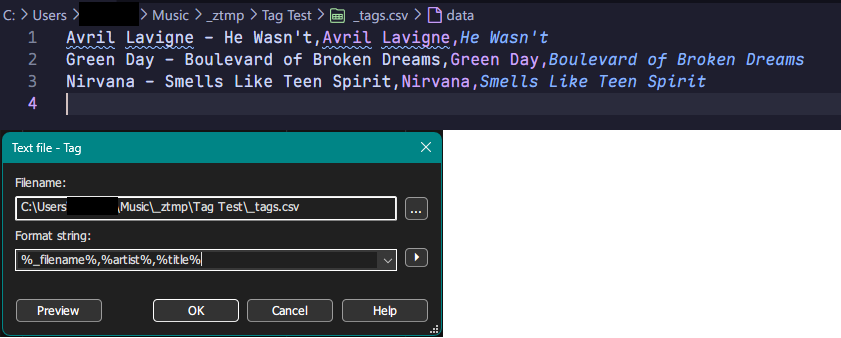
However, when playing around with it, I couldn't get the %_filename% field to work. The format string I used for testing is simple: %_filename%,%artist%,%title%
%_filename% is supposed to match the string to the filename without extension from what I've seen in the documentation, but instead it just tags the files in the order they're listed in Mp3tag from top to bottom. I even added a '.' at the end of the filenames in the .csv in case it literally just trimmed the extension and not the dot, but same result. I also tried different files, formats, and even multiple files with the same name but different extension, no change.
%_filename_ext% works as expected, but then I'd have to make a separate csv file for every format, which is a little bit tedious for 3000+ files across 3 different formats, especially when adding new tags later on.
It happens on both v3.2 and v3.35 on Windows and Linux, even on a fresh installation on a PC that never had Mp3tag installed before so I'm pretty sure it's not from a faulty installation. Just wanted to see if anyone else can replicate this or if I'm making a stupid mistake before creating an unnecessary bug report.
If you want to import data from a text file and use the filename for aligning the records with the files, then use the full filename including extension.
The filename always stays the same for the import and cannot be renamed.
If you want to transfer data from one set of files to another, consider the function to copy tags and paste tags.
This works for single files and several files, provided source and target files match in order and number.
For more detailed suggestions on ow to use the text import function, show us some lines from the text file and the format string that you use to import.
Contents of the csv file: Filename, Artist, Title. Kept basic for testing. Then I used the Text File - Tag function, chose the csv file and entered the format string as seen below:
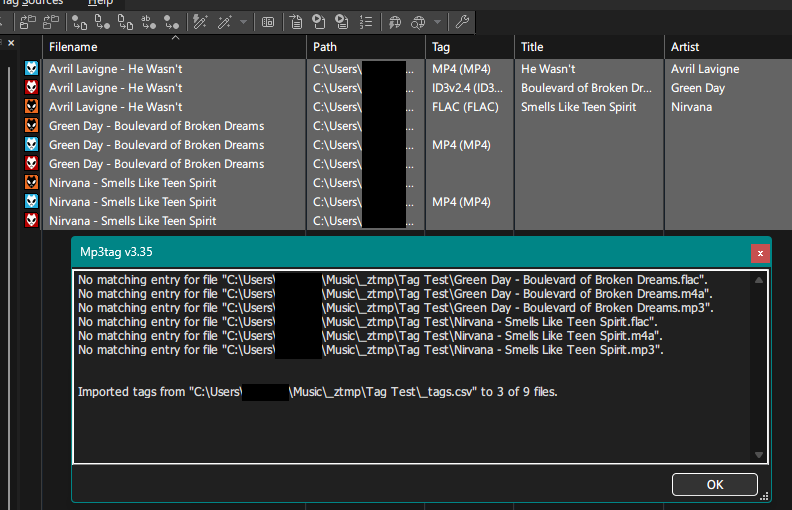
What I expected to happen is that all files with names matching the string in the csv file will be tagged accordingly, but as you can see Mp3tag instead tags them in the order they appear in the list/the csv file. That means File #1 is tagged with CSV Entry #1, File #2 is tagged with CSV Entry #2 etc.
- Second reply due to being limited to 3 pictures per post -
Also no, this is not an issue with multiple files with the same name being in the same directory, I repeated the same basic test with just FLAC files, but the result is the same: files are tagged by order, not by name.
Once again, tagged by order, not via filename matching. I'm pretty sure this either isn't supposed to happen or I am somehow misunderstanding how %_filename% works.
Your example shows that there are several files with the same part of a filename but differ in the extension.
The converter text file - tag has 2 modes:
copy data in sequence to all selected files from top to bottom and, if necessary as there are fewer records in the text file than selected files, repeat the text file data block until all files have been treated.
align each record with a unique identifier which is the full filename. And as the filename is only unique with included extension and possibly the full path, this data has to be supplied.
You would either have to use the first method exclusively for all the files that should get the same data (here: the Green Day files)
or add the extension to the filename and create separate records in the text file.
This makes only sense if you already have structured test-lists of possible tagfields or a database, that can create these. It makes no sense if you have to create these text-files manually in order to fill the metadata.
What about just using the comfortable editing-features of Mp3tag or the plenty websource-scripts. The latter are especially useful if you want to tag whole albums.