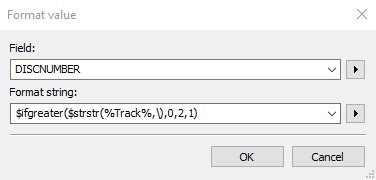
Newbie here - I would be grateful for any help on creating an action
I've recently converted over to a DS Music server. In the past I've always tagged tracks in a double album as disk 1 of 1 and numbered the tracks as if they were a single album. On the music server it doesn't like this and it takes my original track 18 (which was track 1 on the second disk) and renamed it to 1\18 - this has screwed up the sort order of the tracks.
So I'm left with 2 choices.. I either renumber them back by taking the digit(s) after the \ or (and this would probably make more sense) I set the disk number for 2 for any tracks containing \
I've tried creating a variety of actions but I'm really struggling..
$ifgreater($strstr(%Track%),'\'),0,2) gives me a syntax error - this is to set the track value
$if($len($trim(%track%))>2,2,1) only returns one value - this is to set the disk number
$ifgreater($strstr(%Track%),'\'),0,'2','1') again a syntax error - this is to set the track value
is invalid syntax, it should be $strstr(%track%,\)
Also, I think that the slash is actually /and not \.
$ifgreater syntax is also invalid as the false part is missing.
So it should be something like $ifgreater($strstr(%Track%,/),0,2,3)
Thanks for the reply
Have you tried this with a \ character instead of / as per my screen print. I coped your action and replaced the forward slash with a back slash. On the second row in my screen print - 1\18 it set both the Track and the Discnumber to 1
No. See @Florian 's post about multi-value fields.
I would like to add to that that you can also merge the duplicate fields and use the slash as separator which turn the whole thing into a more standard TRACK field.
If I look at the extended tag dialog I see 2 track fields:
18 was the original track number before the media server formatted it to 1\18
What will remove duplicate fields do - will it restore the 18? My preferred option is to keep it at 1 and change the disk number but I'm not having much look getting MP3Tag to recognise the \ characters to create a quick action.
I can remove duplicate fields but I end up with 2 x Track 1, 2 x Track 2 etc. I was hoping for a way of setting the disk number automatically before eliminating duplicate tracks. I'm not sure this is possible
This appears to do nothing - track doesn't change. I'm not sure if this is because I have some tracks that don't have the separator (I ran it across all tracks in the directory)
I've found a fairly fast way to do this manually - manually selecting the records which were on disk 2 then applying an action on those records to set diskNo =2 and finally eliminating duplicates.
Thanks JK
The trick is not use the double-backslash - as MP3tag uses that as separator between multi-value fields - and you get a multi-value field straight away again after you have merged it.
That is why I suggested that you use the single slash as separator. The single slash also looks a lot more like an ordinary track field with current track and total tracks.
Hi, the merge worked in that in enabled me to se the TRACk as a string and parse out the data. This is what I did....
So the first action removes a \ and it is now a string I manipulate
Using the single \ I create the disk number
The final action takes the correct track number for the disk - I had to trim as it was leaving a space at the end