Hello @Florian, it would be useful to add 2 functions—which already exist in Mp3tag but are currently missing from the customizable icon Toolbar:
CTRL+Shift+Enter: Copy data to tag
CTRL+Shift+Delete: Remove data from tag
Hello @Florian, it would be useful to add 2 functions—which already exist in Mp3tag but are currently missing from the customizable icon Toolbar:
CTRL+Shift+Enter: Copy data to tag
CTRL+Shift+Delete: Remove data from tag
already is used for
| Ctrl+Shift+Del | Delete file (WARNING: the file will be removed from your harddrive!) |
|---|
(see the documentation
For me it is not quite clear if you mean by "tag" the whole tag which includes all fields or just the contents of a single field.
Hello @ohrenkino,
I was referring to the content of a single field...
In edit mode the easiest shortcuts to copy and paste the contents of a field is Ctrl-C and Ctrl-V.
I wonder how you want to set the focus to a particular field without switching to edit mode.
Hello @ohrenkino, I am referring to this:
CTRL+Shift+Enter (Left): Copy data to tag
CTRL+Shift+Delete (Left): Remove data from tag
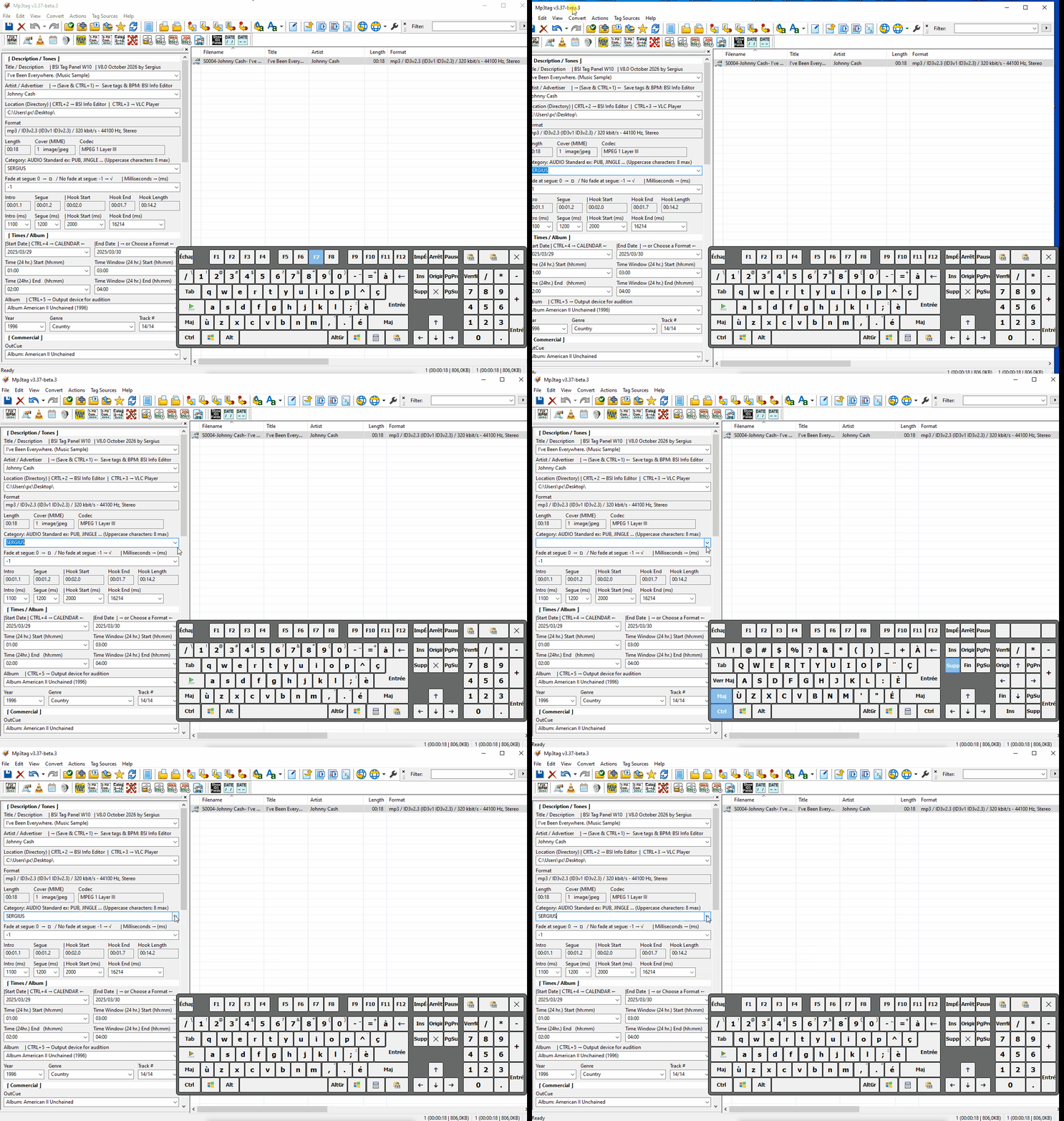
For the sake of accuracy for this request, in both cases these keyboard shortcuts are for Copy/Remove from list (not tag).
Hello @MotleyG, thanks for your help…
Regarding my request, I think it should be:
Left column:
CTRL+Shift+Enter (Left): Copy data to tag
CTRL+Shift+Delete (Left): Remove data from tag
For the right column, I believe we can use this command:
CTRL+Shift+Delete (Left): Delete audio file
I’m starting to find this a bit confusing… 
It is not likely a good idea to have the same shortcut for two different operations. Especially one that includes a delete function.
IMO the suggestion to add toolbar icons for these functions is up to @Florian to decide but frankly I personally don't see the value of adding these. The keyboard shortcuts already performs the functions and using a mouse doesn't save any time.
The shortcuts for a field in edit mode are described in the section "Useful helpers":
There are special ones that help to manage the list of custom values.
For the currently displayed data there are the ordinary shortcuts for the clipboard with Ctrl-C, Ctrl-V, Ctrl-X - which are shorter than the need to press 3 buttons.
Hello @MotleyG, you’re right about that....
Personally, I prefer using the icons in the Toolbar rather than the keyboard—that’s why I made the request to Florian. However, implementing this same functionality—which relies on two different commands—as a feature in the Toolbar would be very difficult.
Hello @ohrenkino,
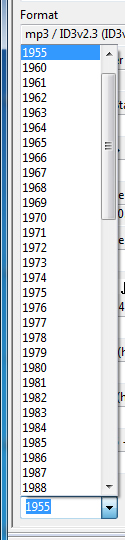
I understand what you mean. If I want to enter "1955" into the date tag, I can use Ctrl+V to paste the value into the input field, but then I still have to press Ctrl+Shift+Enter (Left) to actually write that data into the tag...
As I mentioned to MotleyG, I prefer using the icons rather than the keyboard.
And as I wrote above: However, implementing this same functionality—which relies on two different commands—as a feature in the Toolbar would be very difficult.
To save modifications into file, press Ctrl-S
Could we agree on the same terminology? The "tag" is IMHO all of the metadata in a file.
A tag consists of several "fields" which structure the "tag" into individual parts of information.
In general: AFAIK you cannot save data individually in a field with the help of MP3tag but MP3tag writes the whole tag.
In the file list, this process is triggered as soon as you leave a field, in the tag panel, you have to trigger the saving either with Ctrl-S or by click on the disk icon in the toolbar or click on a file in the file list to be asked if you want to save the modification.
Sorry @ohrenkino, if I’m not using the right terms...
Here is what I mean—what I’ve been talking about from the start...
CTRL+Shift+Enter (Left): Copy data to tag (or Field)
Apparently, I do not understand what the purpose should be.
To add a new piece of data to a list of custom values, there is Shift-Enter
To get a piece of data from a list of custom values, use the incremental search (which is on by default) or open the list with Alt-Arrow down and select the value. (TBH, looking at the exampIe, do not see a real improvement to scroll through a long list of 4-digit number which may include several key presses or mouse clicks to get to the bottom of the list instead of just typing it in which requires just 4 keys to be pressed - but that could just be an example and not the best use-case)
To copy, paste, delete an existing value, you have to set the focus to an element in the tag panel which gets into edit mode straight away and there you can use the shortcuts for the clipboard as decribed previously.
To delete a value from the list of custom values, there is Shift+Del.
To remove a whole tag (and not just a single field) there is Ctrl-X, to paste it (again) there is Ctrl-V - and these 2 functions sound a lot like the ones that you suggest in the initial post.
I do not want to be an obstacle in this thread - but so far I think that the function is already there.
I already made a reference to this earlier in this thread as well. What are asking for with these shortcuts is to update the LIST value in those fields, not the tag itself. Using the correct terminology moving forward would be most helpful when discussing potential feature requests.
Those are the functions @Sergius is referring to, and which had been changed to Ctrl+Shift+Enter and Ctrl+Shift+Del with v3.37-beta.1
CHG: changed shortcuts to add and remove history entries to Shift+Ctrl+Return and Shift+Ctrl+Del. (#60573)
Based on the discussion in this topic I became aware of
which I did not realize initially when changing the shortcut.
I agree with @MotleyG that
I'm now contemplating to remove the shortcut to delete a custom field value with the next version to resolve this ambiguity. It's already possible to remove values via Options → Field Values, and contrary to adding custom field values, it's probably not the most used feature in this context.
Perfect, I understand better now, @MotleyG. I’ve provided a few examples—image and a video. It seems @ohrenkino doesn’t quite grasp what I mean, but since you, @MotleyG, have understood what I’ve been trying to explain from the start, that’s encouraging!
Sorry, everyone—I might not have the same level of technical knowledge as you when it comes to using the proper terminology...
Let me rephrase:
I would like the keyboard shortcuts—the ones used to update list values within fields—to be integrated as a feature in the Toolbar, so that I can add or remove data in the fields within the Tag Panel.
Is that clearer now?
Thanks, @Florian, for joining this discussion. I’m glad that @MotleyG helped you realize something you hadn’t initially considered regarding the change to the shortcut.
I’m not entirely clear on your point—what exactly do you mean in technical terms? Are we going to lose one of the two features because they are programmed in the same way?
Yes, this is what I meant. Using Shift+Del only is not possible and using Ctrl+Shift+Del might accidentally trigger file deletion if the focus isn't in one of the Tag Panel fields.
But as I said above, it's already possible to remove values via Options → Field Values, so nothing is really lost.
Hello @Florian, since there's no conflict with Shift+Ctrl+Return (Left), could you add it as a feature in the Toolbar? I really enjoy working with icons; I find it very fast to work with them...