The latest iteration of Serato DJ Pro and Lite now support ratings using the POPULARIMETER field in the Syntax: Email|Rating|Playcounter ie Serato|Rating|Playcounter.
With Serato DJ being one of the most popular professional DJ software on the market, would love to see native support for either star ratings or numeric ratings in the Mp3Tag gui both in the side panel and the columns.
Bonus: In the Serato DJ interface you can actually change the ratings to emojis, if Mp3Tag could support that too it would be amazing!
I just made some tests with the new "Serato DJ Pro v4.0" and added field content in Serato for 4 different music formats: FLAC, M4A, MP3 and WAV
and for Remixer, Label, Grouping and the mentioned Rating.
As @djbeware wrote, Serato is using POPULARIMETER for the star-rating in MP3 and WAV.
For MP3 and WAV Serato writes 1 (1-star), 64 (2-star), 128 (3-star), 196 (4-star) and 255 (5-star) into the POPULARIMETER field.
For FLAC the field RATING is used and for M4a the field RATE.
The POPULARIMETER content is interchangeable. To re-read the externally changed values from Mp3tag, simply right-click in Serato and select 'Re-Scan File Info'.
For MP3, the Serato fields Remixer, Label, Grouping and Rating are written into MIXARTIST, PUBLISHER, CONTENTGROUP and the mentioned POPULARIMETER.
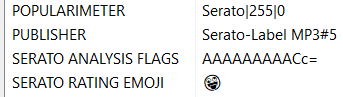
In Serato, you can right-click on a track and "Select Rating Emoji" to choose the Emoji displayed individually for each music track. It looks like this:
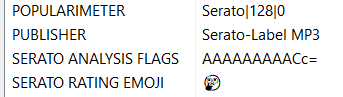
But the chosen Emoji will be written into the tracks metadata too. Example for MP3:
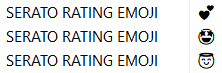
The field name used for MP3 is SERATO RATING EMOJI.
The funny thing: These Emojis are interchangeable too.
You can change your Emoji in Mp3tag and Serato will display it (after a "Re-Scan File Info").
In my own tests this only really works, if Serato has initially written the SERATO RATING EMOJI field. If you add it initally in Mp3tag, Serato does not read it and write it back duplicated.
Technical update 16:30 CET
I think, I have found the reasons for the incompatibilty between a SERATO RATING EMOJI field set by Mp3tag and one set by Serato DJ Pro v4:
Serato writes the field name case-sensitive as Serato Rating Emoji.
This could be adjusted by the usual Mp3tag ursfields.ini entry.
Once manually changed, you could set a new Emoji initially in Mp3tag.
The Emoji content will be read from Serato and displayed, BUT there is one big caveat:
You cannot change this value to anything else in Serato. This applies to both the value (1 to 5) and the Emoji.
I assume that Serato reads such values, but due to the missing information - see the next point - it does not allow you to change them.
The reason for the incompatibilty is most likely that Serato not only stores the Emoji as a so-called Surrogate Pair, but also adds a Zero-Width Joiner (ZWJ) and Variation Selector (FE0F). -> AFAIK, this is currently not possible with Mp3tag.
It seems to be possible - If an Emoji is chosen with all the necessary parts, like 👩🏼❤️👩🏿
"Couple with Heart: Woman, Woman, Medium-Light Skin Tone, Dark Skin Tone Emoji"
Unfortunately, the above point #3 remains valid. I need to look into it further...
Two examples for those interested:
a) Use of ZWJ: + ZWJ + + ZWJ + = <- two female faces with one heart in 1 Emoji
b) Textsymbol U+2764 ( ) → black heart as textsymbol:
If a Variation Selector is added as in U+2764 U+FE0F = red heart as Emoji
Explanation for the above hex data:
ff fe 3d d8 36 de 0d 20 3c d8 2b df 0f fe
This looks cryptic at first, but it’s simply the UTF‑16 encoding of a modern emoji sequence. Let’s break it down:
1. ff fe
UTF‑16 BOM (Byte Order Mark)
Indicates that the following values are stored in little endian order.
2. 3d d8 36 de
A UTF‑16 surrogate pair :
High surrogate: 0xD83D
Low surrogate: 0xDE36
Together they represent U+1F636 → (Face Without Mouth).
3. 0d 20
This is U+200D , the Zero‑Width Joiner (ZWJ) .
It’s invisible, but it links two characters together so they display as a single combined emoji.
4. 3c d8 2b df
Another surrogate pair:
High surrogate: 0xD83C
Low surrogate: 0xDF2B
This corresponds to U+1F32B → (Fog).
5. 0f fe
This is U+FE0F , the Variation Selector‑16 .
It forces the preceding character to render in emoji style rather than plain text.
Putting it all together
The sequence encodes:
BOM → UTF‑16 Little Endian
(Face Without Mouth)
ZWJ (joiner)
(Fog)
FE0F (emoji presentation)
Combined, this produces the emoji (“Face in Clouds”).



 + ZWJ +
  + ZWJ +
  <- two female faces with one heart in 1 Emoji
 ) → black heart as textsymbol:
 (Face Without Mouth).
 (Fog).
 Combined, this produces the emoji
  (“Face in Clouds”).