I'm aware Mp3Tag is not built to add tags to WebP files. Recently my music player began to support animated album artwork as Gif & WebP, I've opted to utilize the WebP files as they give me a bit better quality & flexibility.
I'm trying to see if there is a smarter or more efficient way to sort WebP files with Mp3tag than my current idea.
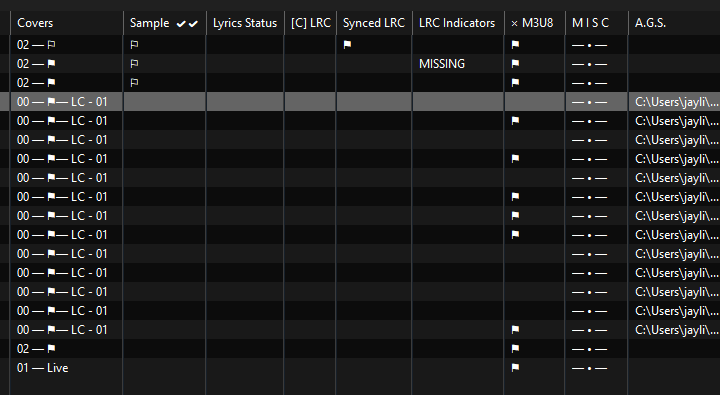
I've created a custom column in my configuration that I call the Artwork Guidance System (AGS), I know...amazing name. This scripting spits out a file path for the animated album artwork based on the corresponding tracks current location on my PC.
In the Image below for the Covers column LC = Live Cover. These are the aforementioned corresponding tracks.
In any instance where I have animated artwork the tracks I want the animated artwork shown on are stored in an album folder within a subfolder. (Keeping all the tracks & animated art in the main folder would force the animated artwork to show for every track on the album)
Example path for Track:
Users\Music\Finished Tags\American Teen by Khalid (2017)\01 - Official Animation\Track.flac
AGS Column for this track will be:
Users\Music\Finished Tags\American Teen by Khalid (2017)\01 - Official Animation\cover.webp
If the track moves the AGS column auto updates. It is not a tagged value but an informational column
Currently I will use Mp3Tag to sort my tracks & then I will copy the AGS column from any one of the tracks that will have the animated artwork then I do Convert - TAG - TAG to relocate the album art.
• The filename for Artwork has to be "cover" or "album" to read properly in the player
I'm simply wondering how others may go about sorting these types of files. I also thought of exporting the AGS path to a text file that way I could import the path & move the artworks without needing to copy pate but WebP isn't holding tags so that doesn't work.
My current method works & I'm not faulting mp3tag for doing what it's supposed to but i do wonder if I've actually chosen the best workaround
I usually only work with full albums, which allows using _DIRECTORY to move the folder the tracks are in (as well as sidecar files like .log, .cue, .jpg and subfolders) to a new target folder.
The only other way I've used to work with untagged files from within Mp3tag is using the target folder structure as the source. So for example, using the final parent folder name (sanitized version of ALBUM in my case) to rename a .cue file to ALBUM.cue. Or using the grand parent folder name (ALBUMARTISTSORT in my case) as well as the parent folder name, to rename a .log file to ALBUMARTISTSORT - ALBUM.log.
Or renaming a .jpg file to Cover.jpg as long as the parent folder name is not Artwork, Scans, Art etc. to leave dedicated artwork folders untouched.
These all only work if there's only one .jpg, .cue or .log file in the folder to begin with. I usually ensure this by manually checking each source folder with yazi and ensuring that my Mp3tag actions won't run into problems due to duplicates or a wrong source folder structure.
Your approach already seems fairly efficient if you are indeed moving single tracks around. Since the pictures are not tagged, I don't see much room for improvement within Mp3tag.
Using directory to move the entire folder would save me some time in some scenarios.
My current workflow is
Tag loose tracks in a holding folder
Sort tagged tracks into an album folder & move them to a "finished folder"
Final checks / QC
Copy full album folder to a Syncthing folder (for me this is a network folder) & then using mp3tag to auto sort the original tracks (this leaves behind empty folders in the "finished" folders as I've move the individual tracks to a folder elsewhere with the same name & structure)
Step 4 typically doesn't need to sort the individual tracks unless i have multiple versions of the same track(s), i could instead move the entire album folder to its final destination in my library which would be simpler & prevents the shell folders I have to delete.
For context when I have multiple versions of a track like a clean / explicit version for example, I create separate album folders for the explicit & clean tracks which later gives me the ability in my player to globally turn on or off all the clean / explicit versions I have.
Thank You!
Just that one additional method will save me much time & effort