Spurious characters prepended to GROUPING tag for ID3v2 (MP3 and DSF)

Recently I've been using Mp3tag (v.1.13.5 for Mac OS) to add "GROUPING" tags to some of the albums in my library. This tag is very helpful for organizing tracks in a box set or single-disc reissues with added bonus tracks. Lyrion Music Server detects this tag and groups tracks accordingly when viewing them in its album browser.

With FLAC files, everything works as expected with the GROUPING tag. However, with MP3 or DSF files (both use ID3v2 tags), LMS displays 3 spurious characters before the GROUPING tag text. If I specify the ID3v2 native "GRP1" tag instead of GROUPING, the group is displayed correctly, with no spurious characters.

Here's a screenshot snippet from the LMS page showing the spurious characters before the "Original Album" GROUPING tag:
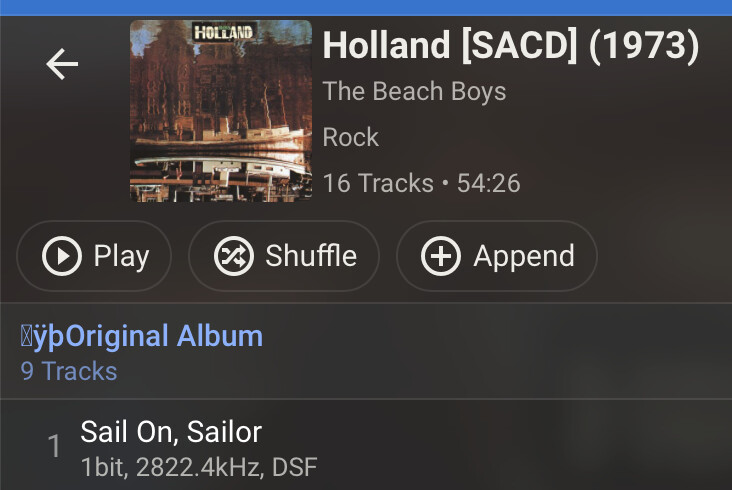
As an experiment, I used Mp3tag to add both GROUPING and GRP1 tags (tag text: "Test") to three different files: MP3, FLAC, and DSF. Then I viewed the tags in each file using exiftool. For the MP3 and DSF files, exiftool shows three '.' characters at the start of the GROUPING tag (signifying some unknown character), but not the GRP1 tag. For the FLAC file, both tags display correctly. Here's the relevant exiftool output:

FLAC file:

  | [adding GROUPING]
  | 7)  Grouping = Test
  | [adding GRP1]
  | 8)  Grp1 = Test

MP3 file:

  | Grouping = ...Test
  | Grp1 = Test

DSF file:

  | | Grouping = ...Test
  | | Grp1 = Test

Since both LMS and exiftool show the spurious characters, I believe Mp3tag is culprit here. I have tried this with multiple samples of each file format, and the behavior is reproducible.

This is only a minor issue, and GRP1 provides a simple workaround for LMS. But if I read the Mp3tag documentation correctly, the mapping between GROUPING and GRP1 should work seamlessly, so I wanted to point this one out.

I purchased the MacOS version of Mp3tag about 5 years ago and I use it regularly (I used the Windows version for several years before that). It has been rock solid and worth every penny/eurocent. Thanks for such a well designed, well supported, and powerful tool.

If you add a field named GRP1 you get a user-defined field of that name. You cannot use format-specific names in MP3tag, you would have to use the MP3tag internal name which is GROUPING in this case.

Thank you for the detailed report. I was able to trace this to the text encoding prefix in the native iTunes ID3v2 GRP1 frame.

For ID3v2.3, Mp3tag writes GROUPING as

01 FF FE <UTF-16 text>

01 is the ID3 text-encoding indicator and FF FE is the UTF-16 byte-order mark. They are metadata, not part of the grouping value, but it appears that LMS reads the proprietary GRP1 frame as raw text and displays them.

When entering a field named GRP1 directly, Mp3tag creates a user-defined TXXX:GRP1 field instead of the native GRP1 frame. LMS apparently handles that correctly, which explains the different result.

Omitting the encoding prefix from the native GRP1 frame would create different problems: it is required to identify the text encoding and thereby correctly preserve characters outside ISO-8859-1. Doing so would make the frame non-conformant with the established ID3 text-frame convention and could break compatibility with iTunes/Apple Music and other readers.


Thanks for the kind feedback on Mp3tag!

Thanks for the detailed explanation -- I think I misunderstood the mapping between native and internal tags.

Just so I understand... is there something unique about the GROUPING tag syntax that causes both LMS and exiftool to parse it incorrectly? I don't see that behavior with any other extended tags.

No, it's treated like any other text-based ID3v2 frame. I think that both LMS and exiftool assume it to be always encoded as ISO-8859-1, which is not the case.

You can try for yourself with iTunes/Apple Music: add a test file that's tagged with ID3v2.3 UTF-16 but don't has a Grouping field. In iTunes/Apple Music enter anything to the Grouping field with characters beyond ISO-8859-1, e.g., Café.

You can check exiftool's output and see the encoding character, the BOM, and the incorrectly decoded Latin-1 character é.

That's very helpful. Thanks again.