1. THE SHADOWS – Quartermasters Stores (Trad. Arr. Shepherd) 1960
2. THE MOONTREKKERS – Night Of the Vampire (LePort) 1961
3. JET HARRIS – Man With The Golden Arm (Bernstein/Fino) 1962
4. TED TAYLOR FOUR – Cats Eyes (James) 1961
I'm trying to make an Action to run through each one and remove everything except the year.
So the above would become
1960
1961
1962
1961
The format is always the same , with the Year at the end.
Can someone advise a method to satisfy this please?
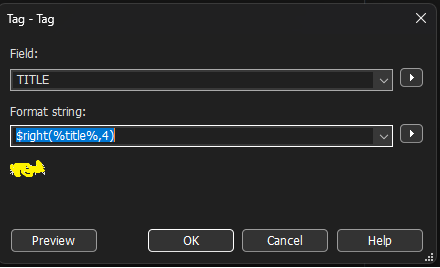
If you plan on making this conversion often, then yes- you can create an Action with it, so you won't have to type out the conversion string everytime.
Happy tagging.
PS: If that reply takes care of your discussion topic, please mark it as the answer, as to help out future readers.
The action equivalent to Convert>Tag-Tag is an action of the type "Format value" for e.g. YEAR. The format string stays the same.
Another suggestion: if you have a varying number of trailing digits and not exactly 4 at the end and if you want to transfer these, then try
Format string: $regexp(%title%,.+?(\d+)$,$1)
Would it not make more sense to strip the YEAR out of your TITLE?
Alternatively, you could move the YEAR into its own field?
Typically, one would split the content of your current title into TRACK. ARTIST - TITLEYEAR