I do not know where to place this topic but I have spent hours looking for information and I have not achieved my goal.
I have these files with the following title:
Posh DJ podcast - DJ Christian Torres 12319.mp3
Posh DJ podcast - DJ BeatBreaker 122518.mp3
My intention is to achieve this:
DJ Christian Torres - Posh DJ podcast - Episode 12-3-19.mp3
DJ BeatBreaker - Posh DJ podcast - Episode 25-12-18.mp3
The changes are:
Switch the first 2 groups of words
Add "Episode" before the date
Change the date format: the original is monthdayyear and my objetive is day-month-year. Here is a complex problem because the date may not have 6 digits. But it is known that the year is always 2 digits at the end.
Can you give me a hand to solve this? I've been "playing" with actions groups and regex replacements but haven't gotten much done...
What do your tags look like?
If the information is only available in the unstructured string of the filename then import the data first into the structured tags with Convert>Filename-Tag:
Format string: %artist% - %title%
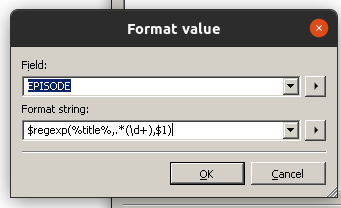
Then create an action of the type "Format value" for EPISODE (a user-defined field that you have to type in)
Format string: $regexp(%title%,.*(\d+),$1)
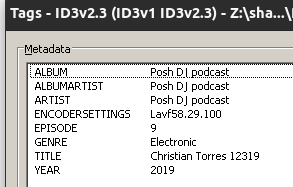
This fills the field EPISODE with the number. YOu can see the field EPISODE in the extended tags dialogue (Alt-T).
Now remove the number from title with an action of the type "Replace with regular expression" for TITLE
Search string: (.*) \d+
Replace with: $1
Now, to format the numbers ... I would treat every case separately - and by "case" I mean the length of the EPISODE.
So filter for
$len(%episode%) IS 4
then create an action of the type "Replace with regular expression" for EPISODE:
Search string: (\d)(\d)(\d\d)
Replace string: $1-$2-$3
Do more or less the same for EPISODE with the 5 digits:
$len(%episode%) IS 5
Search string: (\d\d)(\d)(\d\d)
Replace string: $1-$2-$3
and finally
Search string: (\d\d)(\d\d)(\d\d)
Replace string: $1-$2-$3
Now you can rename the files with
Convert>Tag-Filename
Format string: %title% - %artist% - Episode %episode%
@Crissov
Sorry, I was wrong about the date. You are right, it is March 12.
I think I will change the date part manually.
Current files do not have a "point" of separation. (I did "replace" a long time ago)
In the new files, this point is obtained.
@ohrenkino
I am going to try this solution this afternoon.
I bring a new way to achieve my goal:
I have these files with the following title:
Posh DJ podcast - DJ Christian Torres 12319.mp3
Posh DJ podcast - DJ BeatBreaker 122518.mp3
The tags? Currently they do not exist.
My intention is to achieve this:
%titlename% = "DJ Christian Torres - Posh DJ podcast - Episode 12-3-19.mp3"
%filename% =%title% (without extension)
%artist% = DJ Christian Torres
%album% = Posh DJ podcast
%albumartist% = Posh DJ podcast
%year% = 2019 -> I understand that this can be very complicated. I could do it manually if I can't add this tag.
%filename% =%title% (without extension)
%artist% = DJ BeatBreaker
%album% = Posh DJ podcast
%albumartist% = Posh DJ podcast
%year% = 2018 -> I understand that this can be very complicated. I could do it manually if I can't add this tag.
The first thing I want to do is change the name of the file to generate the labels from it.
I don't know if it is possible, from the current name, to create the labels and then rename the file based on the labels.
As a colophon, it would be great to set the track number according to the playback date. But this I understand that it is also very complicated.
I think you mixed them both up.
The file property by which you find a file in the file system is the %_filename%.
The embedded metadata field is called %title% and usually has no extension.
If you know that the last 2 digits are always the year, then you could extract those from the filename with an action of the type "Format value" for YEAR
Format string: 20$regexp(%_filename%,'.*(\d\d)$',$1)
It has not worked but almost.
There must be a small misprint that I am unable to find. I have tried at http://regexr.com/ and it should work but I haven't got it on MP3Tag.
First step: OK
Second step: Create label ---> FAULT. I have only been able to extract the last digit.
Step Three: Can I do something automatic to find out the length of the episode? I have searched in the actions and there is no automatic filter. Do I have to use the filter section in Mp3Tag to filter from the whole list of elements?
Step Four: Final File Rename: OK (supposedly it should work if the episode had been successfully
extracted)