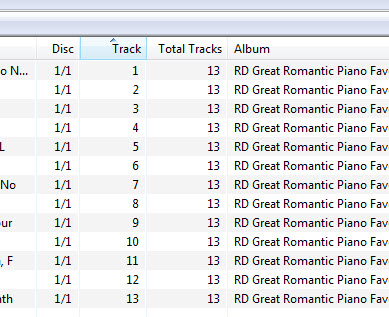
itunes will number tracks, "1 out of 13" Can you all your program to not just assign the track number but also how many tracks are on the cd. One way to do this might be " / 13"
Unless it can already do this and i haven't found it.
I love your program by the way. For years I have been manually renaming...that could have been cut down to days if I knew of your program.
If you already have that info in the TRACK field then you might want to backup the totaltracks into the TOTALTRACKS field. If you don't then just use action #2.
Try this group action. _Script_Test_TEST.mta (215 Bytes) Begin Action Group _Script Test#TEST
Action #1
Actiontype 5: Format value
Field: TOTALTRACKS
Formatstring: $replace($num($if($eql($regexp(%track%,'^\d+\/\d+$','yes'),'yes'),$regexp(%track%,'^\d+\/(\d+)$','$1'),%totaltracks%),1),0,)
Action #2
Actiontype 5: Format value
Field: TRACK
Formatstring: $num($fmtNum(%track%),1)
I'm new to the forum, and was just searching for the tag for Total Tracks.
I have quite a few Track tags formatted as #/#, and your script worked.
I see that TOTALTRACKS is stored as a user-defined TXXX field, as shown in this capture from MP3Diags.
I created a custom column for the %TOTALTRACKS% tag, and it displays just fine.
Thank you.
Edit: I should add that I renamed your script as "Add-Edit_Total-Tracks".
Edit: I use foobar2000 as my player, with Columns UI and NGPlaylist. I hadn't noticed previously, but if I add a Total Tracks column, formatted as [%TOTALTRACK%], then foobar reads the #/# in the %track% field and displays the total # in the new Total Tracks column. I used your script on only one album, but after adding the new column, all albums with #/# display properly.
After discovering that foorbar2000 properly handles #/# in the %TRACK% tag without using the script that "stevehero" shared with us, I noticed that too many of my %TRACK% tags are missing the #/# formatting, but at least have the track number. Out of 11,000+ songs, in 1,000+ folders, most also have numbers 1-9 with leading zeros.
I took the advice of "ohrenkino" and looked at the Autonumbering Wizard in the Tools menu (Ctrl-K). Using the settings shown below, it fixed the missing #/# very nicely. The folder that I tried it on had some numbers with leading zeros, and some without.
Are leading zeros a personal preference thing, or is there a recommended best practice that says either use them, or don't use them.
I like leading zeros in track file name. Looking at file listings in non audio programs show files in track order instead of tracks like 10 coming before 2.
Try the following action group with TRACK content like ...
123
Track 123 out of 333 tracks.
1/14
01/09
001/333
Unknown
Begin Action Group Format TRACK#Set TRACK and TOTALTRACKS
Action #1 Actiontype 5: Format value Field ______: TEMP Formatstring: $if($eql($regexp(%TRACK%,'^0*(\d+)$','match'),'match'),$regexp(%TRACK%,'^0*(\d+)$','$1==='),$if($eql($regexp(%TRACK%,'^\D0(\d+)\D0(\d+)\D*$','match'),'match'),$regexp(%TRACK%,'^\D0(\d+)\D0(\d+)\D*$','$1===$2'),%TRACK%'==='))'==='
Action #2 Actiontype 7: Import tag fields (guess values) Source format __: %TEMP% Guessing pattern: %TRACK%===%TOTALTRACKS%===%TEMP%
End Action Group Format TRACK#Set TRACK and TOTALTRACKS (2 Actions)
I agree for file names. But for MP3 tags, I was thinking that no leading zeros might be best. But foobar2000 uses leading zeros regardless of what the tag shows, so I'll be using leading zeros in the MP3Tag Autonumbering Wizard.
DetlevD: I was trying to figure out regular expressions for this purpose, but your action beat me to it.
Is there a way to only change single digit tracks to leading zeros (#/## to ##/##) to what is already in the track number. Some of my folders have only one or two songs from an album that originally had 15 songs, but I want to preserve the original track number.
I've tried the different settings in Autonumbering wizard, but it only counts the total count.
See scripting function $num, e. g. $num(%TRACK%,2).
DD.20121225.1904.CET
You may apply the following action group to adjust the format of a tag-field TRACK with a given format from ...
"#/##" to "##/##"
"#/###" to "###/###"
"#/####" to "####/####"
... and so forth.
It helps to understand the string "#/##" as a list of numbers separated by the slash character.
The first number of the given number list will be prepended with zero digits to reach the width of the second number.
Begin Action Group Format TRACK#Format TRACK #.## to ##.##
Action #1 Actiontype 5: Format value Field ______: TEMP Formatstring: $replace(%TRACK%,'/','\\')
Action #2 Actiontype 5: Format value Field ______: TRACK Formatstring: $num($meta(TEMP,0),$len($meta(TEMP,1)))'/'$meta(TEMP,1)
hi there ! i'm new here. This was a long while so I doubt you might respond... but I'll try anyway. After looking and searching, I can't seem to make the the total tracks appear at all in the column. How you did you do that? For me, neither %_total% and %totaltracks% work for me...
What kind of files do you have?
For MP3s (ID3v2) there is no official TOTALTRACKS field. You can put the information the TRACK-field.
TRCK

The 'Track number/Position in set' frame is a numeric string containing the order number of the audio-file on its original recording. This may be extended with a "/" character and a numeric string containing the total numer of tracks/elements on the original recording. E.g. "4/9".
If you already have this information in a maybe user defined field have a look at the extended tag-view (ALT-t) to see what name this field has.
I have mp3. In tracks, it does show track # / total tracks (3/13) but I wanted the total tracks in that album to show in a different column. It's unfortunate that it doesn't allow that.
Please note that the ID3 standard is as @poster showed you. So the format for the track number and the totals is x/y.
If you want to have a different display, then you can set up your own column definition that shows the number of total tracks separately - but beware that you cannot edit in this field as you would have to merge this data with the track number to get the format right again.
So if the "it" in
refers to MP3tag then this is not correct as you could get define a column for the total track number.
Ah I think I understand ! I'll try to work on that. Thank you so much for your help !!
edit: I just figured how to do it ! It was easier than I thought ! I went back to @stevehero's reply; The first time I read it, it was so confusing. Anyway, thank you for your time. Sorry for the bother.