Hello all,
I just can't figure out how to use a delimiter.
In my case i want to delete all characters before a given character such as "- "
Please see the attached images.
Thanks in advanced,

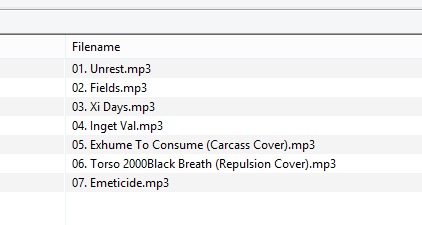
Hello all,
I just can't figure out how to use a delimiter.
In my case i want to delete all characters before a given character such as "- "
Please see the attached images.
Thanks in advanced,
Replace with regular expression
REPLACE
^(\d+)\s+-\s+[^-]+\s+-\s+(.+)
With
$1. $2
OR you can use existing tags.
Use tag to filename with.
[%track%. %title%]
Msg wrote on phone.
Thank you very much. Worked like a charm
Sorry to bother again..
How can i modify the script to achieve the results attached within the post ?
Thanks again,

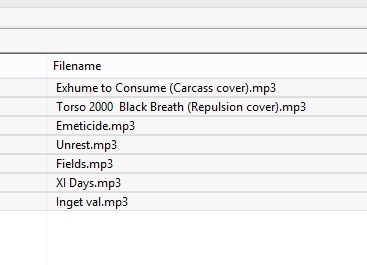
Use the function Convert>Filename-Filename
Source mask: %1. %2
Target mask: %2
Why do you fiddle about with the filename instead of creating a new one from tag fields?
I have lots of splits albums. Just want to create actions to save some time
I don't understand. What does the quantity have to do with the creation of new filenames?
If you insist on an action: use "Guess value" for _FILENAME
Format string: %dummy%. %_filename%
Looking at the pictures, I am even more confused.
Where does stevehero's script fit in the transition?
Also, stevehero mentions 2 ways to achieve the goal - which one did you use?
And what about the suggested way to use the guess value action?
Sorry to confuse you.
Pictures show the final result. I used stevehero's first script to modify the filename.
Then
If you insist on an action: use "Guess value" for _FILENAME
Format string: %dummy%. %_filename%
should work.

