I think I know the answer(s), but thought I should canvas opinion too.....
In total I have 32000 flac tracks, some of which have one or more tags populated relating to volume and replay gain. I've listed below the volumes of tracks with each respective tag populated. My questions are:
is it good practice (necessary even) to use the volume/replay gain tags? (I do want all songs to be the same volume when playing back).
if answer to 1) is 'yes', should I remove the existing tags and then analyse my complete library? The advantage of this approach is consistency as I have never set the tags myself and at least afterwards all volume tags will have been set in the same way.
Many thanks in advance.
Tags and no.s of tracks:
I use ReplayGain (RG) tags for my complete library of about 114,000 tracks. I mostly used dbpoweramp for ripping (and added my TRACK and ALBUM gain values when ripping). But one can easily add RG tags after the fact (they are just tag info, and don't modify actual audio of the file). dbpoweramp can use a utility DSP in its conversion program to add RG tags, by album, automatically. But it is not free. foobar2000 does a great job on adding RG tags. Install foobar2000 and it has a ReplayGain scanner built in. Then you can literally load up your enitre library, and with a few clicks, have it redo/add RG ALBUM and TRACK tags. You can tell foobar2000 in its settings to analyze your files by ALBUM tags or by FOLDER, etc.
All the servers/players I use can be set to automatically use my RG tags. And in fact, they have options that are smart enough to use TRACK RG values when playing a playlist of tracks from different albums, but ALBUM RG values when playing tracks from the same album. This allows the intra-album dynamics to be maintained when playing an entire album.
Both foobar2000 and dbpa are using the modern R128 approach to adding RG tags. And default for both regarding reference loudness is LUFS = -18.
This seems like a fitting place to post my findings concerning replay gain.
I accidentally noticed that different software yields different replaygain tags while all used programs are aiming for -18 LUFS (to my knowledge).
For testing purposes I used the first 3 songs of an album and only checked the resulting tags of the first of the 3 tracks. I deleted the resulting replay gain tags in mp3tag after each test.
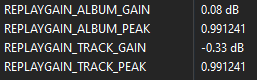
flac CLI (metaflac)
After using flac --best --verify --replay-gain --force *.flac to reencode the 3 songs to flac while also applying replay gain tags, the result is
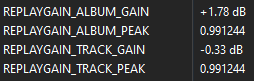
rsgain
After using rsgain easy . to calculate replay gain tags for the 3 tracks in the directory, the result is
foobar2000
After loading and selecting the 3 tracks in foobar and using ReplayGain → Scan as a single album
the result is
dbpoweramp
after reencoding the 3 tracks as flac in dbpoweramp music converter with the dsp effect ReplayGain active the result is
4 different software solutions, 4 slightly different results.
The flac CLI docs don't specify which LUFS value is targeted.
I didn't find a mention as to what LUFS value foobar2000 aims for per default.
And the dbpoweramp music converter DSP effect also aims for -18 LUFS.
Am I missing some part of the picture or shouldn't the results be pretty much identical, no matter which software is used to calculate the replay gain tags?
So far I've always let dbpoweramp calculate the replay gain tags but now I'm wondering which of these is the best / most accurate way to calculate them.
Interesting. You should post this in the dbpoweramp forum and the foobar2000 forum. I’d be interested in feedback there. But Really doesn’t have much to do with mp3tag.
rsgain looks like it has set the track gain to match the net album gain target. I have no idea how this works otherwise, but it is unusual in most cases that the track matches the album gain unless it is a single. In fact, on closer inspection all four on the different converters you have tested are aiming for a result that looks to be within +/- 3/100,000 of the track and album levels, so I'd say they are reliably close no matter what.
I do know that dbPoweramp has more choices available when selecting how you prefer RG to be applied. There are the Replaygain standard or EBU R128 methods available, plus you can choose what level of oversampling you may want to apply during the process as well. Your choices here may influence a difference versus the other programs.
Regardless, I think that using RG is already using some form of manipulation versus the original file to approximate similar levels from track to track or album to album. Differences of this minor level are mostly indistinguishable and should at least make levels between other tracks and albums very close.
mp3tag users (in my experience) tend to be fairly knowledgeable when it comes to tags and use a wide variety of other software. Thus I was hoping for some other experienced users to chime in and share their workflow / thoughts concerning the different methods of generating / handling replay gain tags.
True, it's probably negligible but I'm curious why the results are different. I haven't consistently used ReplayGain on all files in the past and wanted to change that.
However before I apply replay gain to 848k tracks I do want to be fairly certain that I choose the best currently available way of calculating it.
rsgain's ability to traverse folders recursively and calculate replay gain for as many folders at once as you have cpu threads available seemed like a really neat way of doing that but considering how different it's results are compared to dbpoweramp and foobar2000 (both software that I tend to trust) I'm not so sure if that's the way to go.
You can use the Batch Converter function of dBPoweramp to run this on your entire library. The Album setup needs to be correct to ensure each Album has its' own separate level. Like most batch options I do recommend you trial a few scenarios before unleashing it on your entire library.
My 26k files that I recently refreshed all RG info took about 5 hours on my system. Given your 848k files I would think this will take upwards of a couple of days. Maybe breaking this into smaller batches would be advisable.
And foobar2000 also can add RG tags to your entire library by album recursively, if you set it up properly. So there is no advantage to rsgain I can see. I use both dbpoweramp and foobar2000 for RG tagging and trust them both.
That would reencode all files, which is not what I want to do. Unless you can run the "converter" without actually encoding the music and instead only apply the DSP effect tags. I was also hoping to apply replaygain tags to the non flac files in my collection, which rules out a converter anyhow since transcoding and reencoding lossy files are both sins in my book.
Good to know.
I dislike the lack of documentation and settings as to how the replaygain tags are calculated in foobar2000.
The advanced settings only tackle performance issues, not how it's implemented or which formats it supports.
I also don't see an option to customize how many folders it will analyze at the same time (weighing whether more threads at the same time yields better speed or slows down the hard drives and hurts speed).
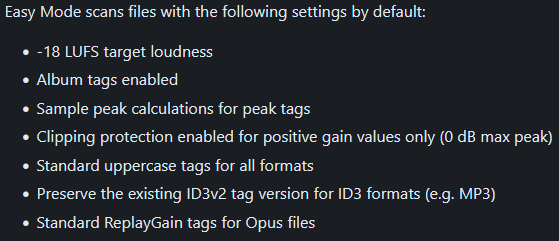
In comparison rsgain seems to be fairly well documented.
You can either run the standard Replaygain process to simply only add the tags with the appropriate RG values to each file. This method does not change the audio or re-encode anything. You can simply delete the tags and your original audio remains the same.
Or you can run the Replaygain (apply) function that actually does update the audio date with the changes. These are permanent changes and cannot be reversed. I personally would not recommend this type of action.
Wow. I looked again and found the mode. I've used dbpoweramp for close to a decade now and didn't know that was a thing. Thanks for letting me know. So far I've only used replaygain as a DSP effect during conversions from flac to flac to add the tags. I didn't know there was a separate standalone "mode" to only apply the replay gain tags.
Same, that's something I'd never do. Tags are fine and dandy, altering the audio irreversibly on the other hand, no thanks.
Edit:
While registering on the foobar2000 forum I found this informative knowledge base article concerning ReplayGain.
I'll do some further tests to compare dbpoweramp, foobar2000 and rsgain results (and performance) before deciding.