What Do People Populate SOURCE, MEDIATYPE, MEDIA and SOURCEMEDIA Fields With?

Sorry for the (weird) long question (seems to be my milieu), but what I am looking for is not the standard answer (use the fields for any purpose you want), but instead I'd like to know what other people are using the fields SOURCE, MEDIATYPE, MEDIA and SOURCEMEDIA for, with examples.

Not 100% relevant, but I use MP3Tag v3.33.1, Windows 11 Pro (10.0.26200 Build 26200), I have about 55,000 .flac files and 10,000 .mp3 files. Pretty much everything lossless I convert to FLAC, everything lossy gets converted into .mp3.

I have bought music from a number of online sources (e.g. 7digital, Bandcamp, Burning Shed, DGM Live, HDtracks, etc.). Those online stores put different info into different fields (HDTRACKS, QBZ:TID, %CONTACT%, DESCRIPTION, etc.) and usually in an inconsistent manner. It occurred to me that there were four fields: SOURCE, MEDIA, SOURCEMEDIA AND MEDIATYPE - that could be used for that (and related info). I could delete the data from those unique fields and find it all my info in one place.

I also noticed that when converting .flac to .mp3, my dbPowerAmp maps the four fields converted as follows:
SOURCE ->
MEDIATYPE -> SOURCE >> Perfect (Lossless) [flac]\MEDIATYPE
MEDIA -> MEDIA
SOURCEMEDIA -> SOURCEMEDIA

So I was thinking of populating those fields with some (not all) examples as follows:
SOURCE - Blu-ray, CD, FLAC, M4A, SACD, Vinyl, WAV
MEDIATYPE - 16-bit 44.1 kHz, 24-bit 44.1 kHz, 24-bit 352.8 kHz, Blu-spec CD2, Linear PCM (LPCM)
MEDIA - CD-Ultradisc (DCC), CD-Ultradisc (Gold), MPEG-4 AAC, MPEG-4 ALAC, SHM-CD, XRCD
SOURCEMEDIA - 7digital, Apple Music, Bandcamp, Burning Shed, DGM Live, Domino, HDtracks, Qobuz, ZeRecords, Physical Media

Other than super rare Prog-Rock CDs from Freeson Rock in Montreal or really unique CDs from Other Music in New York - I can't possibly remember all the stores (and which CDs) I bought where so all my CDs will have to map to Physical Media, not much I can do there... but I do keep track of my online purchases.

My MEDIATYPE idea is a bit redundant because Bit Rate ($if(%_bitspersample%,%_bitspersample%-bit,n/a)) and Frequency ($ifgreater($mod(%_samplerate%,1000),0,$div(%_samplerate%,1000).$trim($mod(%_samplerate%,1000),0) kHz,$div(%_samplerate%,1000) kHz)) are found elsewhere, but works well when I convert .flac to .mp3 say, for car stereo playlists....

So ultimately, my question is would anyone care to share how (and with what data) do other people use/populate the fields SOURCE, MEDIATYPE, MEDIA and SOURCEMEDIA to make themselves happy and make their lives easier?

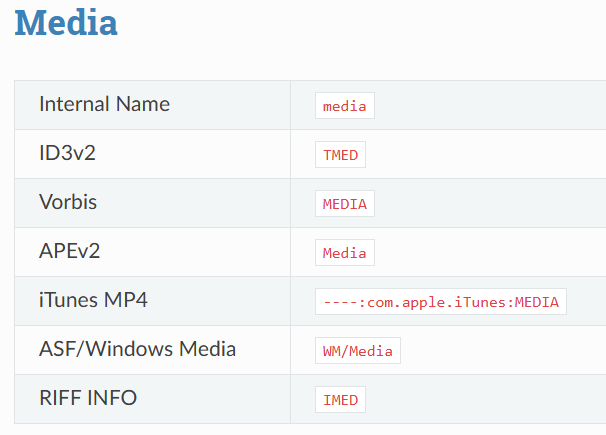
AFAIK the MEDIATYPE field is the only official standard field, so it should be supported by other applications.

According the ID3 specification TMED should contain:

TMED
The 'Media type' frame describes from which media the sound originated. This may be a text string or a reference to the predefined media types found in the list below. References are made within "(" and ")" and are optionally followed by a text refinement, e.g. "(MC) with four channels". If a text refinement should begin with a "(" character it should be replaced with "((" in the same way as in the "TCO" frame. Predefined refinements is appended after the media type, e.g. "(CD/A)" or "(VID/PAL/VHS)".

Incomplete list with some examples:

For the other fields, I suggest checking which of your third-party players or devices support them. Once you know that, you can consider what content to put in them.

Thanks, that is very helpful. Looking at id3v2.3.0, the MEDIATYPE (TMED) field appears to be for the media from which the music was originally recorded - e.g. everything from the 1930s would be (TT/78). I briefly thought TFLT might help, but that seems to be more about the file type (MP3 or MP4, no mention of FLAC). You helped with what I was asking, but not where I was going - I was more interested about the last media (the media I transferred from) than the first. I hadn't even thought about the Minidisc in a longtime and if nothing else I was amused by the results when I googled 'music by telephone'. "checking which of your third-party players or devices support them" is a very good idea as well.

Thanks again.

Of course every download will have its own tags that you need to normalize into your system. Don’t use so many “media” fields. This is just what those authors each chose. I use MEDIA = CD, Vinyl, WEB, DVD, SACD, Blu-Ray, Cassette, Reel-to-Reel. MusicBrainz differs here slightly in that they have 7” Vinyl, 12” Vinyl, Digital Media (=WEB).

I don’t really care to write down anything else.

WEB stores usually have the same release. I downsample everything, it doesn’t stay exactly as they had, but this has insignificant impact on the sound. Maybe you could mark somewhere if the input was hi-res or DSD in this case. But there is almost no DSD from WEB. Record the BARCODE of the web release.

No marketing terms like “Gold CD” or “XRCD” or “Blu-spec” or “SHM-CD” because they don’t tell us anything about the contents, only sometimes about durability, which is irrelevant on a new copy. You can tell if it was a gold disc by the LABEL and CATALOGNUMBER.

There is no such thing as a “Perfect” copy. Everything in reality is a bit flawed one way or another. All copies are assumed to be good, or I denote errors in another field, and have an AccurateRip file.

No need to mark the codec like “ALAC” or “WAV” as that doesn’t affect the music, and you can see what the current codec and bitrate are anyway. It is implicit that the input was DSD when MEDIA == SACD.

I use a field NOTES to for unusual remarks, such as if the release is missing gaps, there is a glitch somewhere, and RELEASEFLAGS for common properties such as “Copy Error” (when it is not perfect) or “Clipping”.

I appreciate the advice to fight my instinct to include every possible bit of info and just simplify. I am going to go in the simplify direction.

"But there is almost no DSD from WEB."
Agreed. I can only find a very limited number of DSD releases at Native DSD, Pro Studio Masters and HD Tracks.
"Gold CD or XRCD or Blu-spec or SHM-CD because they don't tell us anything about the contents"
Not sure I agree 100%, I think that re-mastering for those CDs makes for better contents than for other CD versions of those albums and better listening for me. YMMV.

Thanks again for sharing your experience, it was helpful for me and I appreciate it.

I think quality is better described by writing down the Label such as “Mobile Fidelity Sound Lab” or “Audio Fidelity”, or the Mastering Engineer. But there have been some bad apples even from these audiophile labels, such as the muffled release of “Toto IV” where both UDCD 747 and CK 64423 were made of gold, but sounded quite different. Here I would use the following tag: Series = “MasterSound” to describe its supposedly higher quality.

Just out of curiosity:
Why do you use the non-standard MEDIA fieldname instead of MEDIATYPE?

It came from MusicBrainz Picard, which I no longer use, but have kept the field.

Thank you.

Picards media (TMED) is the same field als MEDIATYPE in Mp3tag (at least for ID3v2.3 and ID3v2.4):

Decisions I've made with your help include:
• I'm planning to populate the tag MEDIATYPE with info on the original source format of the music (e.g. DIG/CD/TT/DVD/MC)
• I'm going to choose one of MEDIA, SOURCE, and SOURCEMEDIA to populate with the final format I converted from into .flac/.mp3 (e.g. WEB/CD/Vinyl/DVD/Cassette/SACD)
• I'm going to look into the SERIES tag, I can't find it used for any values at all, yet...
• I've been using VLC media player for so many years I've lost count, but VLC skins text variables are 100% inadequate, so I guess I'm gonna have to start looking at PLEX, Kodi, Jellyfin, etc to see what tags they will display for me...

Thanks again for all your help. Much appreciated.