I was not ... thank you 
I want to suggest a little improvement of the script to search bandcamp by URL. If you have already performed a bandcamp search and stored the tags including the URL in your files in a previous run, with this change you will get the URL as preset value for the bandcamp URL for the new search.
Just change line 10 in the file &Bandcamp#&Bandcamp URL.src to
[SearchBy]=Bandcamp URL||$ifgreater($strstr(%www%,.bandcamp.com/),0,%www%,)||%s
1 Like
Thanks for the suggestion! I've just released v0.4.5, which uses the existing contents from WWW when searching by Bandcamp URL.
bandcamp-0.4.5.zip (2.7 KB)
1 Like
I've made some extensions to the Bandcamp WSS, including:
- Track URLs are stored in
WWW TRACK. - There are now two scripts that can be used to search bandcamp by URL. The first searches with an Album URL with preset value from
WWWand the second with a Track URL with preset value fromWWW TRACK. - A new configuration setting can be used to get separate
COMMENT,CREDITS,GENREandKEYWORDStags for track Urls. This is intended to support comparing track tags with album tags.
These mods enable to easily use the bandcamp album results to afterwards request track info and artwork from bandcamp for one track after another. Very helpful for that are the keyboard Arrow down to proceed to the next track and the shortcut Ctrl+Shift+I to quickly call the last used tag source again for this track. There have been some requests in this topic for a similar work flow.
If you have questions, remarks or encounter problems please let me know.
Download
Bandcamp-0.4.6.zip (4,3 KB)
2 Likes
I've released version 0.4.7, which fixes a small problem that may occur with bandcamp track requests. If the track request contains two different artists, a multiple value tag is used for ARTIST to correctly reflect this situation.
Bandcamp-0.4.7.zip (4,4 KB)
Hi all. Loving this web source a lot, thank you. Appreciate that it pull credits and now the different track details too.
I was looking at a way to automate locating the release URL, and leverage the fact that bandcamp purchases already contain the comment "Visit [artist/label].bandcamp.com".
Regex seems to do the trick here, given bandcamp urls are pretty consistent in their syntax. I've made these two into actions -
Format WWW field:
$regexp(%comment%,'^Visit\s+(https://[^/]+).*$','$1')/album/$regexp($regexp($replace($lower(%album%),' ','-'),'[^a-z0-9-]',),'-+','-')
Format WWW Track field:
$regexp(%comment%,'^Visit\s+(https://[^/]+).*$','$1')/track/$regexp($regexp($replace($lower(%title%),' ','-'),'[^a-z0-9-]',),'-+','-')
With the recent change utilising a preset value, this makes things very efficient
I'm sure there will be outliers that fail given this is just assuming the album/track name will map directly onto the URL, but of releases i've checked so far ive had no issues
Maybe others could find this useful? Or would there be potential for integrating this into the web source itself?
Thank you for your friendly comment.
It's certainly useful, if you don't have a bandcamp URL to run the script with and if the available tags already contain the needed data. In this case you can easily get the URL with executing your actions.
I don't think that actions could be integrated into web source scripts. Instead you could show your actions files here from mp3tag configuration folder/data/actions.
Thanks! And yes, it is probably easier to keep it seperate from the WS.
I'm running MP3Tag for Mac, so accessing and sharing individual action files isn't very simple, but here is a JSON export of these two actions:
Bandcamp URL Actions.txt (1.1 KB)
You'll need to rename the extension back to .json from .txt. All these do is a simple 'format tag field' action that performs the regex listed above on 'WWW' and 'WWW Track' respectively.
I've just released bandcamp v0.4.8, that supports track numbers with leading zeros and total track count in the format 04/12. This can be set up with new configuration settings.
Furthermore the script extracts bandcamp urls into a custom tag field COMMENT URL, if there are any links to other bandcamp web pages included in the web source of an album or a track.
Download:
Bandcamp-0.4.8.zip (4,9 KB)
I tried using it for an album in FLAC, and after i go to the Bandcamp section, and then Bandcamp album and click, it gives me the error "Settings of the Tag Source "&Bandcamp#Bandcamp &Album" contain a syntax error. ERROR(Settings): expected value, got '&' (38) See scripterror.log for details.". I've seen this happen also on an few other src's, but forgot what they were. Do you know how to fix this and why it's happening for future encounters?
It's most likely because of a missing &Bandcamp#Settings.settings file next to the *.src files.
What does it mean "next to"? The settings.settings file is present in the folder, but is separated by a Changelog & Parserscript file because everything is alphabetized. So, I'm guessing you mean something else by "next to" unless I'm supposed to removed those two files. I'm having the same results as Huntersine, with mp3s (they tried flac).
I read up higher and notice that perhaps because these are older files and do not contain any comments (like "Visit [artist/label].bandcamp.com") - Could be the issue.
Update: nope, I tried a newer file that had comment section, and it did not work either.
The latest Bandcamp version 0.4.8 consists of 5 files, the names of these files all start with
&Bandcamp#. In an alphabetical sorted file list these files will be listed directly next to each other (see below image:)
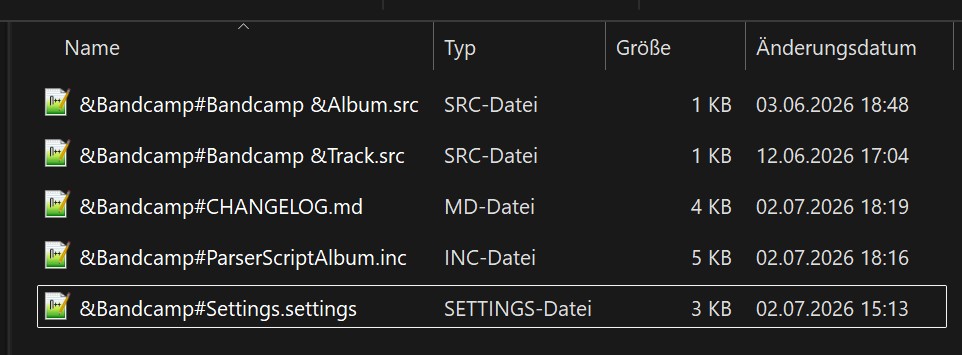
If the last file in this listing is missing or has a different or somehow misspelled name you will get this error message.
To repair your Bandcamp WSS installation you should simply reinstall it without changing any file names.
All five appear exactly as you presented. I downloaded 4.8 this morning, unzipped it, installed it as directed, and I do have Bandcamp showing up in MP3Tag as expected, but still receive the same error as huntersine. Note I am using a PC (in United States).

What kind of OS are you using? Is it a Linux with Wine or a plain windows?
I just detected that there actually is a little discrepancy in the settings file type: it's written with upper case first letter in the .src file and with lower case .settings in the actual file name. Could this difference in the first letter be the reason for the issue? Under plain windows 11 it doesn't matter, but I don't know if it's a problem under Linux.
Plain Windows 11. Looks like the file is the same in your graphic and mine. I looked in the source file, and see Settings.Settings, so I redid the file name to &Bandcamp#Settings.Settings to see if it would work. It didn't. Same error number (38).
Please test the following Bandcamp WS version
Bandcamp-0.4.8a.zip (4,9 KB)
I've only changed the settings file extension in *.src files to all lower case letters. If this doesn't solve the problem, you could please perform some more tests, e.g. install other web source scripts with option settings (musicbrainz expanded, deezer etc.) and check if they work.
Same result = error (38)
Thanks for trying =
I've just released Bandcamp version 0.4.9 with two new features:
- Added configuration setting to use
WWW BANDCAMPto store the Bandcamp URL used as web source. - Added configuration setting to apply standard capitalization to album and track titles, by preserving uppercase letters.
You can download it from here
Bandcamp-0.4.9.zip (5,8 KB)
Please report here, if you have any problems.