Perhaps you try musicbrainz picard in the meantime?
Ofc. no, as I said, I use beatport script. But when i select all tracks with missed tags, and run script - it start search only for the first track in the list. thats the problem...
That is why Im asking, how to run this process for all tracks, because as you see here I have missed tag Album and other, and I got only Artist and Title
I think I got that the first time.
The problem will be that you can issue exactly one search string per call. There is no way to loop through a list of files.
Any script does nothing more than call an internet page. So do you know a search expression that displays a list of albums for 200 tracks on the same page?
The looping has to be done by you ... or you can try musicbrainz picard...
I think, you will be disappointed by the result as the artist/title combination is by far not unique. This could also be part of the orginal album, the single, the greatest hits, the live album, the best of, any odd compilation ... so you would have to judge for each file which of the possible albums is the most likely.
This can works like queue and accept first offer from list of tags that script found.
Musicbrainz needs looping too.
Most of releases will get right tags, and if I will select for each track such things - it will take much time, thats the problem to organize big collection.
You have never tried musicbrainz, have you? (It is not a must. But as it brings it own GUI, you will see that the approach is a different one. Apparently, this option is ruled out now)
As a workaround you could treat every track as a single and copy the TITLE into ALBUM and see if you get any hits for the cover, which - by the way - can be achieved as a bulk task with albumartdownloader ...
cover is not a problem, Im looking for missed tags... thats what I need.
how save cover in folder, with name 'beatport ID'
e.g. http://classic.beatport.com/release/peanut...r-jelly/1557923 -> 11798780.jpg
Steve,
First of all many many thanks for the great script. You're a true hero among us mere mortals 
Although I have been able to customise the script almost to perfection regarding my personal preferences, there's a few things I'm not really sure if they're possible and how it could be done:
-
The ALBUMARTIST field usually gets filled with the original artist AND featured artist AND the remixers. Is there a way to only get the original artist in this filed?
-
If there's a feature on a track (usually vocalists) they normally get added to the ARTIST field but also regularly appear at the end of the track title [ e.g. Super Fantastic Song feat. Singer B (Original Mix ]. Is there a way the script can crop this info, so you get Super Fantastic Song (Original Mix) ?
Sorry for late reply guys, accentually marked mp3tag emails as spam and didn't notice until now.
This script is want you want. It's automatic tag but can only use ONE webpage at a time, therefore if you have songs that are on a complete EP, ablum or release (Some releases only have 1 song) then use the RELEASE scripts otherwise one by one tracks using the SINGLE TRACK scripts.
Can't be done with script but after the fies have been tagged using an action. Look in FAQ for this answer.
Thank you very much.
1+2: I'm limited to doing this as I'm only using the html page of classic BP. Maybe if I could use the API then yes this would be easily possible. Maybe it's possible now but unfortunately I don't have the time to look at this. (I know it won't be easy) My intention of the scripts is to get the values that are as true as possible to how BP formats them) It's then up to the user to use actions to format things the way they like. regexp etc are handy for this propose.
These scripts are awesome, they have spared me so much time, thank you very much.
I have now tried to customize
Beatport by &stevehero v4.1#RELEASE Search by (Album)Artist + &Release.src
for my needs, but without success.
What I want:
- no extended tags (like <BEATPORT_ARTIST_URL>)
- the DATE tag only containing the release year (YYYY, and not YYYY-MM-DD\\YYYY)
- the ALBUM tag without the catalog number
- no ALBUM ARTIST tag
- no COMMENT tag
Hope you can help.
Hi P.nkt.. Glad you find them useful.
Any tags can be parsed or not by looking for the section (self explanatory):
#::::::::::::::::::::::::::::::::::::::::::::::::::::::::::::::::::::::::::::::::::::::::::::#
#                         .:: R E M O V E    F I E L D S ::.                                 #
# • To remove fields from parsing delete the # in front of 'set'                             #
# • Only use this section to remove fields                                                   #
#::::::::::::::::::::::::::::::::::::::::::::::::::::::::::::::::::::::::::::::::::::::::::::#
Change this:
# YEAR OPTIONS
    #regexpreplace "(releaseDate":")(\d\d\d\d)-(\d\d)-(\d\d)" "$1$2-$4-$3"                   # YEAR in YYYY-DD-MM format
    #regexpreplace "(releaseDate":")(\d\d\d\d)-(\d\d)-(\d\d)" "$1$4-$3-$2"                   # YEAR in DD-MM-YYYY format
    #regexpreplace "(releaseDate":")(\d\d\d\d)-(\d\d)-(\d\d)" "$1$2"                         # YEAR in YYYY format
To:
# YEAR OPTIONS
    #regexpreplace "(releaseDate":")(\d\d\d\d)-(\d\d)-(\d\d)" "$1$2-$4-$3"                   # YEAR in YYYY-DD-MM format
    #regexpreplace "(releaseDate":")(\d\d\d\d)-(\d\d)-(\d\d)" "$1$4-$3-$2"                   # YEAR in DD-MM-YYYY format
    regexpreplace "(releaseDate":")(\d\d\d\d)-(\d\d)-(\d\d)" "$1$2"                         # YEAR in YYYY format
Use this code to replace similar looking code in script (Found towards the bottom):
# ALBUM [CATOLOG #]
    outputto "ALBUM"
   # say " ["
   # sayoutput "CATALOG #"
  #  say "]"
As you can see by now placing a # in front of any line stops that line been evaluated in the script when it's run.
The readme/help file attached with the script sort of explains most of this. 
Excellent!
There's one thing I could not manage:
In the %track% field I do not want the total tracks numbers, only the track numbers with leading zeros.
I put a folder.jpg in every album folder - is it possible to add cover art from this file with your script?
(Would be nice to be able to search for words within threads btw)
Change:
    outputto "TRACKTEMP" # TRACK/TOTALTRACK|TRACKTEMP
    sayregexp "(?<=txt-grey\"> )[^<]+" "" "<<endTrack>>"
    say "/"
    sayoutput "TOTALTRACKS"
    say "|"
To:
    outputto "TRACKTEMP" # TRACK/TOTALTRACK|TRACKTEMP
    sayregexp "(?<=txt-grey\"> )[^<]+" "" "<<endTrack>>"
    #say "/"
    #sayoutput "TOTALTRACKS"
    say "|"
You can do this with a dedicated IMPORT COVER FROM FILE action (Scripts are not actions btw):
Use this format string to import file from current folder of music file:
.\folder.jp*g
Hello,
first of all I want to thank you for your work but I got a question here. I couldn't find a solution to remove the CATALOG # infront of the Album.
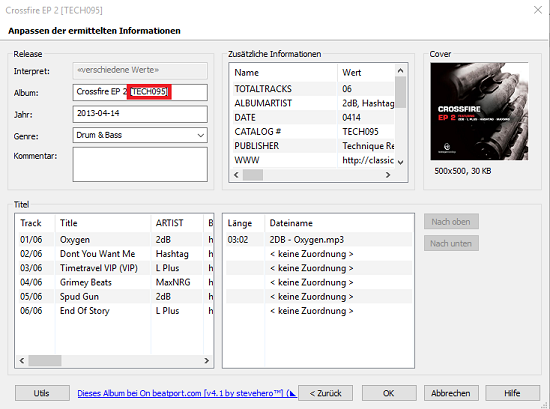
Thank you, the answers here somewhere but it's very simple, open scripts and replace:
# ALBUM [CATOLOG #]
    outputto "ALBUM"
    say " ["
    sayoutput "CATALOG #"
    say "]"
With:
# ALBUM [CATOLOG #]
#    outputto "ALBUM"
#    say " ["
#    sayoutput "CATALOG #"
#    say "]"
Hello guys, how do i remove the duplicate Album Artist? After i use the script on the field Album Artist shows 2 times the artist. Please take a look at the screenshot. Thank you
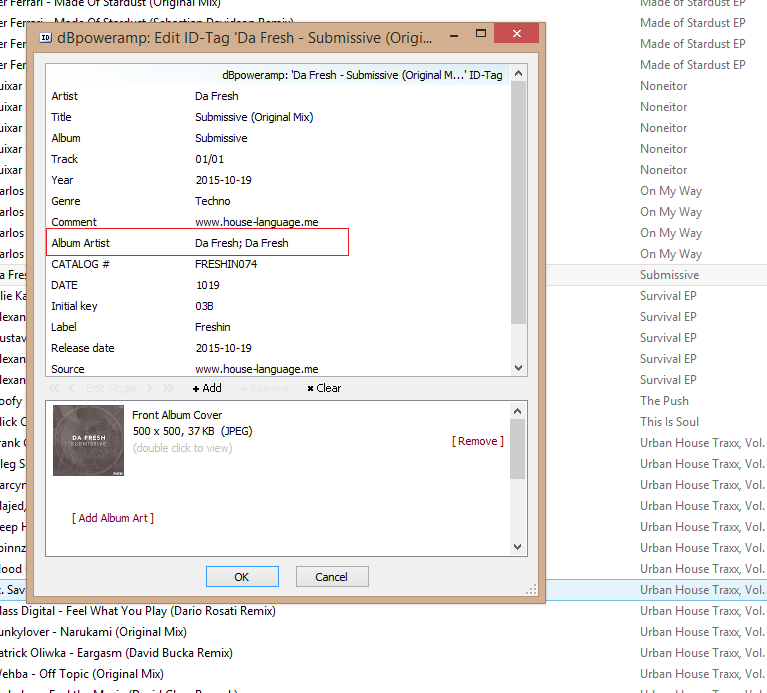
Can you post the tag info page. Not some external tag info dialog. I've tested this exact song both in SINGLE TRACK and RELEASE and there is no problem with the info got from beatport. Anyway my script separates multiple artists by , not ;
Please try the latest version and tag again. I think you accidentally formatted your tags wrong after using the script. Or else your tags have different ID3 versions. My script works fine. Please post the problem URL also.
I've just dowloaded the latest version and did it again. The same thing.
I guess the problems is dbpoweramp id editor. If i tag the files with mp3tag it's ok, no duplicated artist field like in that picture, but after i edit the tracks with dbpoweramp id editor it show's up duplicated artist. I think dbpoweramp reads id3v1 and idv2 and merge them. Very strange
Keep the ID3v2 and remove the ID3v1s if you don't need them. It's in the options of mp3tag to save only your selected type. It's not a problem with my script, it's one with your other piece of SW. If this doesn't solve your problem, I suggest search/start a thread on dppoweramps forum.
Hey guys, I'm using the wine version of 2.73 on OSX but I can't get the scripts to appear. I'm putting them in the correct folder but nothing is showing except the original scripts, even when I delete the original scripts they still appear in the program when I reopen it. My only option atm is to tag my library on a windows machine which is less than ideal.
Any ideas?