confirm, have a such problem tonight
Same here.
Unfortunately, BP support for other apps doesn't work either.
If a Traxsource WS worked, then I could have an alternative to this Beatport WS, because it looks like Beatport must have blocked something, seeing how quick the error message was.
I’m on v3.33.1 and a lightly modified one that I use for my tagging style (last modified on January 28, 2026) worked fine this morning.


Works for me now, everything is ok!
Yes, it’s working for me now too,…but a fraction of a second slower.
It’s working for us again, without any modifications.
I got this message. It seems that Beatport is putting up some authentication on their site. Hope that this could be fixed soon!

@thepotbreaker This looks like a temporary issue, everything fine here.
403: Forbidden is back again today. Unable to connect - Cloudfare check on website frontend too. Tried with VPN On, with different countries, and with VPN off - still unable to connect.
I can still use Cloudfare WARP to use it. Seems like Beatport is acting up these days.
I get 403 forbidden here today as well in USA. 
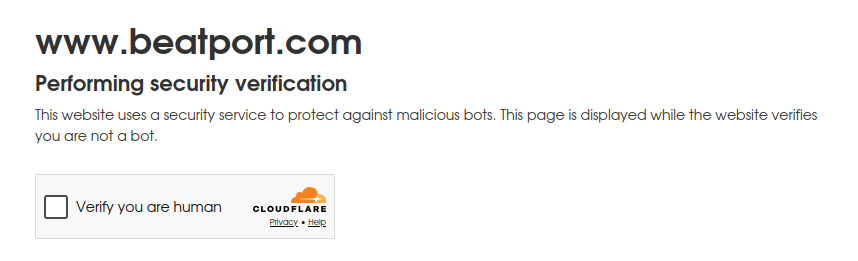
I didn't have the issue yesterday, but definitely am today. Looks like it might be sporadic.
Beatport is merging with beatsource so who knows what things will look like after that....
but 403 error for me today
Here's what gemini says about this. I think it's best not to panic just yet. Perhaps logging into Beatport would be a good idea in your browser.
In the world of Mp3tag and stevehero’s Beatport scripts, a 403 Forbidden error is a classic "Keep Out" sign. Because Beatport is currently in the middle of a massive platform merger with Beatsource (as of March/April 2026), their security and API endpoints are in a state of flux.
Here is why you are likely seeing that error and how to fix it:
1. The "User-Agent" Block (Most Likely)
Beatport often updates its firewall to block "automated" traffic. Since the script isn't a standard web browser, Beatport’s security (like Cloudflare) flags it as a bot and returns a 403 error.
- The Fix: You may need to manually update the User-Agent string within the script file. Open the .src file in Notepad and look for a line starting with [UserAgent]. Updating it to match a modern browser string (e.g., a current Chrome or Firefox string) often bypasses the block.
2. Search Query "Overload"
The script sometimes sends too much data in a single request (like a long Catalog Number or a messy Album string). Beatport's search engine occasionally rejects these complex queries with a 403 instead of a "No results found" message.
- The Fix: Try searching with Artist + Title only. Strip out catalog numbers, "Original Mix," or "EP" labels from your search terms.
3. Rate Limiting (The "Cooldown")
If you are tagging hundreds of tracks in a single session, Beatport’s servers may temporarily ban your IP address for "scraping" behavior.
- The Fix: * Wait 15–30 minutes before trying again.
- If you're using a VPN, try switching servers; sometimes specific VPN IP ranges are blacklisted by Beatport.
4. Outdated Script Version
Because of the March 2026 merger, Beatport has been changing its website structure to accommodate the new "Open Format" categories. If your script version is even a few months old, it might be looking for data in places that no longer exist or are now restricted.
- The Fix: Check the Mp3tag Community forums to ensure you have the absolute latest version of stevehero's script. He is very active and usually pushes "hotfixes" within days of Beatport making a change.
5. API/Subscription Requirements
With the new unified platform, Beatport is tightening its "Link" API. Some metadata requests that used to be "free" to scrape now require an active Beatport Streaming subscription or a valid API key that the script uses. If the script's "built-in" key is revoked or throttled, everyone using it gets a 403.
Quick Troubleshooting Step:
Try to visit Beatport.com in your browser. If you see a CAPTCHA or a "Security Check," solve it there first. Sometimes proving you are human in your browser will "clear" the 403 for the Mp3tag script on the same network.
Small suggestion here:
I've noticed the scripts fill in the RELEASETIME as YYYYT00:00:00Z when a according to this thread the whole date is allowed in there and since Rekordbox uses that field to fill in the Release Date why not change the script to convert it to show the whole date + time (if needed) and add a checkmark for Rekordbox users to only add the date as (YYYY-MM-DD).
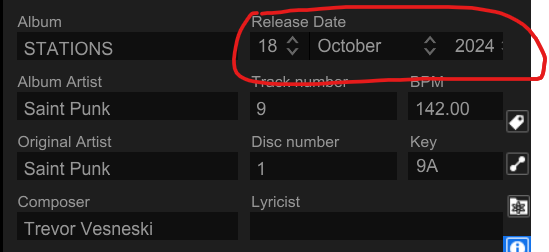
Also why does the script fill the whole date in for YEAR?
It should be in the options to change this.
OutputTo "RELEASETIME"
-SayOutput "YEAR"
-Say "T00:00:00Z"
--->
OutputTo "RELEASETIME"
+json_select "new_release_date"
+SayRest
I swapped to doing the above. Because adding T00:00:00Z to every date made no sense for me for Rekordbox
Hi @stevehero,
I tested the Beatport v6.007 scripts under Mp3tag/Wine and also tested the same URLs directly with curl.
The script include files appear to be using normal Beatport web URLs, e.g.
https://www.beatport.com/search/releases?q=
https://www.beatport.com/search/tracks?q
curl returns HTTP 403 for the Beatport homepage, release search, and track search.
The returned page title is:
Just a moment...
So it looks like Cloudflare is blocking non-browser requests before the script receives the actual Beatport page / embedded JSON. This happens with and without VPN, and across different VPN locations.
So I don’t think this is currently a parser issue or a malformed search query issue. Mp3tag appears to be receiving the Cloudflare challenge page instead of the Beatport page.
Logging into Beatport in a browser may clear the issue for the browser, but Mp3tag under Wine / curl won’t normally share that browser session or Cloudflare cookies. Unless Mp3tag can receive the actual Beatport HTML, the current web source seems a bit stuck.
Cheers,
meo
2 Likes