[WS] Beatport.com by stevehero [Release, Single Track & Artwork tagging]

Using curl -I https://www.beatport.com/ will return:

HTTP/1.1 403 Forbidden
Date: Sun, 10 May 2026 12:05:48 GMT
Content-Type: text/html; charset=UTF-8
Content-Length: 5194
Connection: close
Accept-Ch: Sec-CH-UA-Bitness, Sec-CH-UA-Arch, Sec-CH-UA-Full-Version, Sec-CH-UA-Mobile, Sec-CH-UA-Model, Sec-CH-UA-Platform-Version, Sec-CH-UA-Full-Version-List, Sec-CH-UA-Platform, Sec-CH-UA, UA-Bitness, UA-Arch, UA-Full-Version, UA-Mobile, UA-Model, UA-Platform-Version, UA-Platform, UA
Cf-Mitigated: challenge
Content-Security-Policy: default-src 'none'; script-src 'nonce-QxAJgJURUVrnetEKgeohDg' 'unsafe-eval' https://challenges.cloudflare.com; script-src-attr 'none'; style-src 'unsafe-inline'; img-src 'self' https://challenges.cloudflare.com; connect-src 'self' https://challenges.cloudflare.com; frame-src 'self' https://challenges.cloudflare.com blob:; child-src 'self' https://challenges.cloudflare.com blob:; worker-src blob:; form-action http: https:; base-uri 'self'
Server: cloudflare
Critical-Ch: Sec-CH-UA-Bitness, Sec-CH-UA-Arch, Sec-CH-UA-Full-Version, Sec-CH-UA-Mobile, Sec-CH-UA-Model, Sec-CH-UA-Platform-Version, Sec-CH-UA-Full-Version-List, Sec-CH-UA-Platform, Sec-CH-UA, UA-Bitness, UA-Arch, UA-Full-Version, UA-Mobile, UA-Model, UA-Platform-Version, UA-Platform, UA
Cross-Origin-Embedder-Policy: require-corp
Cross-Origin-Opener-Policy: same-origin
Cross-Origin-Resource-Policy: same-origin
Origin-Agent-Cluster: ?1
Permissions-Policy: accelerometer=(),browsing-topics=(),camera=(),clipboard-read=(),clipboard-write=(),geolocation=(),gyroscope=(),hid=(),interest-cohort=(),magnetometer=(),microphone=(),payment=(),publickey-credentials-get=(),screen-wake-lock=(),serial=(),sync-xhr=(),usb=(),xr-spatial-tracking=(self)
Referrer-Policy: same-origin
Server-Timing: chlray;desc="9f98d0752ce0be27"
X-Content-Type-Options: nosniff
X-Frame-Options: SAMEORIGIN
Strict-Transport-Security: max-age=31536000; includeSubDomains
CF-RAY: 9f98d0752ce0be27-DUB

So this is not a fault with my scripts. Not sure what to say to you guys.

@Florian, what do you think can be done in this case?

1 Like

I don't think that there is something that can be done at the moment, at least I have no idea.

It looks like it's Cloudflare Turnstile requesting a browser challenge (something that requires JS), which is nothing Mp3tag can do.

Turnstile adapts the challenge outcome to the individual visitor or browser. First, we run a series of small non-interactive JavaScript challenges to gather signals about the visitor or browser environment.

These challenges include proof-of-work (computational puzzles), proof-of-space, probing for web APIs, and various other challenges for detecting browser-quirks and human behavior.

3 Likes

Thanks for getting back to me Florian. Looks like an API key is what is needed. Don't think they hand them out too easily either.

Just checked with gemini. Things don't look so good.

1 Like

Hi, I’m new to this forum, and I’ve been using MP3TAG for years, especially the Beatport feature. Thanks for that. But since yesterday afternoon, I’ve suddenly been unable to use this feature because of a 403 Forbidden error. The funny thing is that, out of the blue, I’ve also had to enter a Cloudflare code every time I visit Beatport. Even though I’ve had the website open all day. I hope a workaround is found soon, and that it gets sorted out quickly. It would be a bummer if I couldn’t use this anymore.

It's working again; it seems Beatport has removed the Cloudflare protection, EnJoy :wink:

1 Like

if macos, here is a local proxy that bypasses the cloudflare bot protection - all claude code so dont ask me how it works, but it really does.

seems like the captcha has stopped happening for now, but this was working perfectly when it was breaking the search

2 Likes

Not working anymore, today

1 Like

I'm getting the "403 Error" today too (Sunday, 17 May)

Beatport pages are hidden behind a cloudflare javascript challenge, see stevehero's post from last week. Nothing mp3tag can do.

Hmm so we're screwed atm

Regarding @Florian's point about Turnstile – I think the diagnosis might be slightly off, and that's actually good news. The proxy uses TLS impersonation (curl_cffi) and executes no JavaScript at all, yet it gets a clean 200 on the first request. If this were a real Turnstile/JS browser challenge, that wouldn't be possible. So it looks like it's the lower-tier Cloudflare "managed challenge" that passes silently when the TLS fingerprint + headers match a real Chrome – not an interactive JS challenge. That's why it can be worked around without a browser.

So, I've made a small local proxy for Windows 10/11 that works around the current 403 Forbidden error (Cloudflare blocking).

One caveat: it requires a few very small edits to all the .inc files and to all the "Direct" .src files. The exact changes are documented step by step in the included Modifications.txt.

Note: out of respect for the author, I'm not redistributing @stevehero's scripts (neither the originals nor modified copies) until he's okay with it. For now you apply the edits to your own existing files, so you'll need @stevehero's v6 scripts already installed.

Everything (the proxy + full instructions) is here:
https://drive.google.com/drive/folders/19ACUo9t-DO9JUBM0n30XWXTRElotD7B-?usp=sharing

P.S. if Beatport later tightens the protection, this approach may stop working – but as of now it does.

5 Likes

Wow, thank you very much for this - I will install and try this soon.

EDIT: Actually I couldn't wait :wink:

Tested these scripts successfully:

Beatport by &stevehero v6#RELEASE Direct by &BEATPORT RELEASE ID.src

Beatport by &stevehero v6#RELEASE Direct by &Www(URL).src

My favorite script

Beatport by &stevehero v6#RELEASE Search by (Album)Artist + &Release.src

brings up the List of search results correctly, but when I mark the required release and click Next > I'm still getting the "403 Forbidden" error.

Thanks for the detailed report — two separate things here:

1) Search → Next → 403: You're right, this was a real gap. The search-result link (%_URL%) in the index parser still pointed at beatport.com, so clicking "Next >" went straight to Cloudflare. Fixed — there's now one extra one-line edit per Search .inc (the line marked # _URL (REQUIRED FOR PREVIEW BUTTON TO WORK)). I've updated Modifications.txt in the shared folder; please re-download it and apply that line, then fully restart Mp3tag.

2) "Direct by BEATPORT RELEASE ID" → "URL must contain a hostname": This one works on my end (tested release IDs 6857591 and 6866001). Since Direct by www(URL) works for you through the same proxy, the proxy itself is fine — so it's likely the input. Can you check:

  • Does the file actually have a BEATPORT_RELEASE_ID tag set to a numeric id? This script reads that tag — if it's empty, the URL collapses to just the host and you'd get exactly that "must contain a hostname" error.

  • Paste your exact [SearchBy] line from that .src so I can spot any typo from the edit.

4 Likes

Thanks for your reply.

For 1) Search → Next → 403: It works now!

For 2) "Direct by BEATPORT RELEASE ID" → "URL must contain a hostname": Sorry, my bad! Actually it works.

Happy to hear that! :wink: :+1:

Very simple to modify those INC files and it works like a charm. MANY THANKS!

What's crazy is it seems to search and run faster for me with this proxy on.

Glad it works! And yeah, the speed-up is real – the proxy reuses a single keep-alive connection to Beatport (curl_cffi), so it skips re-doing the TLS handshake on every request like Mp3tag's built-in client does. Nice side effect. :slightly_smiling_face:

2 Likes

Well done, mate. I was shocked how fast these searches have been going. Beatport always was sluggish to pull up, so this saves me some time when I'm retagging several hundred files in a day.

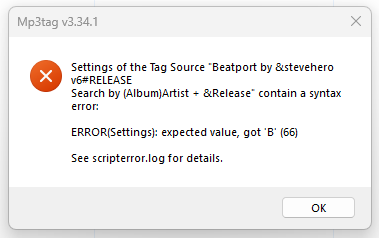
Thanks for this workaround. Sadly it doesn't work for me. I get the following error regardless of which I try

@DaveSumm

That error is from Mp3tag parsing the script settings, before any network request – so it's not the proxy itself. expected value, got 'B' (66) means Mp3tag's settings parser hit an unexpected character.

A couple of likely causes:

  • A find-and-replace that accidentally touched the ...#USER SETTINGS.settings file or broke a line – that file should stay unmodified (only the .inc and "Direct" .src files need edits).

  • The file got saved in the wrong encoding. Make sure edited files are saved as UTF-8 without BOM.

Quickest fix: re-install stevehero's original files fresh, then re-apply only the edits in Modifications.txt (nothing in the .settings file).

Could you also paste the contents of scripterror.log? It pins down the exact file and line of the syntax error.