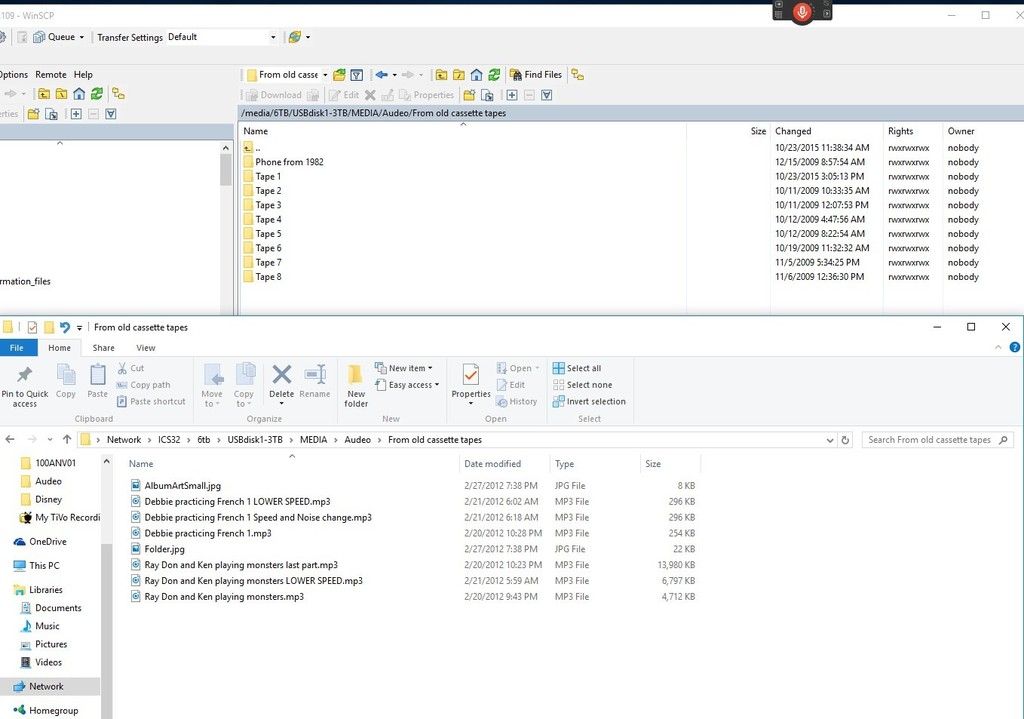
I have some audio files saved on a samba server and right clocked on a MP3 to open it and edit it to put cover art in it. Saved it and all looked good. Then I went back one folder to edit the rest and then that's when all the folders were lost!
Log in with WinSCP and I had a copy of the folder and it shows up in the other folder Mp3tag was not on. But then with Windows 10 folder to it, it showed the same. So I made a new folder and copied with WinSCP to samba new folder and they show up again.
Issuing a bug report about something where you are not really sure what happened, is a bit bold, I think.
I am not sure if I understand which program should show which results.
If MP3tag shows data and then it does not: could you check if you have applied a filter (accidentally)?
Just checked on another Windows PC this one with Windows 8.1 and same thing. The folders are messed up. But the one I have the backup works still how it should.
It's like it just removed all the folders. Not sure how it saved some 6 MP3 files and put them in the root folder it was on with AlbumArtSmall.jpg and Folder.jpg.
Some one else should test this on a network folder with songs in folders and I loaded the image in that same folder and then copy and paste it in Mp3tag and saved it and then it messed it up. It said all was OK but when I went to the folder it all the folders were gone and most of the MP3's.