I've noticed on Windows, when using the Tag -> Filename feature, if the song title has a Backslash ( \ ) in it, it will incorrectly move that song to a sub folder instead of replacing the Backslash character similarly to how it treats other invalid or undesired characters.
Action:
When using Tag -> Filename on an album where one of the songs has a track name with a Backslash in it (40 Years Back\Come) using the string %artist%\%album%\$num(%track%,3) - %title%
Current Outcome:
Only the song with the \ in the name gets moved to a subfolder, while other songs get correctly processed.
Expected Outcome:
All the songs would be in the same folder, and the \ is either deleted from the file name, or replaced with some other placeholder character.
The converter replaces invalid characters with some other character.
But the \ is a valid character for the Windows file system.
The use of the \ to create new folders is actually a feature, see here:
So if you have files with the \ in the tags then either replace it with a similar looking character that does not have the same function for the OS or add $replace() to your format string.
See e.g. here:
See also here (and you are free to search for more threads about the \ in format strings:
Windows states that \ is not a valid character for a file name. So why should we expect that it's treated differently from any other invalid file name character?
I'm willing to bet that 99.9% of the time where there is a \ in a Track Title, the user is not expecting to have it be put in it's own special subfolder, that just doesn't make sense. Because it's part of the file name, it should be treated the same as any other invalid file name character.
Unfortunately, you do not pick up the discussion that has already taken place.
The converter interprets a format string which gets checked for invalid characters after all components have been stitched together. In that state, it cannot be determined where the backslash originated: user-input to define a path or from data in a field.
If the backslash should be excluded, then it is the task of the user to treat the fields in which it may be an unwanted character.
This format string may also contain path components (which is a described feature) and in a path the backslash (and the the colon) is a valid character it therefore it does not and will not get removed.
That sounds to me like there needs to be a seperate check for the tags to determine if it's an invalid file name character that is independent from the main check at the end.
So your solution is to rely on each end user to one-by-one, sanitize each tag so they behave how a normal user would expect them to behave by default? $replace(%artist%,\,)\$replace(%album%,\,)\$replace($num(%track%,3),\,) - $replace(%title%,\,)
While technically correct, that sure seems like a lot of faffing about for something that a normal user wouldn't think they would need to do in the first place.
While I'm sure that probably works (assuming I got the syntax correct), that is pretty intimidating to normal users than them just being able to click some tag values, put in \ to make their own folders, and have it just work as expected out of the box.
The OS doesn't ask how one expects them to behave. If the back slash exists in any string used in a directory it separates it into folders. My suggestion is to consider using alternative Unicode characters that look similar but are not reserved by the OS.
I've addressed this with Mp3tag v3.35-beta.1, which now prevents the creation of subfolders at Convert → Tag - Filename if a referenced field value contains the backslash character \.
The new function treats special characters for filenames differently:
The previously ingnored characters like */ etc. are skipped, the newly added character \ is replaced by _.
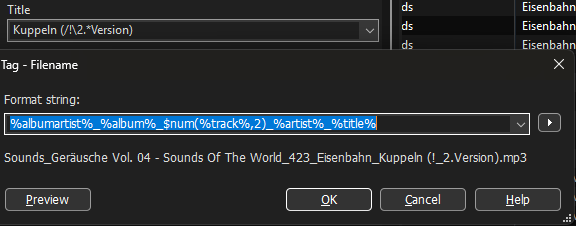
(The / is skipped, the \ is replaced by _ as can be seen at the ! as separator in the middle of /\.
Always.
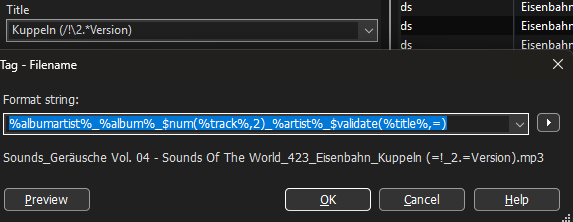
Even in $validate() with a set replacement character it stays the underscore.
Example with $validate()
For me this is unfortunate, as I use the underscore as separator between fields in the filename so that I can import data from the filename if it should become necessary.
TBH I am not really content with this solution as I can neither revert to the old behaviour nor set a more suitable replacement for me.
My suggestion would be: replace the \ with a similar looking character but one that does not upset the OS.
Something like ⧹﹨
U+29F9 : BIG REVERSE SOLIDUS
U+FE68 : SMALL REVERSE SOLIDUS
The implemented change only treats the backslash character differently, if it's in the value of a tag field. It's then replaced by the underscore character _ to ensure that no new folders are created unintentionally (and so that not anyone who's experiencing this either posts a bug report or contacts me via email).
I know that the new folder may cause irritation. And I support the idea to replace or ignore it but not to make it accidentally create a folder.
But as the the \ is replaced anyway - I would suggest not to use the underscore but a character that looks similar like the backslash.
Examples in previous post.
OK, from your previous post it looked like you referred to special characters and a different behaviour of $validate() (which never replaced the backslash).
I'm not sure yet about the Unicode char. Ideally, it would be configurable, but there are already so many configuration options. I'm also pretty confident that the instant I'm making the backslash replacement configurable, at least someone will request to make replacements for all other special characters configurable too.
I am not so keen on a configuration option - I just found the underscore an unlucky choice.
Whereas the really invalid characters for filenames get simply skipped (deleted), the backslash is replaced by another character, which, in my case, collides with my choice of separator in filenames.
IMHO, the backslash should also be left out / skipped / deleted just like all the other problematic characters.
Everybody who wants a special replacement should use $replace() so that no further option should be required.
I recognize the compatibility problem with unicode characters, so that suggestion of mine might not have been the wisest.
Unfortunately, this is not possible as the replacement needs to happen before the actual value gets passed to any scripting functions.
Otherwise it's not possible anymore to distinguish between a backslash from a field value and a backslash that's intentionally provided to denote folders to be created.
The $replace() would have to be applied to individual fields like before, when there was no automatism to avoid the backslash from field data - only that now the underscore has to be replaced.
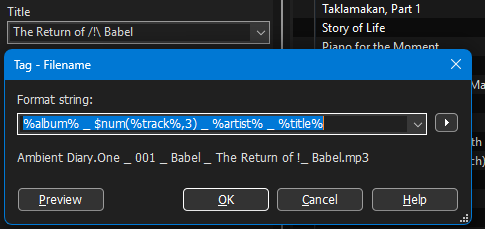
Here is an example of a TITLE with /!\ which is translated to "!_"
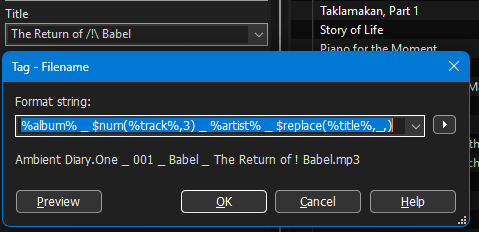
If I apply $replace() to the automatically cleaned-up string and replace the underscore with nothing, then I get rid of the added underscore (which I don't want in the middle of the field data)
in the example /!\ now becomes only ! as the / is removed by the cleansing mechanism and the \ which was transformed to _ got replaced by $replace().
I have no problem with characters being omitted but I do not favour that the service for fields with \ as part of the data leads to extra work for me as I now have to remove the program-generated underscore.
I would much more like it if the backslash (as data part) would be left out just like all the other problematic characters but not substituted with a visible character.
I tend to agree that it might make more sense to have the \ be replaced with nothing instead of _.
One possible thought I had regarding not being able to tell user entered \ and ones generated by replaces... would it be a good idea to have a separate like %newfolderlevel% tag or something like that which tells the software where to actually split into new folders instead of just relying on \ ? I'm not sold on it myself as it adds more complexity, but also allows more flexibility for users so they can replace forbidden characters ahead of time with whatever they desire, and then right before it spits the final output out, replace all the invalid characters remaining with nothings, and then if for some reason there ends up being nothing between two %newfolderlevel% tags, then make it so there is a single _ there to prevent a completely blank folder or file name?
Just thinking out loud, not sure if any of that is feasible (or even a good idea for that matter...)
I've added a configuration option with Mp3tag v3.35-beta.2 for the replacement of folder separators that's used when renaming files from tags (see newly added Options → Files).