Hello! After updating to v3.33.1, when previously tagged files are updated and saved, the track rating is now also being overwritten and results in the rating being removed. If the original track rating was not modified it would be great if the original rating persists. Thanks for your help and thoughts!
Could you show us (a screenshot of) the extended tags dialogue Alt-T of a single old file and a single new one, please?


Thanks for posting these. However these are from the Explorer window. If you could open the files in mp3tag, and with each file selected hit Alt-T to show the extended tags window. This will show what metadata exists from each file that mp3tag can see.
So it is the WIndows Explorer that does not show the rating?!
(A screenshot from the extended tags dialogue and not the windows explorer would still be necessary as MP3tag can only modify tags but not the behaviour or third party programs.)
Then it would be interesting to know how you enter ratings in MP3tag.
You should also check the options Ctrl-O > Tags > Advanced and the settings for Popularimeter (although I think that these settings only apply to ID3 fields and not mp4)
Yes, those are irrelevant in this case, as they only apply to ID3v2.


I would suggest that besides the lack of a RATING field there are virtually no other supporting tags. TITLE, GENRE, and YEAR are all that are embedded before and after. Windows may be storing this elsewhere (?) but I doubt it. Not sure what else to recommend here. Maybe @Florian has better insight into how the rating is stored for mp4 video files?
To me, both screenshots show the same thing: there is no embedded data for a rating. And what isn't there can not be removed, I would say.
Yes, Windows Explorer is storing the rating in a Xtra atom (something similar to PRIV frames in ID3v2) that's not accessible to Mp3tag.
It would be possible that Mp3tag doesn't preserve data it doesn't support upon rewrites. However, I've just confirmed that this is not the case and the Xtra atom that's used by Windows Explorer is still there.
My approach for testing this:
- Create an empty
Test.m4afile with no metadata. - Add a rating via Windows File Explorer.
- Confirm that there is an added
Xtraatom either via a hex editor or AtomicParsley. - Modify the file in Mp3tag, e.g., by adding a Title.
- Confirm that the rating is still displayed in Windows File Explorer and confirm that the
Xtraatom is still present.
I've tested this before I read your posting:
-
Took one of my mp4-video-files (with metadata)
-
Wrote stars in the rating field of windows explorer
-
Loaded the file with Mp3Tag 3.3.4 beta2
-
Saved the file in Mp3tag
-
Result: Rating stars in Explorer are gone
-
Wrote stars again in Explorer
-
Loaded file in MP3Tag 3.32
-
Saved the file in Mp3tag
-
Result: Rating stars in explorer are still there
I'm not sure if this will help:
ExifTool v13.50 displays the Windows Explorer rating as WM/SharedUserRating.
 | | MicrosoftXtra (SubDirectory) -->
  | | - Tag 'Xtra' (45 bytes):
  | |    19df2: 00 00 00 2d 00 00 00 13 57 4d 2f 53 68 61 72 65 [...-....WM/Share]
  | |    19e02: 64 55 73 65 72 52 61 74 69 6e 67 00 00 00 01 00 [dUserRating.....]
  | |    19e12: 00 00 0e 00 13 63 00 00 00 00 00 00 00          [.....c.......]
  | | + [Xtra directory, 45 bytes]
  | | | SharedUserRating = 99
  | | | - Tag 'WM/SharedUserRating' count=1 (18 bytes, int64u):
  | | |    19e0d: 00 00 00 01 00 00 00 0e 00 13 63 00 00 00 00 00 [..........c.....]
  | | |    19e1d: 00 00                                           [..]
BTW: If someone is using the shell extension Icaros, you can not set the rating stars directly in the Windows 11 File Explorer anymore. If you deactivate the extension .Mp4 in the Activated Properties" and restart the Windows File Explorer, you can set it again.

I've removed the solved status from one of the posts and reopened the topic after the OP indicated in a separate topic (now removed) that the issue is not resolved.
There is a new option in Options>Tags>Advanced to leave unmodified mp4 atoms as they are.
Could you try that option and see if it helps?
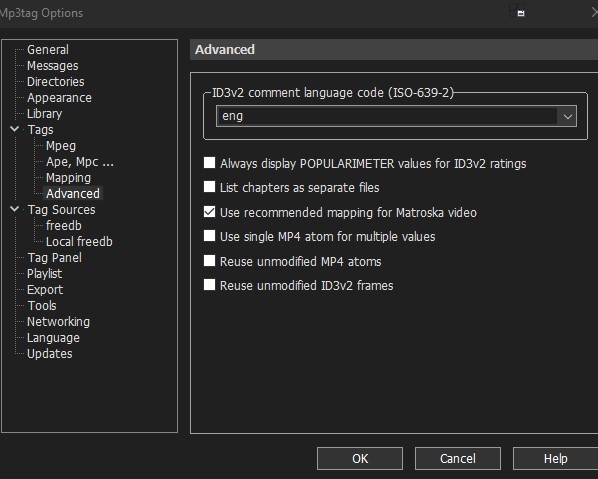
is it perhaps reuse?
3.34-beta.4 is currently available for download with this option.
Yes, it is Reuse unmodified MP4 atoms - try if the enabled option helps you.