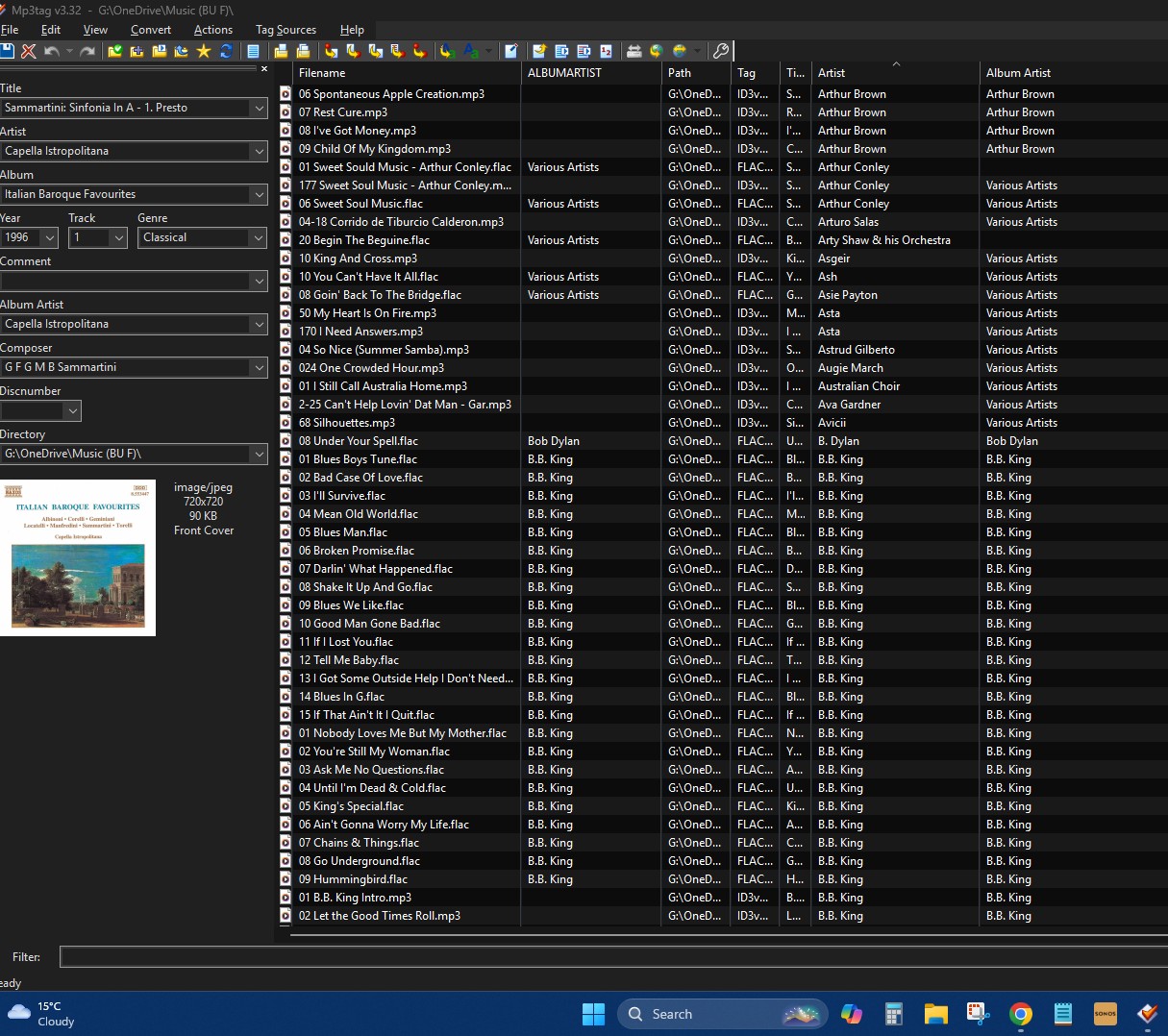
Please do not mix the column header with the displayed field values.
IMHO this result confirms that some files have a field %album artist% and others have a field %albumartist% to show the data.
What do you want to do next?
Leave it as it is?
Move the data from %album artist% to %albumartist%?
Use flac files always with %album artist% and create a mapping?
Thank you. I agree that it does look like some files have album artist and some albumartist. Interestingly in Windows file explorer, they both look the same. I think I’d like a column headed Album Artist that has data from %album artist% OR %album artist%. This should give the same result as Windows file explorer. Does that make sense? Is that possible? It would need to handle the circumstance when both data fields are full.
I made a mistake. It should be %albumartist” OR %album artist%
You still would have to decide which field you really want to have in your flac files.
So, if you want to get all flac files to use %album artist% but see the data in MP3tag in the column that shows the album artist for all files, then create a mapping as shown previously.
This would move the data from %albumartist% to %album artist% only for flac files and only if you save the tag again.
Or you investigate which program creates %album artist% for flac files and then use MP3tag to move the field contents to the more commonly used %albumartist%.
It is not possible to have a column that shows the contents of different fields and writes it back to the corresponding fields.
Do you use some kind of extension for the WE - as flac support for the native WE is rather spurious.
I think I should go with your suggestion
“So, if you want to get all flac files to use %album artist% but see the data in MP3tag in the column that shows the album artist for all files, then create a mapping as shown previously.
This would move the data from %albumartist% to %album artist% only for flac files and only if you save the tag again.”
I’ve looked back at our converstation and it’s not clear to me how I would do that. I’m completely new to mp3Tag, as I’m sure you realise!
Go back to this post:
open the option Ctrl-O > Tags > Mapping and create a new entry as shown in the last line of the screenshot.
Then load the files again and see whether you see all album artists in a single column in MP3tag and also in the tag panel.
Press Ctrl-S for a small set of files and see how they behave in the Windows Explorer.
Windows only added support for FLAC recently and only at a basic level. I wouldn't trust much of what you see in Explorer over more sophisticated music library managers and players.
The spec for the tag field used by Vorbis for the Album Artist was originally used as "Album Artist" but shifted to "Albumartist" around 2013 to be consistent with the spec for id3.
Some older players still prefer the field with the space, some will use both, while most modern players have shifted to only support the tag without a space. What is most important in each case is to understand what your use case requires based on your preferred player(s).
Fortunately mp3tag is more than capable of easily managing this for you. The actions described earlier by @ohrenkino will guide you there.