Demand for a linux app?

Would anyone else be ingerested in a linux native app? I'm currently preparing to move to a linux distro myself from Windows 10 as this os is eventually going to pass on. I've also lost faith in Windows. I'm a total linux noob, but willing to learn. I would love to see this app make the jump with me. It sounds like a lot of other people are movjng to linux at the moment, so maybe it would be a good time to port the app.

Mp3tag is a truly excellent app clearly made from a passion project perspective. I would love to continue my use and support of this app after the linux transition.

I get requests and suggestion for a Linux version of Mp3tag occasionally, so I'd say that there is definitely interest. At the moment I'm quite busy with the Windows and macOS versions of Mp3tag — but you'll never now.

For now, you can run Mp3tag on Linux via Wine. I've kept an eye on Wine-compatibility over the years and it works surprisingly well.

Florian, Good morning,
I 'm using mp3tag for a very long time now. I've try it on linux with Wine, but i was not happy with it. So I used a tagger witch was a sort of clone of.......mp3tag. Was'nt happy with it and went back to Win.11. Maybe you can make mp3tag useable for Linux, specialy Ubuntu / Mint repro's.... Then I'll go back to Linux Mint.

Hannes

I'm happy with this response. As long as it runs okay in wine under Ubuntu, I will continue to use the app. Thanks for the help.

I have used mp3tag for some years now, in Windows and Linux. In Linux (currently Fedora 34) I find it works acceptably as long as the files are on a local drive. I can navigate to the network drive where my music library resides, but cannot open the folder because the path contains a colon. I have run other Windows programs with Wine (NoteTab Pro, Irfanview, Foxit Reader) which share this impediment. I found this:

https://forum.winehq.org/viewtopic.php?t=34953

which has several links to solutions to this problem. I will attempt to implement a solution, but I fear that like a lot of customizations, they may not be applicable to all the distributions, or may break after an update.

I should also note that once I drill down to the SMB share, response becomes very slow, so it is faster to copy the files with the Linux system to a local drive, edit, and copy back up to my network drive. If the solutions in WineHQ are actually faster, even if I can't manage to automate them, that will solve my problems.

After some searching, I must conclude that by Fedora 34, a number of changes to enhance security have made these solutions less than ideal.

Richard

It's great that you support it running under Wine. But I just ran into a load of problems with Wine again. It can't match a native Linux app. Also installing Wine on my machine means downloading over a GIG of packages whereas mp3tag itself is only just of 4mb. If there is demand but its still a bit "niche" maybe you would consider doing a donation only Linux version of mp3tag ? There are alternatives for Linux like kid3 and puddletag but they have a messy layout and workflow compared to mp3tag. As well as annoying problems such as puddletag not retrieving discogs cover art because the author refuses to support oauth3 (or whatever its called). I know its not simply "hit the port button" but Linux seems to have some mature porting tools these days.

+1 for a Linux version one day. I too have been using MP3TAG for years in Windows but since building a server running Linux Mint to hold my music and run Airsonic-Advanced sever to access it I would prefer to be able to tag direct on my server - it's still possible to use MP3TAG to access an SMB share though I have to play around with permissions of the folders and files far more in order to do so.
I have tried just about every other tagging solution available for Linux but they just aren't anywhere near as good.

Linux needs that mp3tag vibe ! :sunglasses:

Lack of a decent tagging app for Linux is the only thing keeping me on Windows. Mp3tag is so superior to anything available on Linux.

The app actually runs fine with wine on Linux. I've used it on my Kubuntu 24.04 system plenty.

Running fine for me on wine & Linux Mint.

I am running linux for a while now but also have windows in a virtual machine, just for tagging the files with mp3tag and a far better file manager (directory opus for instance) all the file managers in linux are also not that great. Puddletag in linux is not that great as they say, it doesnt even have albumartist. I have mp3tag installed via wine, scanning all the files work great. But i want to open only the files that i am working at at the moment, so i want to open with, but that doesnt work in linux, mp3tag opens but it opens the default scanning folder. So if that bit can be solved than i am a happy man, or, but that is a lot of work, @Florian would like to make mp3tag for linux, like you did for windows and mac, the more people wil come to linux.

So does that mean the Win and Mac versions should make more people leave Linux? :rofl:

Can you try loading the selected files via drag and drop?

I've just recently invested quite some time to improve it for running via Wine, so that would be a viable alternative to opening via the shell extension.

i have no idea what you’re talking about

Florian, at first i got a message that it was not allowed to read the X drive.

But when i tried it a second time it worked!

That is a good workaround, thank you!

Excellent! Out of curiosity, what distribution and which DE are you using?

I am using Cachyos with KDE, i have used Mint cinnamon (is still on my server) and Fedora KDE

Are äöü (and quite likely other non-ascii characters) displayed correctly for you? I'm currently in the process of migrating my existing Mp3tag installation to a portable one stored on my NAS, mounted via NFS and executed via wine under KDE on CachyOS. I'm also documenting all the steps since I want to post a guide once I'm done and satisfied.

With this .desktop file Mp3tag opens fine.

#!/usr/bin/env xdg-open
#launch_mp3tag.desktop
[Desktop Entry]
Name=Mp3tag
GenericName=Tag Editor
Exec=env WINEPREFIX="/home/malte/.mp3tag" wine "/mnt/mp3tag/Mp3tag/Mp3tag.exe"
Type=Application
StartupNotify=true

Dragging and dropping folders or songs into it also works well.

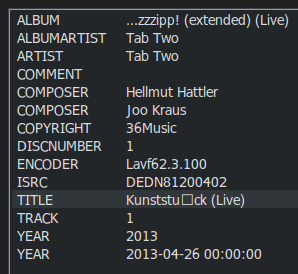
But for the first example album I tested, ü is displayed as
image
Funnily enough, when I select both the u and the square and post them to the forum, they turn into again. Copying only the square yields ̈

Extended Tags of the example file:

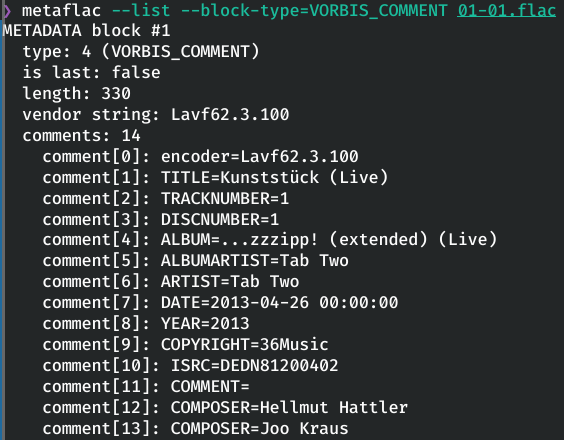
metaflac in the command line shows the tags correctly:

Mp3tag is capable of displaying äöü. Some of my actions contain those characters and they are displayed correctly:

ü in action

Is this only a display issue or did I fudge something up?

I've installed the portable version via:
wine mp3tag-v3.34.1-x64-setup.exe to the mounted NFS share, then saved my old config in Windows and extracted it to the new portable installation in Windows (mounted via SMB). I also performed the changes needed for dark mode as described below.

My markdown notes, WIP

Installing locally via Packet Manager on Arch

Community Package (unofficial)
Install via paru -S mp3tag, octopi, yay etc.

Portable installation on Linux via Wine

Optional Prerequisite:

Store Mp3tag on a NAS share

This is useful if you intend to access the same Mp3tag instance from multiple hosts in the same network.
I mount an NFS share from my NAS to /mnt/mp3tag/ on my host system on boot via fstab.

My /etc/fstab contains:

192.168.0.1:/mnt/tank4/Mp3tag /mnt/mp3tag  nfs     defaults,nofail 0      0

Setting up the Wine Prefix

Create and configure a new Wine prefix for Mp3tag (or use the default prefix if you prefer):

WINEPREFIX=~/.mp3tag/ winecfg

Dark Mode

If you want to use the Dark Mode in Mp3tag, you have change the wine config:

WINEPREFIX=~/.mp3tag/ winecfg

Set DesktopInterface Appearance to No Theme

It might also be a good idea to change the screen resolution in the Graphics tab if you don't want to scale within Mp3tag.

If you like Breeze Dark as the theme, you have to perform an additional step described here

Importing your existing config from Windows

  1. In Windows, in Mp3tag, use FileSave Configuration...
  2. Still in Windows, export the resulting .zip file in the base of your portable Mp3tag Installation

You could also extract the archive within Wine, but that would require setting up an archive tool like 7z.

Extracting the archive on your linux host might not work as the internal paths use \ instead of /, yielding for example a file called \data\actions\Case conversion.mta instead of the folder data, the subfolder actions and the file Case conversion.mta.

I'm not sure, but it sounds like an issue of Unicode Normalization Form D (decomposed) vs. Form C (composed).