Search album artwork click on the desired album cover or even numerous album cover offerings and get a blank album cover even though it shows when searching the actual album cover. I've been using discogs now
Same here, super annoying. No album art preview when match, does not pull down artwork, etc, etc, etc.
I completely redid my authentication with Discogs 3 times, updated and reinstalled.
For both of you: you would get much better responses if you followed:
Mp3Tag retrieves album info (including artwork) via dedicated scripts for each of the plethora of online databases; some come preinstalled with the application, while others are provided by the community.
If you need help getting your artwork to show, you'll need to share which script you're using (the name of the script you select in the "Tag sources" menu). And if you're using a community-provided script, please name the source\author.
Without this info, it's nearly impossible to figure out how to best provide support for each of your issues.
i immediately edited my post to include Discogs as the source issue earlier.
There are community-submitted modded (and original) versions of the Discogs script that ships with Mp3Tag, so it was relevant to ask which version (vanilla or another) you were referring to.
On a fresh (portable) install of the latest beta, using stock Discogs script I can get results (after authorization):
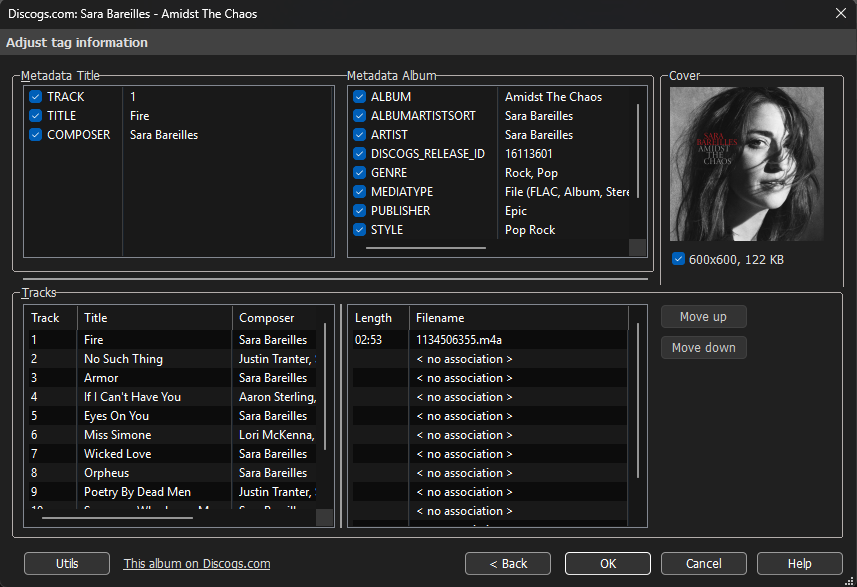
Preview covers are working fine, on result covers I'm getting some ocasional misses.
Discogs scripts aren't really my specialty, so I can't really offer much insight other than general troubleshooting tips:
- Check if the issue is general, or specific to (a) particular album(s);
- Discard local connectivity issues;
- Check site availability;
- (if possible) test on another machine/install.
Also, to better help the author, can you share if the system where you're having issues is MacOS or Windows?
OS version could also be important.
I am using a plain jane install on Windows 11. I have no add ins or plug ins. This started yesterday out of the blue. It is happening 99 percent of the time and I replicated it myself on another PC earlier today. It only happens when using Discogs as a source. It doesn't not happen when using Musicbrainz.
There is an entire thread on Reddit about it. It's not just me.
If there were no changes to your OS or mp3tag, then the only other variable would be the Discogs site. Perhaps they made a change to their security.
Perhaps share a link for this reference?
Ok, I might have found something interesting.
I've added debug info output to a copy of Discogs script, and found a few instances where cover art wasn't showing BUT preview cover art was fine.
Normally both images come from the same source; however the full sized cover art is sourced from a cached archive of Discogs, managed by the developer (I think), and the host https://cache.mp3tag.de is not currently accessible in my location, which could explain this issue.
@Florian may I trouble you to check this?
The file system on the server ran out of inodes (> 39000000). I just fixed the issue and everything should be back to normal.
Thanks for reporting!
Thanks! 
On a side note, I still can't open a cover URL in my browser. Yesterday I assumed there was something wrong with the server, but given that everything is working fine via Mp3Tag now (at least on my end), even if browser access isn't allowed, I was expecting some form of error page (404 or 403), but it's still not connecting to the host (although pings are sucessful).
Merely out of curiosity, is this the normal behavior?
Yes, it's the normal behaviour if you access this URL via a browser that enforces HTTPS. The server serves HTTP only, so you'd need to access via other means.
However, the server was still operational for all cached versions of images, but couldn't store and serve any new images that were not cached yet.
I'm always monitoring the available disk space of this server (it's already at 600GB), running out of inodes was something new.
Same happened to me on my proxmox host a couple of years ago. A docker container had a date-related bug and created 100+ empty log files per second until no new files could be created due to a lack of inodes while 40gb of space remained free.
I think learning about df -i rarely happens voluntarily.
Also funny was that I could not even delete the logs via rm *.log because that hit the argument limit. I had to write a loop with find to delete each individual log file instead. That was a pain in the butt.