Hello
I am currently updating the images on the mp3 / flac files but after updating one image I have to save each time, is there a way to skip each save and bulk save when all images have been updated?
Try an action (quick) of the type "Export cover to file"
don't think that will work for me, even if I could understand it.
thanks anyway
Are you trying to embed an image into your music files? Or export them from existing embedded images to an folder?
Select multiple tracks in Mp3tag, copy your image (for example from Windows Explorer or your Webbrowser), then paste it into Mp3tag and press Ctrl+ S (or File -> Save Tag) for all selected tracks at once.
If you want a different image for each track, you will need to repeat this individually.
As I know that it does work you would have to describe what you have done so far and where your specific problems popped up - if you need further assistance.
There are also some hints how to ask for support:
thanks all, I have mp3 files in folders eg Funk & Soul (Tracks) then all mp3 files are listed in folders A to Z.
I am updating each track art for the files in each folders. This is for individual tracks and not for albums which I know how to create an album image for the complete album.
I am using paint.net to remove the black background to white background and make any other neccessary changes, (like cropping, retouch etce etc).
Each time I update the image in mp3 tag I have to save each individual file even after I load multiple files in mp3tag.
I just want to bypass the save for every file and was asking for a bulk save after I had updated all the folder images in the mp3tag window.
The images are saved in a folder 'Label Edits' and are downloaded from Discogs and 45Cat.
like I said ohrenkino it don't work for me read!
Now there is something to read.
My answer would now be: see @LyricsLover 's statement:
In your initial post it was not at all clear (to me) where you wanted to save images. The action to do that in the file system is still the one I referenced. And that works.
If you want to save modifications that you made in the tag panel automatically when you select a new file, then switch on the option to save when moving to the next file in the file list.
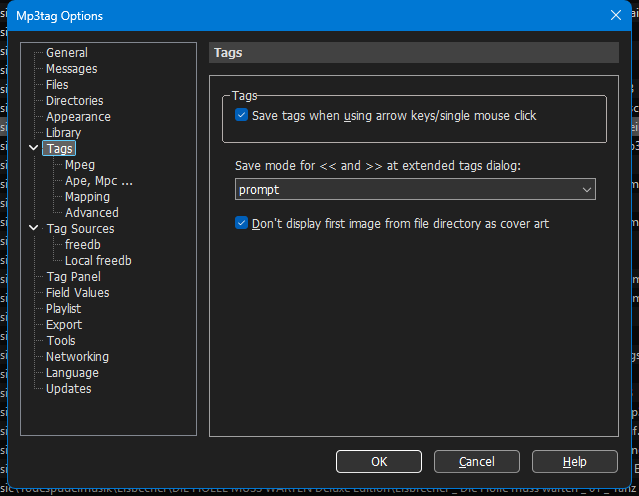
Alternatively, you could first modify all the picture files in the file system and then import them with an action.
The picture file name should allow a reference to the audio file.
you clearly DO NOT understand what I am saying here, so please do not bother responding, LISTEN dude I am not as clever as you so I need simple clear instruction, as far as this post is concerned it's is dead, thanks for everyones input.
It is a good custom in this forum to tick the post as solution that you consider as the satisfactory answer.
but I didn't get a satisfactory answer to my question so why should I tick the post!!!